Shopify handles the technical groundwork of SEO for you: it writes the sitemap, the robots.txt file, the canonical tags and the language tags on every store. What gets a store found is the part it cannot do: product and collection pages that answer what people search for, titles that win the click, clean links between your own pages, careful translations and links from other sites that you earn rather than buy. This guide covers both halves. It also covers the traps only Shopify stores fall into.
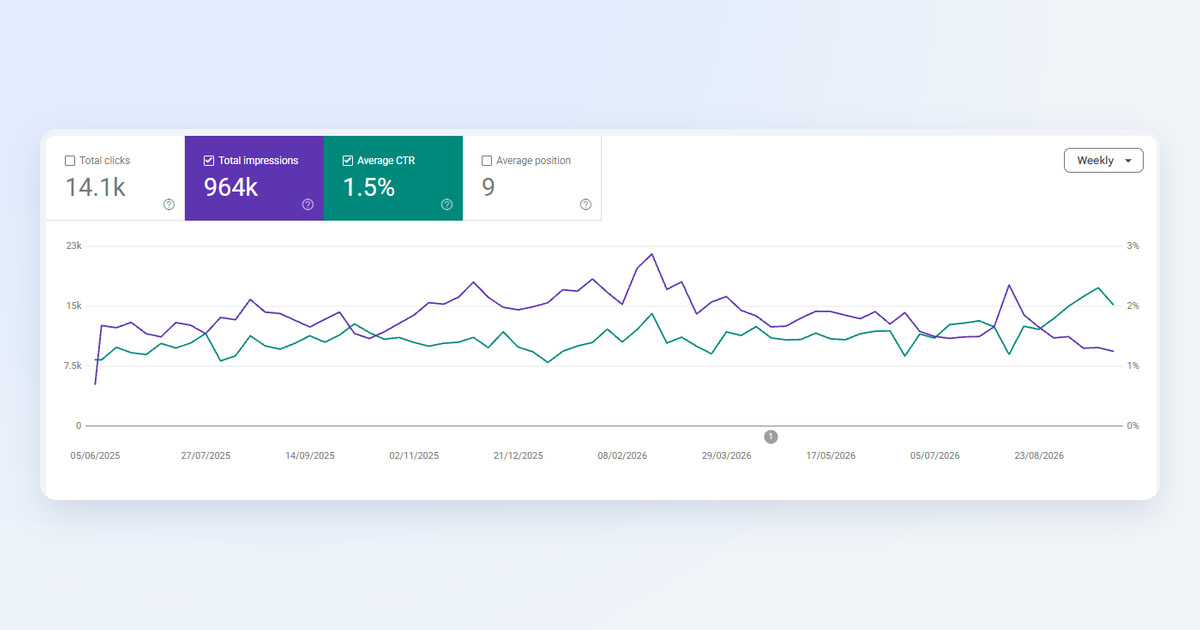
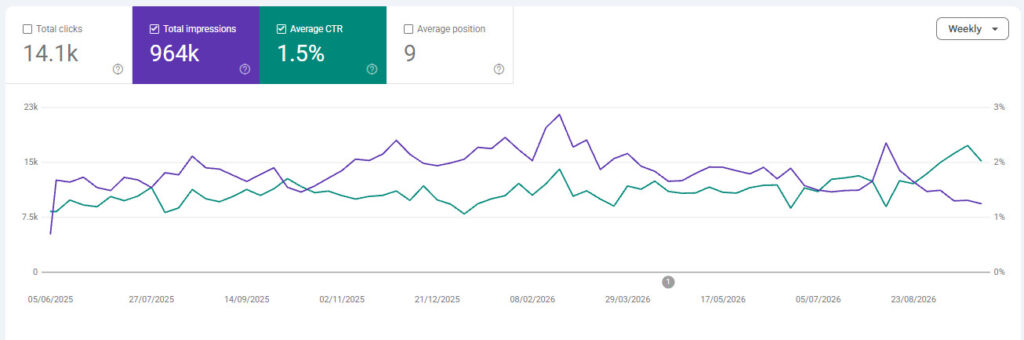
I have built and optimized online stores since 1998. camelway.eu, a store I built and ran, collected 964,000 impressions and 14,100 clicks from Google between June 2025 and October 2026, at an average position of 9, and its Search Console report shows the lesson of this guide better than any rule.
What does Shopify do for SEO automatically?
More than most owners realize. So the first job on Shopify is usually not technical. Every store gets a sitemap.xml file that lists its products, their main images, pages, collections and blog posts, updated whenever you add something, with every published language added automatically. Every store also gets a robots.txt file that keeps search engines out of the cart, the checkout, customer accounts, and collection pages that are only sorted or filtered by several tags at once.
- Canonical tags: every page tells Google its preferred address, so the same product reached through a collection is not counted as a second page.
- Language tags (hreflang): when a store sells in several languages, Shopify adds tags that tell Google which version to show to which audience. They are on by default, under Online Store, then Preferences.
- A secure connection: every Shopify store is served over HTTPS.
You can replace the robots.txt file with your own template, robots.txt.liquid, but Shopify calls that an unsupported customization and warns that a wrong edit can cost all of your traffic. Leave it alone unless you know exactly which rule you need.
How to set up Google Search Console for a Shopify store
- Add your store in Google Search Console as a property, using your own domain, not the myshopify.com address.
- Verify that you own it. Choose HTML tag, copy the meta tag Google gives you, and paste it into your theme's theme.liquid file right below the opening head tag, or add a DNS record at your domain provider instead. How to edit your Shopify theme code safely shows where theme.liquid lives.
- Submit your sitemap: under Indexing, then Sitemaps, enter sitemap.xml.
- Remove the password page first. A store that is still password-protected cannot be crawled at all.
The Shopify SEO traps
Product links that include the collection
A Shopify product can be reached at two addresses: /products/name, and /collections/collection-name/products/name when a shopper arrives from a collection. The canonical tag points both to the first one, so Google does not count a duplicate, but some themes still link to the longer address from collection pages through a Liquid filter called within: collection. That splits your links. Link to the plain /products/ address everywhere, so your own internal links point at the page you want to rank.
Addresses you cannot change, and handles you should not
Shopify fixes the first part of every address: /products/, /collections/, /pages/ and /blogs/. The last part, the handle, is yours. Make it short and descriptive before the product goes live. If you change a handle later, keep the box that creates a URL redirect ticked, so old links and old rankings land on the new address. Change handles rarely, because each change asks Google to learn the page again.
Tag pages and thin pages
A collection filtered by one product tag gets an address of its own, and Shopify's robots.txt blocks only the combinations of several tags. A page that differs from another only by a tag adds nothing for searchers, so link to your real collections, not to tag pages. The same goes for supplier descriptions copied onto hundreds of products, because Google's spam policies name scaled content abuse, many pages made mainly to rank, as a reason to rank a site lower. Copied catalogs rarely rank. Is dropshipping still worth it? covers why copied catalogs fail.
Product data written twice
Your theme already describes each product to search engines in structured data, the hidden code that lets Google show the price, availability and star rating. Review apps often add another. Run your product page through Google's Rich Results Test and keep one complete description of the product, with the rating included, rather than two partial ones that disagree.
Titles and descriptions that win the click
Ranking is half the job. Getting the click is the other half, and it pays to treat it as a separate skill. In Backlinko's study of 4 million Google results, the first organic result got 27.6% of clicks, ten times as many as the tenth, and only 0.63% of searchers clicked anything on the second page. Every product, collection and page in Shopify has a Search engine listing section where you set the title and description that appear in Google. Keep titles under 70 characters, put the product and the reason to buy first, and give the description something concrete, such as free shipping, a delivery time or your review count.
Google also decides your reach. On camelway.eu, impressions fell by roughly 40% from early 2026 while the share of searchers who clicked rose from about 1.4% to over 2% by September 2026, and the weekly clicks held. My reading is that Google narrows a store's exposure to the searches it answers well, and that the click-through rate is one of the signals it learns from. Chasing impressions for searches your pages do not answer brings nothing; titles that match what the searcher wants do.
Selling in several languages on Shopify
A store in several languages needs every language to read as if a native speaker wrote it, because each version competes on its own. Shopify adds the language tags and the translated sitemaps on its own; the translations are your job. I translated the 10 languages of camelway.eu by hand in Shopify's free Translate & Adapt app: in the theme editor, select an element, open the three-dot menu, choose Translate & Adapt, then translate each field and save. It is manual work, and worth it.
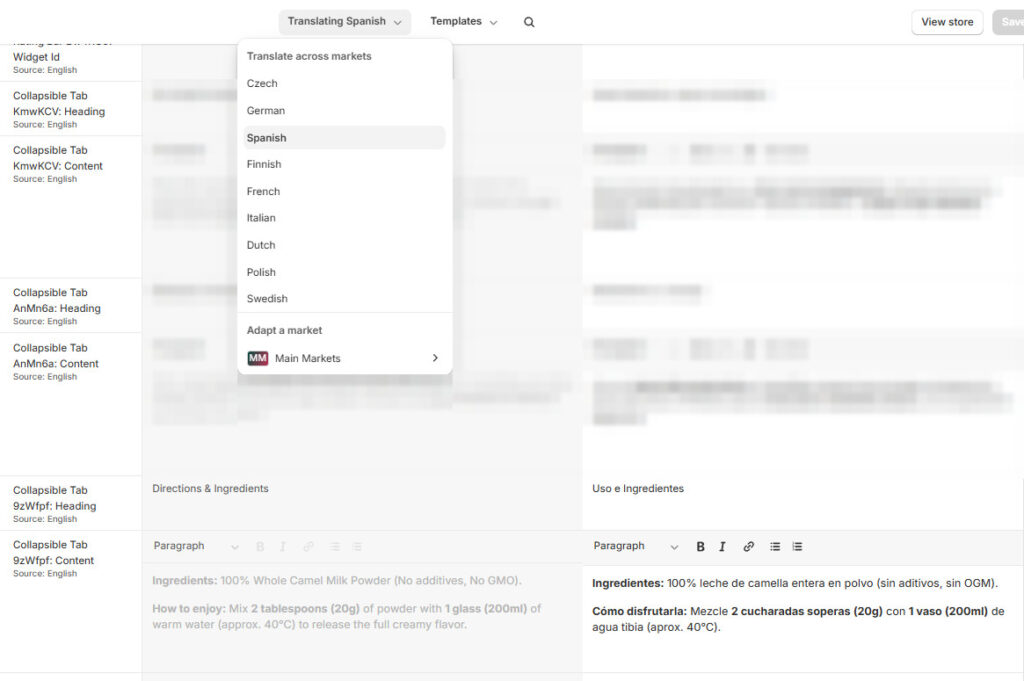
For the translation itself, I use an AI assistant such as ChatGPT or Gemini rather than a plain machine translator, because an assistant can follow your instructions on tone, terms and product names. Give it a prompt that carries your brand's rules, paste the text, and paste the result into the matching field. A prompt along these lines works:
Translate the following product text from English into German for an online store.
Keep product names, units, numbers and any HTML tags exactly as they are.
Use the formal form of address and the tone of a premium brand.
Write it the way a German copywriter would, not word for word.
Return only the translation.
Read the result once before you save it, and have a native speaker check your best-selling pages. Shopify or WooCommerce covers what Translate & Adapt can and cannot translate automatically.
Links: earn them, never buy them
Links from other sites still tell Google which stores deserve trust, and that is exactly why buying them is dangerous. Google's spam policies name buying or selling links for ranking purposes, including paying for posts that contain links and sending free products in exchange for a link, and a site that breaks the policies may rank lower or disappear from results. Cheap link packages get you there fastest.
Earned links come from being worth citing. Publish something nobody else has, such as your own data, a guide from real experience or a clear comparison; get listed by the manufacturers and partners you work with; and show who stands behind the store, with real names, an address and the experience that makes your advice credible. Learning SEO yourself costs time instead of money, and it builds an asset that keeps working after you stop paying for ads.
Speed is part of SEO
Google's documentation says plainly that Core Web Vitals, its three speed and stability scores, are used by its ranking systems, though relevance always comes first. Shopify's servers are fast. Apps and oversized media are what slow a store down. What Google's speed scores mean for your store explains the scores, and how to find what is slowing down your Shopify store shows how to fix them.
Check your store's Core Web Vitals for free
Paste a product page address. You get the three scores right away, and a free account names every slow app and the fix for your platform.
Test my storeShopify SEO checklist
- Search Console verified on your own domain, with sitemap.xml submitted.
- Password page removed before you expect any traffic.
- Short, descriptive handles, with a redirect whenever one changes.
- Internal links to /products/ addresses, not collection-based ones.
- Your own descriptions on every product, never the supplier's copy.
- One complete product markup, checked in the Rich Results Test.
- Titles under 70 characters with the product and the reason to click.
- Every language translated with care, not left to automatic translation.
- Links earned, never bought.
- Fast pages on phones, with apps kept in check.
Shopify SEO questions store owners ask
Is Shopify good for SEO?
Yes. Shopify covers the technical basics on every store: the sitemap, robots.txt, canonical tags, language tags and a secure connection, while what decides your rankings, from content and titles to links and speed, is up to you on any platform.
Do I need an SEO app on Shopify?
Usually not at the start. Shopify already does what most SEO apps advertise, and every app you add is one more script on your pages. Install one only for a specific job you cannot do in the admin, such as editing image alt text in bulk across thousands of products, and check your product markup afterwards.
How do I get my Shopify store on Google?
Remove the password page, add and verify the store in Google Search Console, and submit sitemap.xml. Google then finds your pages on its own; how high they rank depends on how well they answer the searches people make.
Why are my impressions dropping while clicks hold?
Often because Google stops showing your pages for searches they do not answer well. If the click-through rate rises at the same time, the traffic you keep is the traffic that matters, and better titles and pages for your real searches are the way to grow it.
Sources
- Shopify Help Center: Finding and submitting your sitemap, Editing robots.txt.liquid, Hreflang tags and Adding and updating products.
- Backlinko: Google organic click-through rate study, 4 million search results.
- Google Search Central: Spam policies. Google Search Console: Rich Results Test.
- camelway.eu, Google Search Console performance, June 2025 to October 2026; weekly values read from the chart.