Choose Shopify if you want to sell rather than run a website: it looks after the hosting, security, payments, taxes and languages for you, and its stores are faster out of the box. Choose WooCommerce, the store plugin for WordPress, if you or someone on your team is comfortable with servers and a little code. It gives you full control. Set up well, a WooCommerce store can even be faster than a Shopify one, but somebody has to keep watching it, and that is not for everyone.
I have built online stores since 1998, on both platforms and on many before them. camelway.eu, a store I built and ran, is on Shopify, and the next part explains why.
Shopify or WooCommerce: which one fits you?
| You are | Choose | Why |
|---|---|---|
| New to selling online, no technical help | Shopify | Hosting, updates and security are done for you |
| Selling to many countries in many languages | Shopify | Local payment methods, languages and taxes are built in |
| Comfortable with servers, not afraid of some code | WooCommerce | Full control over every page and every line |
| Already running a WordPress site with lots of content | WooCommerce | The store lives inside the site you have |
| Willing to learn WordPress and keep it updated | WooCommerce | It can be faster and cheaper per year, if you keep watching it |
Why camelway.eu runs on Shopify
camelway.eu sells in 10 languages to almost every country in Europe, and Shopify makes that ordinary work. Shopify Payments brings the local ways to pay, such as iDEAL in the Netherlands and Bancontact in Belgium, with no extra setup. Languages are built in: a store on any plan can sell in up to 20 of them, and Shopify's free Translate & Adapt app translates two automatically. That limit is real. Beyond two languages you translate by hand or pay for another app, which is the one place where Shopify's own tools held me back.
AI closes most of that gap. Paste a product text into a chat such as ChatGPT, Claude or Gemini, ask for the translation into the language you need, and paste the result into that language in Translate & Adapt. When you do not speak a language, I recommend this over a plain machine translator such as Google Translate, because an assistant keeps the tone of your text and can follow instructions such as keeping your product names unchanged. Have a native speaker read your best-selling pages once.
Taxes are the other reason. Set up properly, Shopify charges each European shopper the VAT of their own country, and its Shopify Tax service works out US sales tax by state. There is no server to look after, and the photos load from Shopify's worldwide network of servers, its CDN, even on the Basic plan. The store is easy to run and fast. The one thing to be careful with is apps, because every app you add can slow the pages down.
Which one is faster, Shopify or WooCommerce?
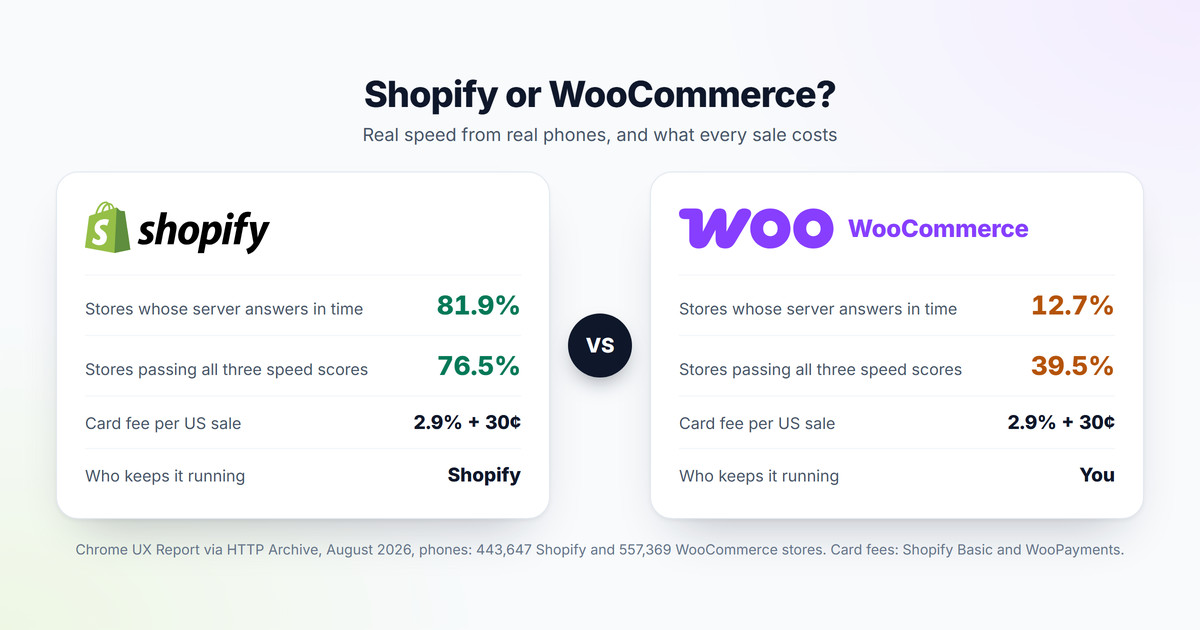
Out of the box, Shopify wins. Google measures real visits through the Chrome browser and publishes the results for every site with enough traffic, and the HTTP Archive, a public research project, groups those results by the platform each site runs on. On phones in August 2026, 76.5% of Shopify stores passed all three of Google's speed scores, against 39.5% of WooCommerce stores.
| Share of stores with a good result on phones | Shopify | WooCommerce |
|---|---|---|
| All three speed scores passed | 76.5% | 39.5% |
| Loading (Largest Contentful Paint) | 87.3% | 43.7% |
| Layout stability (Cumulative Layout Shift) | 92.5% | 88.3% |
| Responsiveness (Interaction to Next Paint) | 87.4% | 91.7% |
| Server answer time (Time to First Byte) | 81.9% | 12.7% |
Chrome UX Report through the HTTP Archive Technology Report, August 2026, mobile: 443,647 Shopify and 557,369 WooCommerce stores.
The gap is the server. Shopify runs every store on its own servers, while a WooCommerce store answers from whatever hosting its owner picked, and only 12.7% of them answer in time. It is not WooCommerce itself. In my own benchmark of one WooCommerce store, a single server setting cut the time to build a product page from 473 to 100 milliseconds, and page caching brought it under 2 milliseconds on the test machine. Why your WooCommerce store is slow shows each step, and WooCommerce hosting covers what to pay for. Shopify's weak spot is responsiveness, where apps add work to every tap; How to find what is slowing down your Shopify store covers that side.
Check your store's Core Web Vitals for free
Paste a product page address. You get the three scores right away, and a free account names every slow app and the fix for your platform.
Test my storeWhat does each one cost?
The money looks closer than most comparisons suggest. WooCommerce itself is free, but it needs hosting, and the card fees, which are the biggest cost for any store that sells, are the same on both in the United States.
| Cost | Shopify, Basic plan | WooCommerce |
|---|---|---|
| The store software | $39 a month, or $29 paid yearly | Free |
| Hosting | Included | From EUR 19.49 a month for a 2-core Hetzner cloud server, or a managed host |
| Card fee per US sale | 2.9% + 30¢ with Shopify Payments | 2.9% + 30¢ with WooPayments |
| Card from another country | +1% | +1.5% |
| Shopper pays in another currency | 1.5% for a US store, 2% elsewhere | +1% |
| Paying through another payment company | Shopify adds 2% | Nothing extra |
| US sales tax | Shopify Tax: free up to $100,000 of sales, then 0.35% of taxed orders | WooCommerce Tax: free, for one store location |
| Several languages | Up to 20 included, 2 translated automatically | A plugin such as WPML, EUR 99 a year for 3 sites |
| Updates, security, backups | Done by Shopify | Your time, or a developer's |
Shopify's US prices and the WooPayments US rates, October 2026; the Hetzner price is from Hetzner Console on October 5, 2026, before VAT. For Shopify Tax, the $100,000 is counted over the store's whole life for stores created from May 13, 2026, and per calendar year for older stores. Rates change often.
Take a store selling $10,000 a month in 200 orders, all paid by card: on both platforms the card fees come to $350 a month, or $4,200 a year. Shopify adds $348 a year for Basic paid yearly. WooCommerce adds about EUR 234 a year for that Hetzner server before VAT, plus any paid plugins, plus the hours someone spends on updates and backups. The real difference is time. How much Shopify really costs each month works through the Shopify side in full.
What do you look after yourself on WooCommerce?
WordPress is very stable today. It still needs care, and on WooCommerce that care is yours:
- Updates: WordPress, WooCommerce, the theme and every plugin, tested so that one update does not break the checkout.
- Security: a firewall plugin such as Wordfence, strong passwords and two-step login for every admin.
- Backups: daily copies of the files and the database, kept somewhere other than the server.
- The server: its system updates, the PHP version, the disk space and someone who notices when it goes down.
- Payments and taxes: each local payment method and each tax rule comes from its own plugin with its own settings.
On Shopify none of that is your job. The flip side is control: on WooCommerce you can change everything, while on Shopify the checkout and the servers stay Shopify's.
Languages, countries and payments
Selling abroad is where the gap is widest. Shopify Payments offers iDEAL, Bancontact, BLIK, TWINT and other local methods to shoppers in the right country with no extra plugin, and charges European shoppers their own VAT once it is set up. WooCommerce reaches the same result through plugins: WPML or a similar plugin for languages, a payment plugin for each local method, and an EU VAT plugin for the One-Stop Shop scheme that European sellers report through. Each one has its own account, settings and updates. Why shoppers abandon their carts has the full table of local payment methods on both platforms.
What about going headless with Shopify?
Some growing Shopify stores move to a setup called headless. Shopify keeps the products, the orders and the checkout, while the pages shoppers see come from your own server, with your own templates and scripts, reading everything from Shopify through its programming interface, the API. Then everything except the checkout is yours. It takes a lot of time and a lot of work to build and keep running. It is only worth it for a store that knows exactly what it wants to change and why, and has the developers to do it.
Which should you choose?
- Choose Shopify if you want the store running this month and your time going into products and marketing. It is the friendlier of the two, and you never upgrade a server.
- Choose WooCommerce if you have experience with servers, do not mind some code and are willing to learn WordPress. It rewards that work with control, and with speed if the hosting is right.
- Either way, be careful with add-ons. Apps on Shopify and plugins on WooCommerce are where most stores get slow, and where most monthly bills grow.
Shopify vs WooCommerce questions store owners ask
Is Shopify better than WooCommerce?
For most new store owners, yes: it is easier to run and faster out of the box, with 76.5% of Shopify stores passing all three of Google's speed scores on phones against 39.5% of WooCommerce stores. WooCommerce is the better choice for owners who want full control and can look after a server.
Is WooCommerce free?
The plugin is free. A store still pays for hosting, a domain, card fees of 2.9% + 30 cents per US sale with WooPayments, and often for paid plugins such as WPML for several languages.
Is WooCommerce faster than Shopify?
Usually not, because most WooCommerce stores sit on slow hosting: only 12.7% answer from the server in time on phones, against 81.9% of Shopify stores. A well-hosted and cached WooCommerce store can be faster than Shopify, but it has to be set up and watched by someone who knows how.
Can I move from WooCommerce to Shopify later?
Yes. Products, customers and orders can be moved with import tools, and the old page addresses should be redirected to the new ones so that your Google rankings survive the move. Plan it for a quiet month.
Sources
- Speed data: HTTP Archive Technology Report, Chrome UX Report results for August 2026, mobile.
- Shopify: US pricing page, Internet Archive copy of October 5, 2026; Help Center pages on selling in multiple languages, Translate & Adapt, Shopify Tax pricing and fees for selling internationally.
- WooCommerce: WooPayments fees and WooCommerce Tax. WPML: plans and prices.
- Hosting price: Hetzner Console, October 5, 2026. Server timings: CartHacker WooCommerce benchmark, October 4, 2026.