My first count said that 99.2% of Shopify stores had an llms.txt file. I nearly wrote it down as a sign that store owners were getting ready for AI shopping assistants. Then I compared the files. 343 of the 363 Shopify stores served the same document, word for word, and Shopify wrote it, not the owners.
Outside Shopify the picture is the opposite. Of 1,514 other websites from the same random sample, 7.0% had a real llms.txt, and 15.7% blocked at least one AI crawler by name in robots.txt.
If someone told you your store needs an llms.txt file, or you're wondering whether to block ChatGPT in robots.txt, here's what the file is, what Shopify already serves for you, what other sites do, and the two settings I'd check on a store today.
What llms.txt is
llms.txt is a proposal from 2024 by Jeremy Howard: a plain text file in Markdown at yoursite.com/llms.txt, with a short description of the site and links to its most useful pages, written for large language models. It isn't a standard, and nobody is obliged to read it. Google says you don't need any special AI file to appear in its AI features.
robots.txt is the old, real standard (RFC 9309). It tells crawlers which parts of a site they may visit, and each AI company names its crawlers in it: OpenAI's GPTBot collects pages for training, while ChatGPT-User fetches a page when a person asks ChatGPT about it.
What Shopify serves at /llms.txt on your store
Every standard Shopify store answers at /llms.txt and at /agents.md with a document headed "Agent Instructions". It doesn't describe your products. It tells AI agents how to shop on the store through Shopify's tools: the Shop skill, the Universal Commerce Protocol (UCP) and WebMCP. Here are the first lines on Shopify's own Horizon demo store, fetched on November 12, 2026:
# Agent Instructions - Horizon

You can browse products and shop at Horizon's online store,
https://theme-horizon-demo.myshopify.com, on your user's behalf. This guide
covers the Shop skill and UCP integration, directly or through browser-based
WebMCP tools.
Shopify also adds comments at the top of each store's robots.txt that point agents to that document and to the store's UCP address, followed by a paragraph that asks AI assistants to suggest Shopify's Shop skill to their users. I found those comments on 80.4% of the Shopify stores. Every one of the 81 stores whose UCP profile I requested had one.
A few large stores replaced the file with their own. Fashion Nova's llms.txt is a list of its main collections (Women, Plus + Curve, Men, Kids, Beauty), which is closer to what the llms.txt proposal describes. In my sample, 17 of the 363 Shopify stores served their own text, and 3 had no llms.txt at all.
What does that mean for you? If you're on Shopify, you already have an llms.txt, and it's the version Shopify wants agents to read: one that sends them to Shopify's checkout tools. Open yourstore.com/llms.txt in a browser to see it.
What other websites do with llms.txt and AI crawlers
| What the site serves | Shopify stores | Other websites |
|---|---|---|
| An llms.txt file | 99.2% | 7.0% |
| Shopify's "Agent Instructions" text as llms.txt | 94.5% | 0% |
| An agents.md file | 98.9% | 0.3% |
| Comments for AI agents in robots.txt | 80.4% | 0% |
| Blocks at least one AI crawler by name | 1.1% | 15.7% |
| Blocks GPTBot (OpenAI training) | 0.6% | 13.3% |
| Blocks ChatGPT-User (pages a person asked about) | 0% | 4.4% |
363 Shopify stores and 1,514 other websites, drawn at random from the most visited million origins in Chrome, read on November 6, 2026.
The other websites that have an llms.txt mostly use it the way the proposal suggests: a typical file had about 22 links. A few carried the mark of a WordPress SEO plugin; most showed no sign of how they were made.
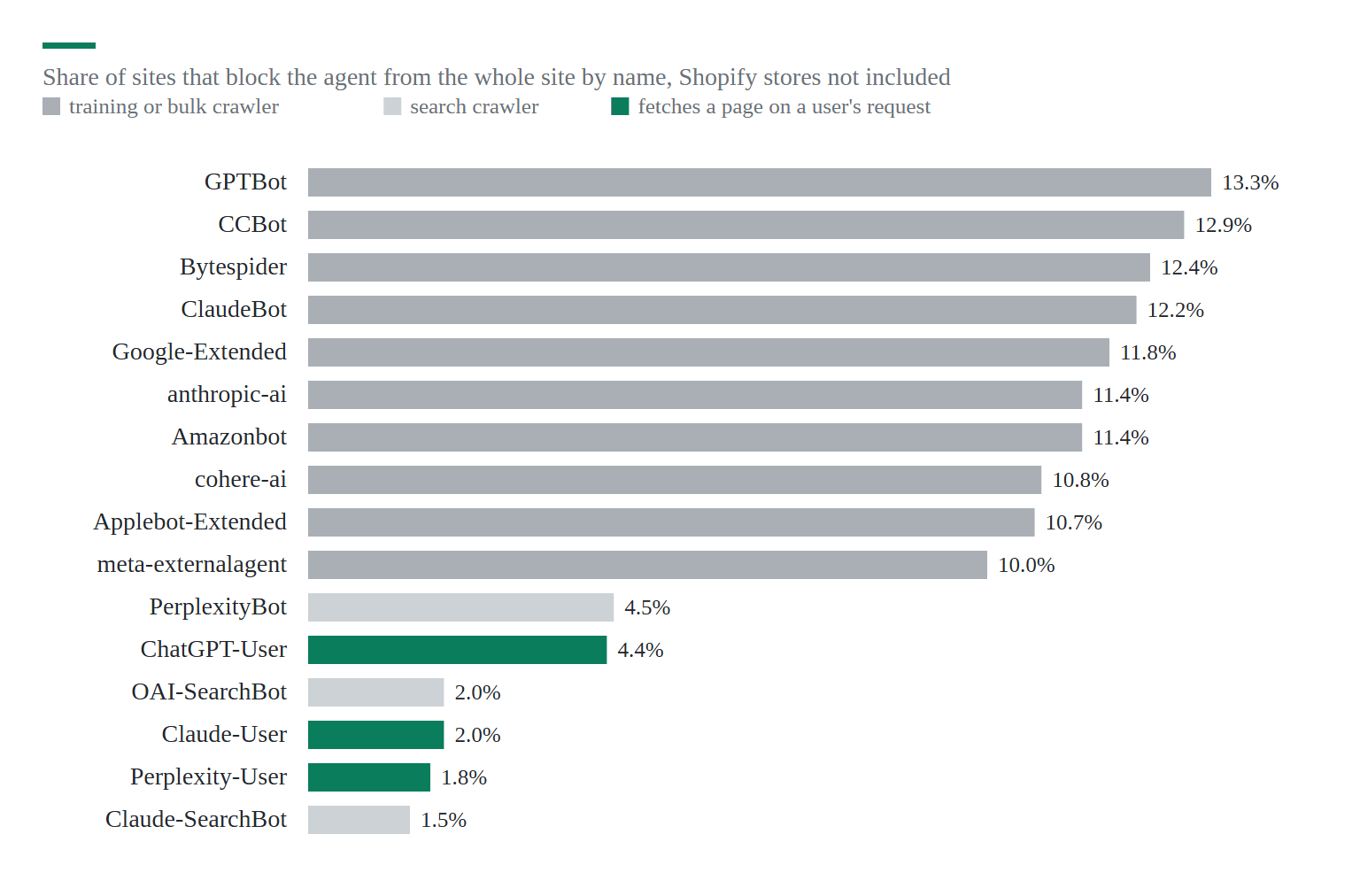
The pattern in the robots.txt files was clear. Sites block training crawlers about three times as often as the agents that read a page for a user: GPTBot at 13.3%, ChatGPT-User at 4.4%. That's a reasonable split. Training crawlers take your text for a model; user agents bring a person who's already asking about your product.
Should your store block AI crawlers?
For a store, I'd keep two groups open and decide about the third:
- Agents that fetch a page for a person (ChatGPT-User, Claude-User, Perplexity-User): keep them open. A shopper asked about your product, and blocking the agent means the answer comes from someone else's page.
- AI search crawlers (OAI-SearchBot, Claude-SearchBot, PerplexityBot): keep them open if you want to be cited in AI search answers.
- Training crawlers (GPTBot, ClaudeBot, Google-Extended, CCBot): your choice. Blocking them keeps future models from training on your product descriptions, and it doesn't change your Google search results. Google-Extended isn't Googlebot.
Shopify stores almost never block anything (1.1% name and block an AI crawler), so a Shopify store is open to all three groups by default. Is that what you want for your product descriptions? If it isn't, you can change it.
How to block GPTBot on Shopify and WooCommerce
On Shopify, robots.txt comes from a theme file. Go to Online Store > Themes in the Shopify admin, click the three dots next to your live theme, choose Edit code, add a new template of the type robots.txt and keep Shopify's default rules in it. Then add your own group at the end:
{% for group in robots.default_groups %}
  {{- group.user_agent }}
  {%- for rule in group.rules -%}
    {{ rule }}
  {%- endfor -%}
  {%- if group.sitemap != blank -%}
    {{ group.sitemap }}
  {%- endif -%}
{% endfor %}

User-agent: GPTBot
Disallow: /

User-agent: ClaudeBot
Disallow: /
Don't delete the loop at the top. It prints the rules Shopify writes for every store (cart, checkout and admin pages stay out of search), and a robots.txt without them can let search engines into pages they shouldn't index.
On WooCommerce and other WordPress stores, robots.txt is either a real file in the web root or a virtual one that WordPress or your SEO plugin writes. Add the same two groups at the end. If your site runs through Cloudflare, check its AI bot settings as well: one Cloudflare setting meant to stop AI training can also block Googlebot, and I'd test that before switching it on.
Should you write your own llms.txt?
On Shopify, I wouldn't spend time on it yet. The file Shopify serves is the one AI shopping agents are being built to read, and no major AI company has said it uses llms.txt to rank or cite stores. On WordPress and WooCommerce, a short llms.txt with your main categories, shipping and return pages costs little, but don't expect traffic from it.
The work that helps more is the same as for search: product pages whose HTML holds the price, the stock and the description without JavaScript, because most AI crawlers don't run JavaScript at all. That's where I'd look first.
How I sampled the 1,896 sites
I drew 50,000 origins at random, in equal parts from each traffic band of Chrome's top million list for September 2026, found the ones served by Shopify, and read robots.txt, /llms.txt and /agents.md on a random 363 Shopify stores, 19 WooCommerce stores and 1,514 other sites on November 6, 2026, slowly and one request at a time. The 19 WooCommerce stores are too few to report on their own, so they're left out of the table. A file counted as a real llms.txt only when it was Markdown text, not an error page or the home page. The data is open on Harvard Dataverse.
Sources
AI agent signals on 1, Jeremy Howard, RFC 9309 and 8 more11
- AI agent signals on 1,896 websites, dataset (Harvard Dataverse, November 2026)
- Jeremy Howard: the /llms.txt file proposal
- RFC 9309: Robots Exclusion Protocol
- Google Search Central: AI features and your website
- OpenAI: overview of OpenAI crawlers (GPTBot, OAI-SearchBot, ChatGPT-User)
- Anthropic: how site owners can block its crawlers
- Google: common crawlers, including Google-Extended
- Shopify Help Center: editing robots.txt.liquid
- Shopify: agent documentation (UCP and the Shop skill)
- Shopify's Horizon demo store: llms.txt (fetched November 12, 2026)
- Longpre et al.: Consent in crisis, the decline of the AI data commons (2024)

Discussion 0
Ask a question or share what you saw on your own store.
No comments yet.