I expected online stores to be worse at email security than other websites. Most of them are small businesses, and DNS records aren't what an owner thinks about between orders. So I checked the email records of every Shopify store domain in the top million websites of the Chrome UX Report, 42,231 of them, and compared them with a random sample of other sites from the same list.
On paper, the stores were far ahead. 79.6% of Shopify store domains have a valid DMARC record, against 51.0% of other domains. Then I looked at what those records say. Most of them are the minimum that Gmail, Yahoo and Shopify ask for: a line that collects no reports and stops no fake email.
If you send email from your own store domain (order confirmations from Shopify, newsletters from Klaviyo, replies from Google Workspace), this is how to set up a DMARC record that does its job: what the three records do, how to check yours, how to add DMARC in Shopify or at another domain provider, and when it's safe to start blocking.
What SPF, DKIM and DMARC do
Anyone can send an email that says it comes from [email protected]. Three DNS records let the receiving mail server check whether it really does.
- SPF is a list of the servers that may send email in your domain's name: Shopify, Google, Klaviyo and so on.
- DKIM is a signature your sending service adds to every message. The receiver checks it with a public key published in your DNS.
- DMARC tells the receiver how to treat a message that fails both checks, and where to send a report about it.
The DMARC policy has three levels. With p=none the receiver only watches and delivers the message anyway. With p=quarantine a failing message goes to spam, and with p=reject it isn't delivered at all. So a store with p=none and no report address has a record that passes Gmail's requirement and changes nothing for someone who sends fake invoices in your name.
What 42,231 Shopify stores have in their DNS
I read the SPF, DMARC and DKIM records of each domain on November 9 and 10, 2026. The difference between stores and other websites is real, but most of it sits in the weakest setting:
| Email record | Shopify store domains | Other domains |
|---|---|---|
| Valid DMARC record | 79.6% | 51.0% |
| DMARC set to none (monitoring only) | 55.0% | 28.1% |
| DMARC set to quarantine | 14.7% | 12.5% |
| DMARC set to reject | 9.9% | 10.4% |
| No valid DMARC record | 20.4% | 49.0% |
| Bare "v=DMARC1; p=none", no report address | 39.2% of valid records | 23.5% of valid records |
| SPF record | 83.2% | 66.6% |
| Broken SPF (two records, or more than 10 lookups) | 5.5% | 2.6% |
| Neither SPF nor DMARC | 9.1% | 31.1% |
42,231 Shopify store domains and 19,878 other domains, Chrome UX Report top million list, DNS read in November 2026.
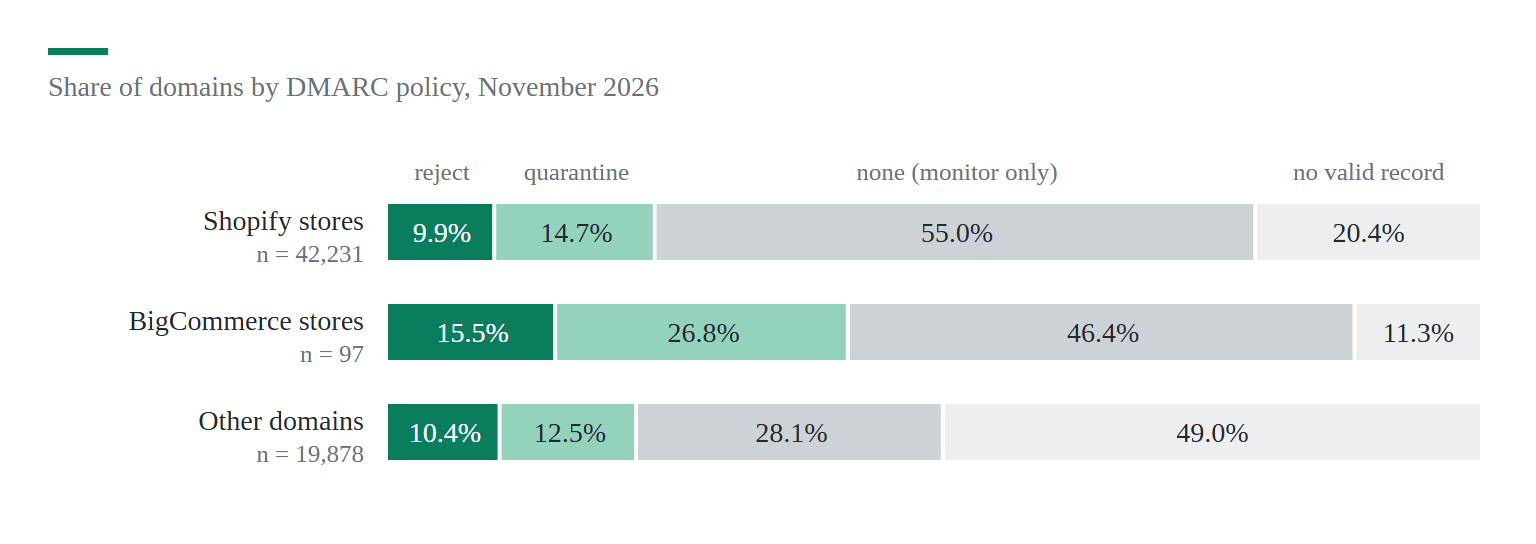
Only 23.7% of Shopify store domains enforce DMARC, close to the 21.8% of other domains. The big brands do: when I looked up a few well-known Shopify stores on November 12, Allbirds and Fashion Nova had p=quarantine, and Gymshark, Kylie Cosmetics and ColourPop had p=reject. Among the 10,000 most visited sites about nine in ten Shopify stores have DMARC, and in the lowest band of the list it's 78.3%, mostly at p=none.
Why most stores stop at p=none
Because that's all anyone asked for. Gmail and Yahoo started requiring a DMARC record from bulk senders in February 2024, Outlook.com followed in May 2025, and the minimum they accept is p=none. Shopify has the same minimum: it sends your notifications from your own address only when your domain is authenticated and has a DMARC record. Without one, your emails go out from an address like [email protected].
If you bought your domain through Shopify, Shopify adds the record for you, and it's exactly v=DMARC1; p=none. I think that explains the 39.2%. That one line meets every requirement, but it has no report address, so nobody ever learns who sends email in the store's name. Is someone sending fake "your order is delayed" emails from your domain right now? With that record you can't know.
Step 1: Check the records your domain has now
Open a terminal (on Windows, Command Prompt works) and ask for the DMARC record. Replace allbirds.com with your own domain:
nslookup -type=txt _dmarc.allbirds.com 8.8.8.8

_dmarc.allbirds.com  text =
        "v=DMARC1;p=quarantine;pct=100;rua=mailto:[email protected];ruf=mailto:[email protected];fo=1"
That's the real answer I got for Allbirds on November 12, 2026: a quarantine policy and a report address on its own domain. What does yours say? If the answer shows p=none and has no rua= part, you're in the 39.2%. If you get no answer at all, you have no DMARC record. Run the same command with -type=txt yourstore.com to see your SPF record (the line that starts with v=spf1), and check there's only one.
If you'd rather not use a terminal, a free DMARC lookup site such as dmarcian's DMARC Inspector (the one Shopify's help links to) shows the same record.
Step 2: Authenticate your sender domain in Shopify
- In your Shopify admin, open Settings > Notifications.
- In the Sender email section, click Email domain authentication.
- If your domain is with Cloudflare, GoDaddy or IONOS, click Authenticate automatically, follow the provider's steps and click the button that returns you to Shopify.
- For any other provider, copy every CNAME record Shopify shows into your provider's DNS settings. The number of records varies, so add all of them.
Those CNAME records set up DKIM and SPF for the email Shopify sends, so you don't add a separate SPF record for Shopify. Shopify says the check can take up to 48 hours. Automatic setup doesn't add a DMARC record, so step 3 is still yours.
Step 3: Add a DMARC record with a report address
A DMARC record is a TXT record with the name _dmarc. Start with the policy none, but add the rua= part, so the big mailbox providers send you a daily report of who sent email in your domain's name:
Type:   TXT
Name:   _dmarc
Value:  v=DMARC1; p=none; rua=mailto:[email protected]
Replace yourstore.com with your domain and use an inbox you really read, or the address a DMARC report service gives you (the reports are XML files, and a service turns them into a readable table).
- Domain bought through Shopify: go to Settings > Domains, click the domain, click Manage under DNS settings, then Add custom record > TXT record. If Shopify already added
v=DMARC1; p=none, edit that record instead of adding a second one. - Domain at another provider (Cloudflare, GoDaddy, Namecheap): open its DNS page and add the TXT record. Some providers add your domain to the name by themselves, so check that the result is _dmarc.yourstore.com and not _dmarc.yourstore.com.yourstore.com.
A domain must have only one DMARC record. Two records make the check fail, the same as having none.
Step 4: Fix a broken SPF record
5.5% of Shopify store domains break their own SPF. Some publish two SPF records, which makes receivers treat both as invalid; others need more than the 10 DNS lookups the SPF standard allows. Both happen the same way. Each email service asks you to add "its" SPF record, and the owner adds a new one every time.
The services I found most often in the SPF records of Shopify stores were Google, Microsoft 365, Mailgun, Klaviyo, SendGrid and Shopify itself. If you use Google Workspace and a helpdesk like Zendesk, one merged record looks like this:
v=spf1 include:_spf.google.com include:mail.zendesk.com ~allEach include: counts as at least one lookup, and some count as several, so remove services you stopped using. A typical store record needs about 3 lookups, far below the limit.
Step 5: Move from p=none to quarantine
Read the reports for two to four weeks. Which services send email in your name, and do their messages pass? The usual ones that fail are a newsletter tool without its own domain authentication, a helpdesk, and an old contact form plugin. Klaviyo, Mailchimp and the others each have a domain authentication page of their own: set it up, or their emails will fail DMARC the day you enforce it.
On WooCommerce, order emails leave from your web server unless you send them through an email service with an SMTP plugin. Set that up first, and add the service to SPF and DKIM, before you go past p=none.
When the reports list only services you know, and their messages pass, change the policy:
v=DMARC1; p=quarantine; rua=mailto:[email protected]I'd stay at quarantine for a month and only then move to p=reject. That's the setting the big stores use, and it's the one that stops fake emails in your name from reaching your customers at all. Shopify's help now says its emails pass DMARC even with the strict alignment settings adkim=s and aspf=s, so you don't have to remove them if you already use them.
How I measured the 62,223 domains
I resolved all one million origins of the September 2026 Chrome UX Report list and kept the ones served by Shopify (44,472) or BigCommerce, plus a random sample of 20,000 others. Then I read their MX, SPF, DMARC and BIMI records, and looked for DKIM keys under 16 common names, on November 9 and 10, 2026. DKIM keys can't be listed from outside, so the DKIM numbers are a lower limit and I left them out here. The data and the full method are open on B2SHARE.
Your own domain isn't in a dataset like this until you look it up. The nslookup line from step 1 takes ten seconds.
Sources
Shopify Help Center, Google, Yahoo Sender Hub and 7 more10
- Email authentication of online store domains, dataset (B2SHARE, November 2026)
- Shopify Help Center: setting up your email and authenticating your domain
- Shopify Help Center: displaying your store's sending email
- Google: email sender guidelines
- Yahoo Sender Hub: sender best practices
- Microsoft: Outlook's requirements for high-volume senders (April 2025)
- RFC 7489: DMARC
- RFC 7208: SPF (the 10-lookup limit)
- RFC 6376: DKIM
- CrUX Top Lists (September 2026)

Discussion 0
Ask a question or share what you saw on your own store.
No comments yet.