Trust badges right under Add to cart
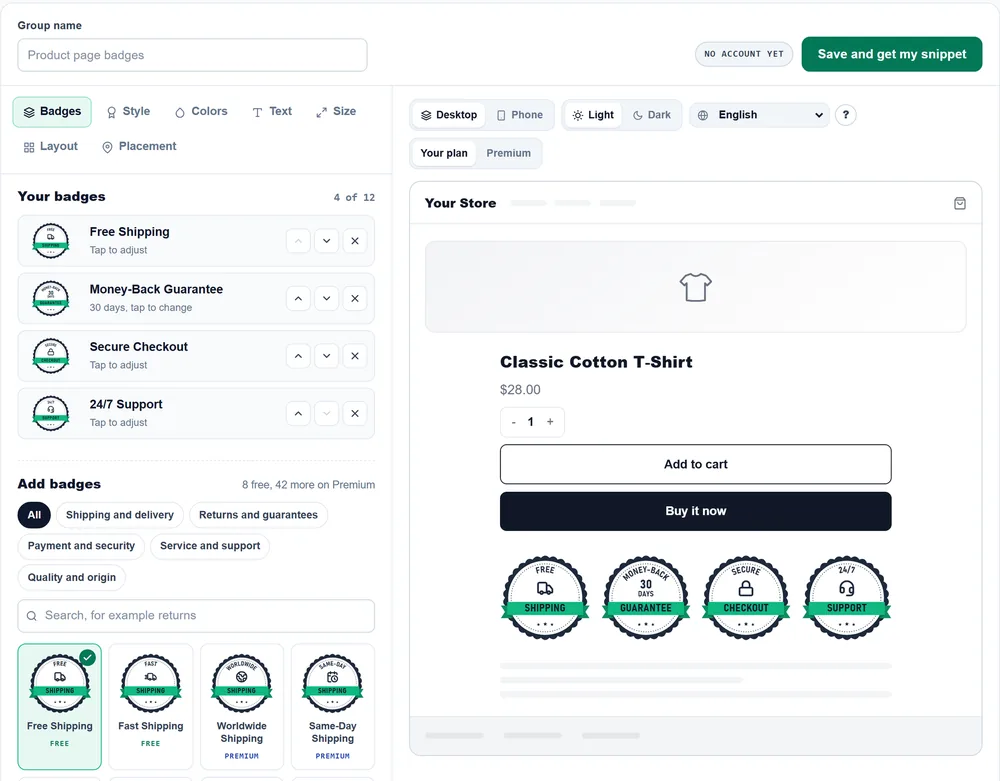
Your trust badges show up automatically under Add to cart on every product page, simple and variable, in classic and block themes.
Trust Badges & Seals for WordPress Free
Create trust seals and badges that help you sell more on any WordPress site or WooCommerce store. Place them under Add to cart, in the cart, above the footer or anywhere with the Trust badges block, and you'll get statistics on how many shoppers saw them.
What you get
Your trust badges show up automatically under Add to cart on every product page, simple and variable, in classic and block themes.
Add a group with the Trust badges block or the shortcode to any post, page or template, or show it above the footer on every page.
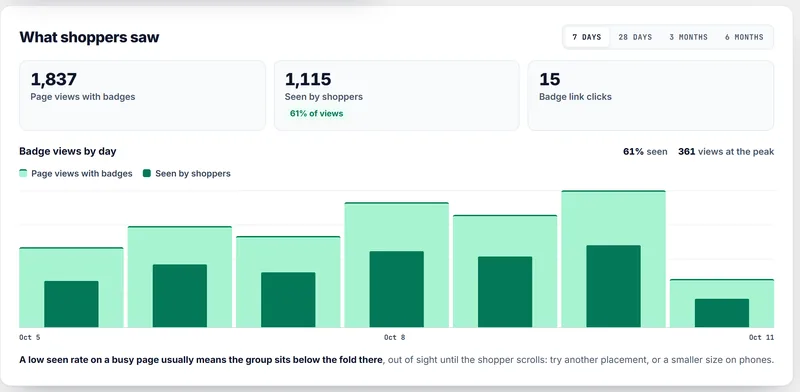
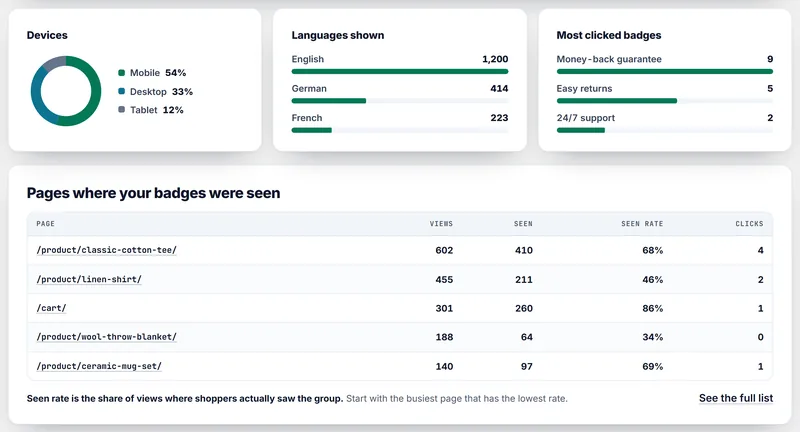
See page views with badges and how many shoppers saw them. The Premium plan adds views by page, language and device.
Free trust badges
The latest market research found that 40% of shoppers who left a checkout blamed extra costs like shipping, and 19% didn't trust the site with their card. These trust badges are built to win over customers who are still unsure.
Real numbers
We tested the trust badges WordPress plugin on 16 free WordPress and WooCommerce themes, on desktop and phone. They showed up under Add to cart on every product page, simple and variable, and under the checkout button in both the Cart block and the classic cart.
CartHacker placement test, October 2026: WordPress 7.1 and WooCommerce 11.1 at 1,366 px and 390 px. Layout shift measured on Storefront and Twenty Twenty-Five.
WordPress and WooCommerce themes tested on desktop and phone
Storefront, Astra and moreof product pages show the trust badges under Add to cart
Simple and variable productsadded to Google's Visual stability score (Cumulative Layout Shift)
Desktop and phoneSee the plugin
 Example
 Premium
How to install
Free vs Premium
Free account
$0 no credit card
CartHacker Premium PRO
Loading your price a month or Loading your price a year
In your currency, with your local tax.
Everything in Free, plus:
Common questions
Download and install the free CartHacker Trust Badges & Seals plugin, press Build my trust badges and connect a free CartHacker account. Then pick your badges in the badge builder and choose where they go: under Add to cart, in the cart, above the footer or wherever you place the Trust badges block.
Set the group to Under Add to cart in the badge builder. The plugin puts it on every product page, simple and variable, right after WooCommerce's Add to cart form, in classic and block themes.
No. The badge file loads deferred and the badges use no images or web fonts. On product pages and inside the block and the shortcode, the plugin saves each group's exact space before the page reaches the visitor, so nothing moves and Google's Visual stability score (Cumulative Layout Shift) doesn't suffer.
Yes. A group set to Under the checkout button shows on the cart page, directly under the checkout button, in the Cart block and in the classic cart.
There's no automatic spot inside the checkout. On the checkout page, a group set to After a CSS selector can follow an element you name, such as the order review table.
Yes, on any WordPress site. Place a group with the Trust badges block or the shortcode in any post, page or template, or show it above the footer on every page.
In a randomized test on a retailer's site, a trust seal raised the likelihood of a purchase (Ozpolat and others, 2013), and a study of 493 retailers found the effect largest for newer stores and first-time shoppers. CartHacker Premium's impact test hides your badges from a share of visitors and compares add to cart rates, so you can see the result on your own store. What the evidence says about trust badges.
1 badge group from 8 badges, 2 styles, English trust badges in your brand color, every layout and size, and 7 days of view statistics, counted up to 1,000 page views a day. CartHacker Premium adds all 50 badges in 14 styles, 30 languages, up to 50 groups, badge links, 180 days of statistics and the impact test.
Yes, with CartHacker Premium. Each badge switches to the language your page is shown in, across 30 languages, and you can write your own wording for each language, in any script.
Because a store can't honestly award itself someone else's certificate. EU consumer law lists an unearned trust mark among the practices that are always unfair (Unfair Commercial Practices Directive, Annex I, point 2), and Directive (EU) 2024/825 restricts generic green claims, so the library has no certificate-style seal and no generic environmental badge. Each badge is a promise you control, and badges that state something checkable carry a note in the builder reminding you to keep it true.
Free on every account, no credit card required.
Create my trust badgesUsing Shopify or another platform? Trust Seals & Badges works on Shopify and any other platform