On October 23 a jewelry store owner posted on r/shopify with a problem nobody had a template for. One customer had placed 13 orders in 3 days, all through Muse, Meta's shopping agent, and wasn't answering email or phone. Was the agent still ordering without the customer knowing? Should the parcels go out?
I'd never seen that question before, and I doubt the owner had either. On Shopify, agents like Muse have been able to place orders since this spring, and nobody had to switch anything on for that to happen. On WooCommerce it's the other way round: nothing is on, so an agent gets in only the way a person does, through the pages and the checkout. And if your store sits behind Cloudflare, one setting meant to keep AI training crawlers out can lock Googlebot out too (Cloudflare says so in its own blog post).
So if you run a small or mid-size store on Shopify or WooCommerce, and you'd like agents to find you and buy from you without every training crawler copying your catalog, here's what I checked this week. Which agents can buy where. What Shopify already turned on for you, and what WooCommerce needs. The Cloudflare settings I'd pick, with the menu names. A free snippet that puts your return and shipping policy where agents read it. And what I'd do with an agent order that looks wrong.
How much money is in it yet
Not much, but it converts. Adobe's July 2026 data has AI-referred visitors to US retail sites converting 60% better than other traffic, the eleventh month in a row they've been ahead. BCG puts agent referrals at under 1% of visits in late 2025 and maybe 5% by the end of 2026, and only 4% of shoppers would let an agent finish a purchase on its own (a Clutch survey BCG quotes). Coveo found 16% comfortable with an assistant that finds and buys for them.
BCG's own summary is the line I'd remember: "The battleground today is the recommendation, not the transaction." So I wouldn't rebuild a store for agents this quarter. I'd make sure nothing on it stops them, which is mostly cheap, and that the facts an agent repeats to a buyer are the right ones.
Where agents can buy from you today
| Agent or surface | Shopify store | WooCommerce store |
|---|---|---|
| ChatGPT | On by default; sends the buyer to your own checkout (US buyers) | Found by crawling; a product feed only if OpenAI approves you; ACP through the Stripe extension (US) |
| Google AI Mode, Gemini, Universal Cart | On by default through Merchant Center; direct checkout for US, Canada and Australia buyers | Merchant Center feed now; Google's checkout integration is a developer project, rolling out gradually in the US |
| Microsoft Copilot | Enrolled automatically, direct checkout (US) | Apply through Stripe or PayPal |
| Meta Muse | Shop Pay checkout through Shopify Catalog | No program; Muse arrives as a browser and pays with a one-time card |
| Walmart Agent Gateway | Walmart's own site, opened to identified agents with spending limits on October 21 | |
OpenAI's own checkout inside ChatGPT, the one everybody wrote about in 2025, was pulled back in March: "Instant Checkout is moving to Apps," a spokesperson told Digital Commerce 360. For a store that means ChatGPT is a source of visitors who then pay on your checkout, which is easier to live with than it sounds.
Agents come in two ways: pages and feeds
Google's CEO put it simply on the Sources podcast this week: agents will browse sites the way a person does, and they'll use protocols built for them, "and they're going to develop" side by side. A browsing agent opens your product page and clicks through checkout. A protocol agent never loads a page; it reads your feed or calls your platform's API.
I wanted to see the second door on a real store, so on October 24 I asked a standard Shopify store, Allbirds, for the files Shopify now publishes for agents. Then I asked Gymshark, which runs a headless front end on Shopify, for the same ones:
$ curl -s -o /dev/null -w "%{http_code} %{content_type}\n" https://www.allbirds.com/.well-known/ucp
200 application/json; charset=utf-8
$ curl -s -o /dev/null -w "%{http_code} %{content_type}\n" https://www.allbirds.com/agents.md
200 text/markdown; charset=utf-8
$ curl -s -o /dev/null -w "%{http_code} %{content_type}\n" https://www.gymshark.com/.well-known/ucp
404 text/html
$ curl -s -o /dev/null -w "%{http_code} %{content_type}\n" https://www.gymshark.com/agents.md
404 text/html
The first file is the store's profile in the Universal Commerce Protocol (UCP), the standard Google and Shopify wrote for agents to search, fill a cart and check out. Allbirds' profile, version 2026-08-25, points agents at a checkout service on its Shopify domain. The second is a plain-text note for agents, and its most important line is one I'd want every agent to follow:
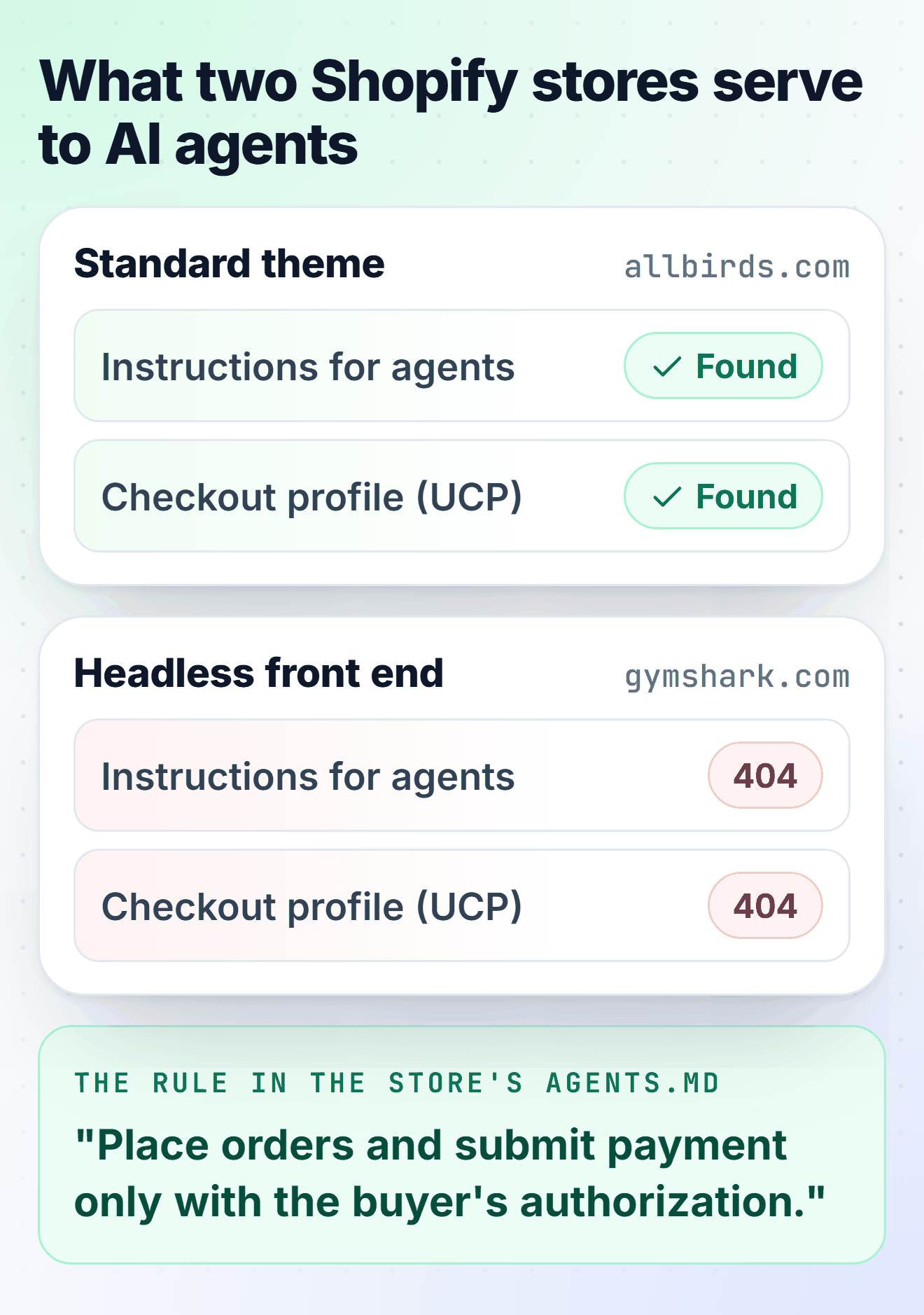
The same note tells agents not to fall back to scripted form fills when the checkout tools are missing. So a standard Shopify theme gets the agent plumbing without anyone touching it. A headless Shopify build doesn't, and neither does a WooCommerce store.
On Shopify, check what's already switched on
Open Sales channels > Agentic. On most stores Allow Shopify to manage for me is ticked, which means every AI channel, direct checkout and automatic enrollment in new channels are on. Untick it and you get a switch per channel (ChatGPT, Google AI Mode and Gemini, Microsoft Copilot, Meta AI and Muse) and a switch for Shopify Catalog access, which stops third-party agents (Shopify says sharing can take up to 7 days to stop).
Leaving it on is reasonable for most stores. What I'd check is the list of things those direct checkouts don't do, from Shopify's own help pages:
- No subscriptions, bundles, customizable products or B2B-only products, and no local delivery or pickup.
- Sign-in can't be required before checkout.
- Many checkout blocks don't load (upsells, loyalty, address autocomplete, consent collection), so anything you sell there doesn't sell to agents.
- Google Analytics and custom pixels don't fire on Google, Meta and Copilot direct checkouts. Your GA4 numbers will undercount AI orders; the per-channel performance report in the Agentic page won't.
- ChatGPT and Copilot only read the first 6,000 characters of a product description, so legal disclosures belong at the top.
Shopify also needs three policies filled in under Settings > Policies: terms of service, privacy, and returns and refunds. It grades how well your listings show to agents partly on "shop policy completeness", next to descriptions, images, reviews and variants.
On WooCommerce, nothing is on, so start with the feed
WooCommerce's own advice (its August post, "From found to bought") comes down to two moves.
First, send a clean product feed to Google Merchant Center with the Google for WooCommerce extension, because that's what Google's AI Mode, Gemini and Universal Cart read; my Merchant Center guide walks through the setup and the suspensions to avoid. Second, if you want ChatGPT and Copilot checkout, the route is Stripe's Agentic Commerce Suite through the official Stripe extension. Stores on WooPayments can't use it yet, even though WooPayments runs on Stripe.
Don't wait for WooCommerce core to do it. Version 11.2 (October 7) removed the experimental agentic checkout endpoints, wc/agentic/v1, "with no replacement endpoint". There's also Shopify's Agentic plan, which lists a non-Shopify store's products in ChatGPT, Gemini, Copilot and Perplexity for a fee per sale and sends buyers to your existing checkout.
Then look at what your product page tells a machine. AI crawlers don't run JavaScript (Vercel measured that across its network), so they read the HTML your server sends. I fetched a product page from my WooCommerce 11.1 test store with GPTBot's user agent and pulled out the Product schema. Price, stock, SKU, image and seller were all there, in the server HTML. Return window and shipping cost weren't anywhere in it, and those are the two things a buyer asks an agent before paying.
WooCommerce prints that schema itself, so the gap closes with a small must-use plugin that adds both to every product. Change the seven numbers at the top to your real policy, and keep them identical to your returns and shipping pages, because Google checks the markup against the visible page and an agent repeats it to a buyer:
<?php
/**
 * Plugin Name: Store Policy Schema
 * Description: Adds your return window and shipping cost and times to the Product schema WooCommerce prints, so search engines and AI shopping agents read them straight from the product page.
 * Version: 1.0.0
 * Author: Adrian Wadowski, CartHacker
 * Author URI: https://carthacker.com/
 * License: GPL-2.0-or-later
 * Requires PHP: 7.4
 *
 * Copy to wp-content/mu-plugins/ and change the numbers below to your real policy.
 * Every number here must match what your returns and shipping pages say, word for
 * word: Google checks the markup against the page, and an agent quotes it to a buyer.
 * If Merchant Center has its own return and shipping settings, those win there.
 */

defined( 'ABSPATH' ) || exit;

const SPS_COUNTRY        = 'US';   // where these rules apply, ISO 3166-1 code
const SPS_RETURN_DAYS    = 30;     // days to send it back; 0 = no returns
const SPS_FREE_RETURNS   = true;   // false if the buyer pays the return label
const SPS_SHIPPING_COST  = 5.95;   // flat rate in the store currency
const SPS_FREE_FROM      = 50;     // free shipping from this order value; 0 = never
const SPS_HANDLING_DAYS  = array( 0, 1 ); // days from order to dispatch, min and max
const SPS_TRANSIT_DAYS   = array( 2, 5 ); // days in the post, min and max

add_filter( 'woocommerce_structured_data_product', function ( $markup, $product ) {
	if ( empty( $markup['offers'] ) || ! is_array( $markup['offers'] ) ) {
		return $markup;
	}
	$currency = get_woocommerce_currency();
	$days     = function ( array $range ) {
		return array( '@type' => 'QuantitativeValue', 'minValue' => $range[0], 'maxValue' => $range[1], 'unitCode' => 'DAY' );
	};

	if ( SPS_RETURN_DAYS > 0 ) {
		$returns = array(
			'@type'                => 'MerchantReturnPolicy',
			'applicableCountry'    => SPS_COUNTRY,
			'returnPolicyCategory' => 'https://schema.org/MerchantReturnFiniteReturnWindow',
			'merchantReturnDays'   => SPS_RETURN_DAYS,
			'returnMethod'         => 'https://schema.org/ReturnByMail',
			'returnFees'           => SPS_FREE_RETURNS ? 'https://schema.org/FreeReturn' : 'https://schema.org/ReturnFeesCustomerResponsibility',
		);
	} else {
		$returns = array(
			'@type'                => 'MerchantReturnPolicy',
			'applicableCountry'    => SPS_COUNTRY,
			'returnPolicyCategory' => 'https://schema.org/MerchantReturnNotPermitted',
		);
	}

	foreach ( $markup['offers'] as $i => $offer ) {
		// A variable product with different prices gets an AggregateOffer, which Google
		// reads for price ranges only, so the policy goes on plain offers.
		if ( ! isset( $offer['@type'] ) || 'Offer' !== $offer['@type'] ) {
			continue;
		}
		$price = isset( $offer['price'] ) ? (float) $offer['price'] : 0.0;
		$free  = SPS_FREE_FROM > 0 && $price >= SPS_FREE_FROM;

		$markup['offers'][ $i ]['hasMerchantReturnPolicy'] = $returns;
		$markup['offers'][ $i ]['shippingDetails']         = array(
			'@type'               => 'OfferShippingDetails',
			'shippingRate'        => array( '@type' => 'MonetaryAmount', 'value' => $free ? 0 : SPS_SHIPPING_COST, 'currency' => $currency ),
			'shippingDestination' => array( '@type' => 'DefinedRegion', 'addressCountry' => SPS_COUNTRY ),
			'deliveryTime'        => array(
				'@type'        => 'ShippingDeliveryTime',
				'handlingTime' => $days( SPS_HANDLING_DAYS ),
				'transitTime'  => $days( SPS_TRANSIT_DAYS ),
			),
		);
	}
	return $markup;
}, 10, 2 );
Once it's in mu-plugins, the same product's offer on the test store ends like this (the shipping rate is 0 because the product costs more than the free-shipping threshold):
    "price": "83.28",
    "priceCurrency": "USD",
    "hasMerchantReturnPolicy": {
        "@type": "MerchantReturnPolicy",
        "applicableCountry": "US",
        "returnPolicyCategory": "https://schema.org/MerchantReturnFiniteReturnWindow",
        "merchantReturnDays": 30,
        "returnMethod": "https://schema.org/ReturnByMail",
        "returnFees": "https://schema.org/FreeReturn"
    },
    "shippingDetails": {
        "@type": "OfferShippingDetails",
        "shippingRate": { "@type": "MonetaryAmount", "value": 0, "currency": "USD" },
        "shippingDestination": { "@type": "DefinedRegion", "addressCountry": "US" },
        "deliveryTime": {
            "@type": "ShippingDeliveryTime",
            "handlingTime": { "@type": "QuantitativeValue", "minValue": 0, "maxValue": 1, "unitCode": "DAY" },
            "transitTime": { "@type": "QuantitativeValue", "minValue": 2, "maxValue": 5, "unitCode": "DAY" }
        }
    }
Merchant Center settings still win over page markup when both exist, by Google's own order of precedence. The markup is for everyone else who reads the page.
Cloudflare: allow Search and Agent, disallow Training
Skip this section on Shopify: Shopify handles bots at its own network edge and says it "doesn't recommend a proxy in front of the store and can't support one". For a WooCommerce store behind Cloudflare, this is the part that decides whether agents get through at all.
Since July 1, every Cloudflare plan, the free one included, sorts AI bots by what they do: Search (indexing so it can answer later), Agent (acting for a person who is waiting) and Training (taking content into a model). Here's how I'd set them:
- Search and Agent on Allow. In Security Settings, filter Bot traffic, then Configure AI bot policies.
- Training on Disallow, with Enable Bot Preference Sync on, then Save. Not Block: Cloudflare's own July 1 post says customers who block Training also block "multi-purpose crawlers such as Googlebot, Applebot, and BingBot", while its robots.txt documentation (updated October 22) says Disallow with Bot Preference Sync leaves those mixed-use crawlers out of the edge block.
- Check the result. Open yoursite.com/robots.txt and make sure Googlebot isn't disallowed, then watch the crawl stats in Search Console for a week.
- Leave the old Block AI bots switch off. Cloudflare deprecated it on September 15.
- Check pages with ads. Domains added since September 15 block Training and Agent on pages that display ads by default, which hits a store blog with display ads.
The two Cloudflare pages don't say it the same way, which is why step 3 exists. I'd rather spend two minutes reading robots.txt than lose Google traffic for a week before Search Console shows it.
The managed robots.txt also adds a Content-Signal line that states your terms for search, AI answers and training. For comparison, Cloudflare's own blog lets everyone in; this is the line its robots.txt served on October 24:
$ curl -s https://blog.cloudflare.com/robots.txt | grep -i "^content-signal"
Content-Signal: ai-train=yes, search=yes, ai-input=yes
The default Cloudflare writes for you with Training disallowed is search=yes, ai-train=no. Compliance is voluntary, and the big agents that matter for checkout don't depend on robots.txt anyway: Google's own documentation says user-triggered agents such as Google-Agent "generally ignore robots.txt rules".
The setting that can actually stop an agent at checkout is Bot Fight Mode. On the free plan it challenges traffic that looks automated, and Cloudflare says plainly that you can't skip it with WAF rules or Page Rules.
When Jefferies sent Meta's Muse to several hundred retail and travel sites, about a third blocked it and another third challenged it. If you run Bot Fight Mode, ask someone with an agent (Muse, or ChatGPT's agent mode) to buy something cheap from your store. If it stalls, switch Bot Fight Mode off, or move to Pro, where Super Bot Fight Mode lets a WAF Skip rule exempt /checkout/, /cart/, /wp-json/wc/store/ and your payment webhook paths.
Signed agents make this easier over time. OpenAI's browsing agent signs its requests with Web Bot Auth, and the public keys sit where anyone can check them:
$ curl -s -o /dev/null -w "%{http_code} %{content_type}\n" https://chatgpt.com/.well-known/http-message-signatures-directory
200 application/http-message-signatures-directory+json
Cloudflare treats signed agents as verified, which lets you allow them by category instead of guessing from a user agent string that anyone can fake.
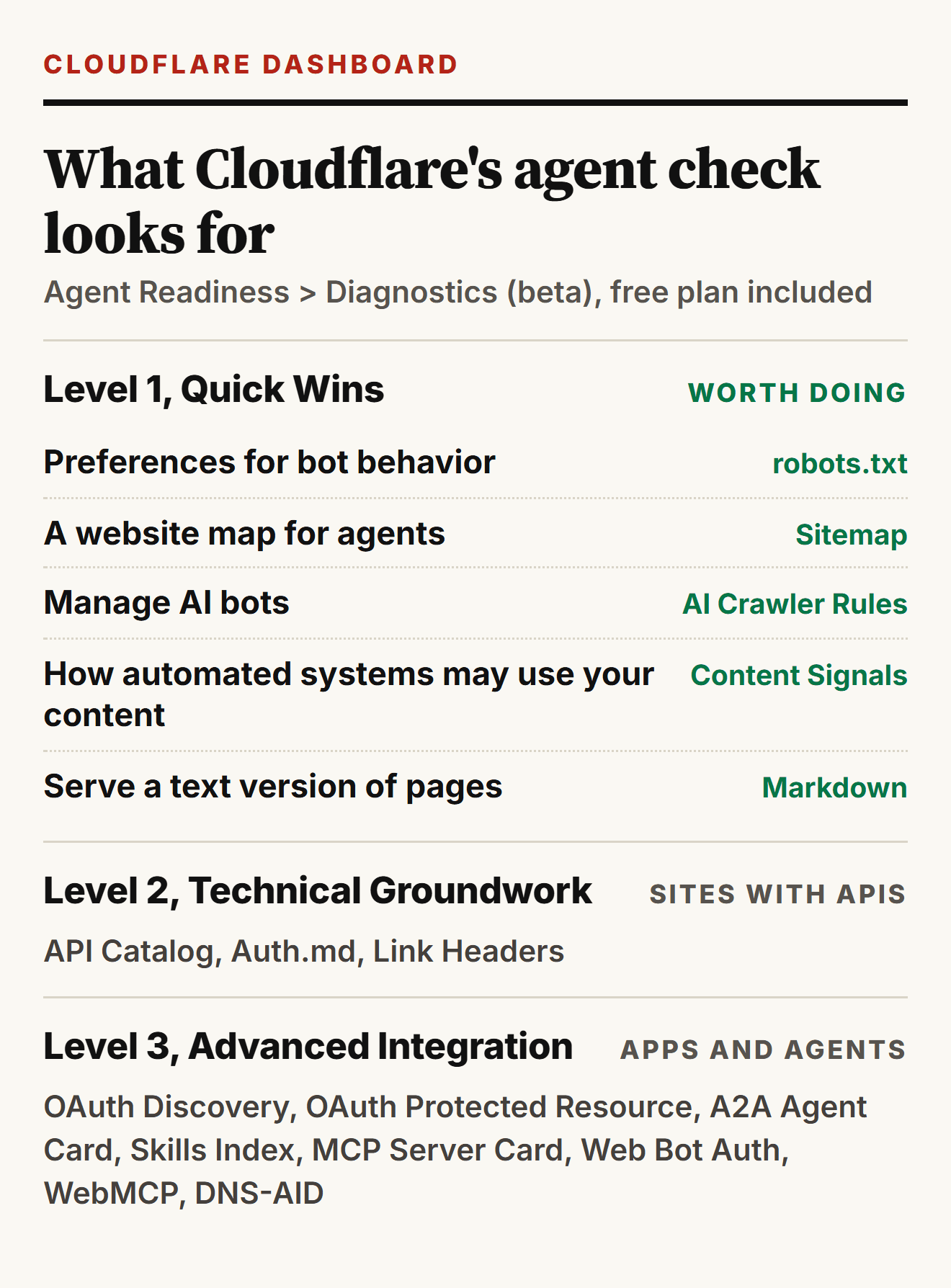
Cloudflare now grades a domain on all this, too. Under Agent Readiness > Diagnostics (still a beta, and it's on the free plan) a scan sorts what it finds into three levels. I ran it on a domain I look after, and only the first level made sense for a store. The other two are for sites with their own APIs, logins and AI agents, which a small store doesn't have.
Agent ready is mostly the boring list
Google says there's "no special schema.org structured data that you need to add" for AI Overviews and AI Mode, and no special files either. What it asks for is structured data that matches the visible page. In practice, being ready for agents is the list good stores already work through. Have you done all five?
- Complete product data in the feed (titles, variants, GTINs where you have them) and the same facts on the product page, in the HTML rather than loaded by JavaScript.
- Shipping and returns with exact numbers on the product page ("30-day returns", "ships within 2 business days"), WooCommerce's own advice, plus the schema from the snippet above.
- Merchant Center's new conversational attributes if you have the answers: question_and_answer pairs, document_link for a manual or size chart PDF, related_product for accessories. They're optional, go in a supplemental feed and don't affect approval.
- A checkout a person on a phone and an agent can both finish: no CAPTCHA on the final step, no forced account, and buttons with real labels ("Add to cart", "Place order"), which screen readers and browser agents read the same way.
- llms.txt if you like. It's cheap, Shopify writes one for every standard store anyway, and Google says it doesn't need one.
When an agent order looks wrong
Back to the 13 orders. Muse is supposed to show its user an approval card with the order details before every purchase (CNBC walked through it on October 3), and it pays with a one-time Link card or Shop Pay. Thirteen orders should mean thirteen approvals. I couldn't find anything public that says whether a Muse purchase can ever skip that step, so I wouldn't assume either way.
What I'd do with an order like that: check the sales channel on the order (Shopify marks direct-checkout orders as attributed to Meta) and the payment method, hold fulfillment, write to the buyer, and refund what isn't shipped if nobody answers within the window your policy names. Keep the order records; they're your evidence in a dispute.
On liability, nothing has moved yet. Shopify Protect covers fraud chargebacks on eligible Shop Pay orders through Shopify Payments, for US stores, and Shopify names Facebook, Instagram and Google but not Muse or Copilot. No card network has published a rule that moves agent mistakes off the merchant. The one explicit promise so far is American Express, whose Agent Purchase Protection (April 14) covers its card members when a registered agent buys the wrong thing. Until that changes, an agent order carries the same chargeback risk as any other order, and a parcel held for two days costs less than 13 chargebacks.
Sources
r/shopify, Digital Commerce 360, BCG and 23 more26
- r/shopify, "Customer placed 13 orders in 3 days through Muse and won't respond" (October 23, 2026)
- Digital Commerce 360: Adobe AI referral traffic, July 2026
- BCG: How retailers can win with AI shopping agents (October 21, 2026)
- Axios: Walmart opens to AI agents while Amazon blocks Muse (October 21, 2026)
- Digital Commerce 360: OpenAI shifts checkout plans (March 6, 2026)
- Search Engine Journal: Pichai on agents using pages and APIs (October 22, 2026)
- Shopify Help Center: Managing agentic storefronts
- Shopify Help Center: Selling on Meta
- Shopify Help Center: Shopify Catalog and product discovery
- Google: Universal Cart launch (October 15, 2026)
- Google: UCP integration in Merchant Center
- Google Merchant Center: conversational attributes
- Google Search Central: AI features and your website
- Google Search Central: return policy structured data
- Google: user-triggered fetchers
- WooCommerce: From found to bought (August 1, 2026)
- WooCommerce 11.2.0 release notes
- Vercel: The rise of the AI crawler
- Cloudflare: new options for AI traffic (July 1, 2026)
- Cloudflare docs: managed robots.txt and Bot Preference Sync
- Cloudflare docs: Bot Fight Mode
- Proactive: Jefferies test of Meta's Muse (October 8, 2026)
- OpenAI: allowlisting ChatGPT's agent
- CNBC: how Muse checkout works (October 3, 2026)
- Shopify Protect
- Digital Commerce 360: Amex Agent Purchase Protection (April 14, 2026)

Discussion 0
Ask a question or share what you saw on your own store.
No comments yet.