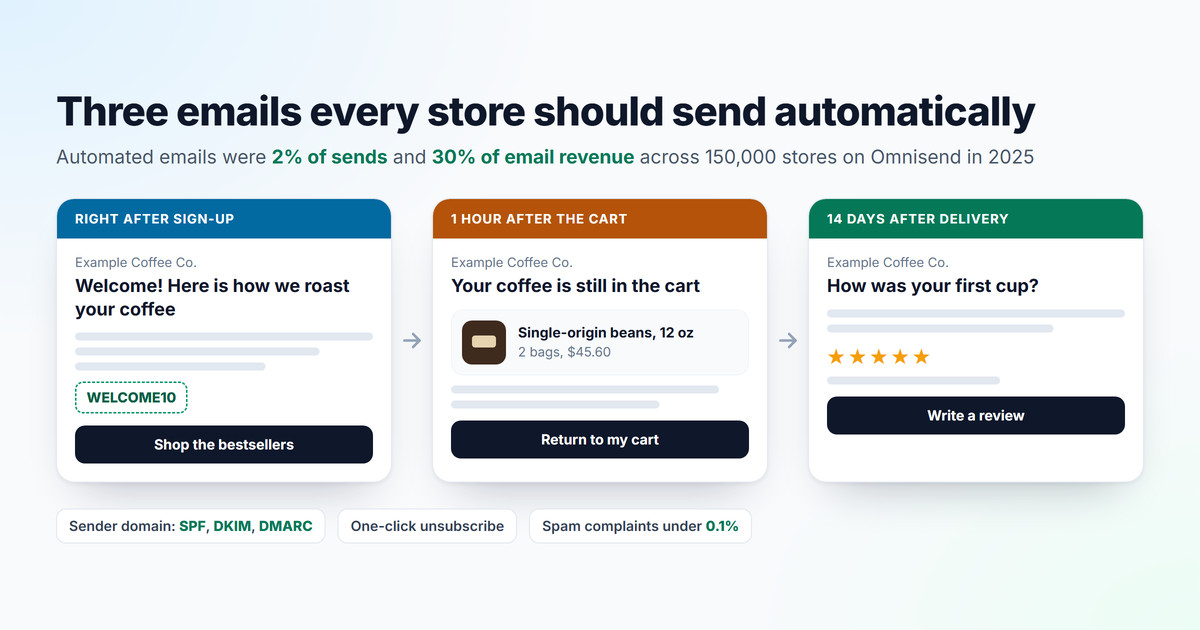
Every online store should send three emails automatically: a welcome email when someone subscribes, an abandoned cart email when a shopper leaves without paying, and a thank-you after the purchase that later asks for a review. They earn far more than they cost. Across 150,000 stores on Omnisend in 2025, automated emails were 2% of all email sends and brought in 30% of email revenue. This guide covers what to write in each one, the tool to send it with and the sender settings that keep it out of the spam folder.
I have built online stores since 1998, and camelway.eu, a store I built and ran, sends these emails through Shopify Messaging.
Why do automated emails earn more than newsletters?
Because they arrive at the moment the shopper is already thinking about you. Timing does the work. A newsletter goes to everyone on the same day; an automated email goes to one person right after they did something, such as subscribing or leaving a cart. Omnisend's 2025 data puts the difference in money: each automated email earned $2.87 on average, against $0.18 for a scheduled campaign, about 16 times as much. Abandoned cart and welcome emails alone brought in 76% of all orders from automations.
| Benchmark | Result | Source |
|---|---|---|
| Automated emails, share of all sends | 2% | Omnisend, 150,000 brands, 2025 |
| Automated emails, share of email revenue | 30% | Omnisend, 150,000 brands, 2025 |
| Revenue per email, automated vs campaign | $2.87 vs $0.18 | Omnisend, 150,000 brands, 2025 |
| Abandoned cart flow, share of recipients who order | 3.33% on average, 7.69% for the top 10% | Klaviyo, 143,000 flows, 2023 |
| Abandoned cart flow, revenue per recipient | $3.65 on average | Klaviyo, 143,000 flows, 2023 |
Email 1: the welcome email
The welcome email goes out the moment someone subscribes, while they still remember why. Say who you are, what makes your product different and where to start, with your two or three best sellers and one clear button. A first-order discount is optional; it helps in a crowded category and teaches price-hunting in a premium one. Shopify Messaging has templates for both: Welcome new subscribers with a discount email, and a series that sends the discount, then two emails about your brand, then a reminder if nothing was bought.
Email 2: the abandoned cart and abandoned checkout email
This one pays the most. It comes in two kinds. An abandoned cart email goes to a known shopper who added products and never started the checkout. An abandoned checkout email goes to someone who reached the checkout, typed an email address and left. Send the first one about an hour later, show the product they left with a link straight back to their cart, and answer the doubt that most likely stopped them: the shipping cost, the delivery date or the returns. Keep any discount for a later reminder, if at all.
On Shopify, Messaging includes the Recover abandoned cart and Recover abandoned checkout templates; by default they go only to customers who agreed to email marketing, and for an abandoned checkout you can switch the recipients to all customers in the email editor. WooCommerce sends none on its own. Why shoppers abandon their carts covers the reasons shoppers leave and what the email should answer.
Email 3: the thank-you and the review request
After the purchase, say thank you. Later, ask for a review. Shopify Messaging's Thank customers after they purchase template covers the first part after a customer's first and second orders. The review request usually comes from your review platform, timed to arrive once the product has been used for a while: on camelway.eu, REVIEWS.io writes about two weeks after the parcel arrives.
camelway.eu pays nothing for reviews. Honest reviews that nobody was paid for are worth more than a larger number of bought ones, and I would rather have 30 real reviews than 50 encouraged by a discount. Instead, every parcel carries a printed letter in the customer's own language. It thanks them for the order, explains what makes the product's quality different, and tells them that in two weeks an email from REVIEWS.io will ask for their opinion, which can genuinely help other shoppers decide. The text message that confirms the shipment says the same, also in their language. That steady reminder brings in more reviews over time, and every one of them is unprompted by money.
Many stores do offer a discount or a gift card for a review, and for some of them it makes sense. The rules are clear on two points. In the United States, the Federal Trade Commission's rule on consumer reviews, in force since 2024, bans rewards that depend on the review being positive or negative. Google shows reviews earned with an incentive only if the incentive does not depend on the rating, and you must mark them with the incentivized review attribute when you send reviews to Google.
Which email tool should you use?
| Tool | Platform | Cost to start | Good to know |
|---|---|---|---|
| Shopify Messaging | Shopify | 10,000 emails a month free, then $1 per 1,000 | Built in, with templates for all three emails; each automated email is written in one language |
| Klaviyo | Shopify, WooCommerce | Free up to 250 active profiles and 500 emails a month | Deeper segmentation; Smart Translations sends each subscriber their own language |
| MailPoet | WooCommerce | Free up to 1,000 subscribers, with your own sending service | Welcome, first purchase and abandoned cart emails included |
Prices and limits from each tool's own pages, October 2026.
Shopify Messaging is the simplest start. For most small stores it is enough. Its limit shows when you sell in several languages: an automated email goes out in one language, so a store that wants every customer addressed in their own needs a separate automation per language or a tool such as Klaviyo. The emails of camelway.eu are written in English, and every reply is answered in the customer's own language, which is how many European shoppers expect to be treated. Klaviyo would handle the languages, but for a business that size it is more tool, and more time, than it needs.
Make sure your emails reach the inbox
Gmail, Yahoo and Outlook now reject or file as spam the email of senders who skip authentication. Authentication is no longer optional. Since February 2024, Gmail and Yahoo require every sender to authenticate with SPF or DKIM and to keep spam complaints below 0.3%. Senders of more than 5,000 emails a day need SPF, DKIM and a DMARC record, a From address that matches the authenticated domain, and a one-click unsubscribe link; Yahoo adds that an unsubscribe must take effect within 2 days. Outlook began sending non-compliant high-volume email to the junk folder on May 5, 2025.
The three names stand for three DNS records, the settings your domain publishes to the world. SPF lists the services allowed to send email for your domain. DKIM signs every message. The receiving server checks that signature to confirm that nothing was changed on the way and that the message really comes from your domain, not from someone pretending to be you. DMARC tells receivers what to do when a message fails those checks, and where to send reports about it. Gmail asks bulk senders to stay below a spam rate of 0.10% and never to reach 0.30%.
- On Shopify: go to Settings, then Notifications, set your sender email on your own domain and add the CNAME records Shopify shows you at your domain provider. They cover DKIM and SPF. Without them, Shopify rewrites your sender to an address at shopifyemail.com.
- On Klaviyo, MailPoet or any other sender: add the records that service shows you, the same way.
- Add a DMARC record if your domain has none. Shopify's minimum is a policy of none; avoid the strict settings adkim=s and aspf=s, which can make Shopify's emails fail.
- Use a different From address per kind of email, as Gmail recommends, for example orders@ for receipts and news@ for promotions, so a promotion that annoys people does not drag your order confirmations into spam.
Host:  _dmarc.example.com
Type:  TXT
Value: v=DMARC1; p=none; rua=mailto:[email protected]
Replace example.com with your domain. The rua address receives daily reports of who sends email in your name; once they show only your own services passing, you can tighten the policy from none to quarantine.
Read every new guide 2 weeks early, with no ads
Premium also opens all 50 trust badges in 30 languages, keeps 180 days of your Core Web Vitals, removes the limit on PDF tools and tracks 200 QR codes.
See CartHacker PremiumAutomated email checklist
- A welcome email the moment someone subscribes, with your best sellers.
- Abandoned cart and abandoned checkout emails about an hour after the shopper leaves.
- A thank-you after every first order and a review request once the product has been used.
- Review rewards, if any, never tied to the rating, and disclosed to Google.
- SPF, DKIM and DMARC set up for your sending domain.
- One-click unsubscribe and spam complaints under 0.1%.
- Separate From addresses for receipts and promotions.
Email automation questions store owners ask
What is an abandoned cart email?
It is an automatic email to a shopper who added products to the cart and left without ordering. It shows what they left. It also links back to the same cart and answers the doubt that stopped them, and in Klaviyo's 2023 data from more than 143,000 flows, 3.33% of recipients placed an order on average, and 7.69% for the best 10% of stores.
When should I send an abandoned cart email?
The first one about an hour after the shopper leaves, while they still remember the product. A second reminder can follow the next day; keep any discount for that one, if you use one at all.
Do I need DMARC for my store's emails?
Yes, if you send more than 5,000 emails a day to Gmail or Yahoo addresses, and it is a good idea below that too. A record with a policy of none is enough to start, as long as SPF and DKIM are set up for the same domain.
Can I offer a discount for a review?
You can, as long as the reward does not depend on the review being positive. The US Federal Trade Commission bans rewards tied to the rating, and Google requires reviews earned with an incentive to be marked as such.
Sources
- Omnisend: 2026 ecommerce marketing report, 150,000 brands and 27 billion emails sent in 2025.
- Klaviyo: Abandoned cart benchmark report, 2023 data from more than 143,000 flows; Smart Translations; pricing.
- Google: Email sender guidelines and Product ratings policies. Yahoo: Sender best practices. Microsoft: Outlook's requirements for high-volume senders.
- Federal Trade Commission: Rule on the use of consumer reviews and testimonials, 16 CFR Part 465.
- Shopify Help Center: Creating marketing automations, Shopify Email pricing and Setting up your sender email. WordPress.org: MailPoet.