About 7 in 10 online shopping carts never become an order, and Baymard Institute's average across 50 studies puts the share at 70.22%. Some of those shoppers were only browsing. The rest left for reasons you can fix, such as a shipping cost they saw too late, a delivery date nobody promised, a checkout that demanded an account or no way to pay the way they pay at home. This guide takes those reasons in the order shoppers give them, with the setting or the code that answers each one on Shopify and WooCommerce.
I have built and tuned online stores since 1998. The funnel here comes from camelway.eu, a store I built and ran, and I tested the countdown code on a WooCommerce store with a classic and a block theme before printing it.
What is cart abandonment, and how is the rate calculated?
Cart abandonment means a shopper put a product in the cart and left without ordering. The rate is one minus orders divided by carts. A store with 1,000 carts and 300 orders therefore has a cart abandonment rate of 70%, and Shopify's analytics shows both of those numbers on one card. Checkout abandonment is narrower. It counts only the shoppers who opened the checkout and then left it.
How many carts does a real store lose?
camelway.eu, a Shopify store for camel milk powder that I built and ran, recorded 38,373 sessions between December 1, 2023 and July 7, 2026. In 1,154 of them a shopper added a product to the cart, in 870 the shopper reached the checkout, and 304 ended with an order. That is a cart abandonment rate of 73.7%. Baymard's average is 70.22%. The 0.79% conversion rate on the card is the average over all 31 months; in the same report the monthly rate was close to 2% by June 2026.
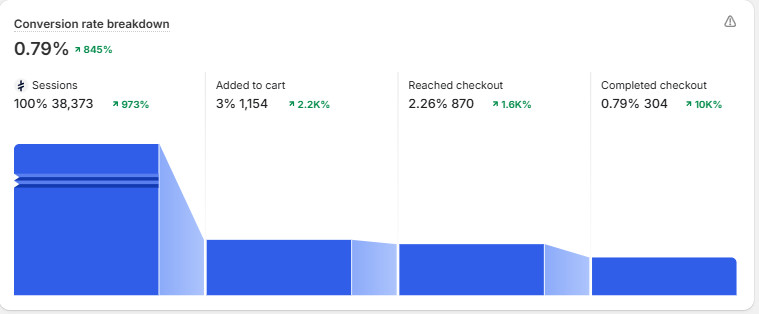
The split is the useful part. Of the 850 carts that never became orders, 284 stopped at the cart and 566 inside the checkout, so two in three were lost after the shopper had already opened the checkout. That is where the shipping cost, the payment methods and the doubts about the store all surface at once. On Shopify the checkout runs on Shopify's own pages, so most of the fixes go on the product page and in the cart, where shoppers decide whether to start it.
Why do shoppers abandon their carts?
Baymard Institute asks US online shoppers why they left a checkout. The largest group, 42%, left a cart because they were just browsing or not ready to buy, and Baymard leaves them out of the list, because no checkout fix brings them back. The rest gave these reasons.
| Reason shoppers gave | Share | The fix |
|---|---|---|
| Extra costs too high (shipping, tax, fees) | 40% | The shipping cost and the free shipping threshold next to the price, taxes included |
| Delivery was too slow | 20% | The dispatch cutoff and the delivery time on the product page, with a countdown to the cutoff |
| Did not trust the site with card details | 19% | Express payment buttons, verified reviews, trust badges and a visible way to reach a person |
| The site wanted an account | 18% | Guest checkout turned on |
| Checkout too long or complicated | 17% | Fewer form fields: company, apartment and phone optional or hidden |
| The website had errors or crashed | 17% | A test order on a phone after every app or plugin update |
| Returns policy not good enough | 13% | The returns promise next to the Add to cart button |
| Could not see the total cost up front | 12% | No surprise at checkout: costs, customs and the free shipping threshold stated on the product page |
| The card was declined | 10% | A second way to pay: wallets, bank payments, pay later |
| Not enough payment methods | 9% | The local payment methods of the countries you sell to |
Baymard Institute, current edition, US online shoppers who abandoned during checkout. Shoppers could pick several reasons, so the shares add up to more than 100%.
Show the full cost and the delivery date before the checkout
Extra costs lead the list and slow delivery comes second, so answer both where the shopper makes up their mind: next to the price, before the cart. Name the free shipping threshold, the cost below it, the dispatch cutoff and the tracking. Say whether taxes and customs duties are included. Shopify's Dawn theme prints "Discounts and shipping calculated at checkout" in the cart, because the exact cost depends on an address the shopper has not typed yet. The product page has to carry it.
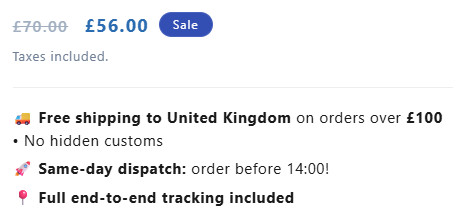
Returns belong in the same place. One line such as "Easy returns" or "30-day returns" under the button, linked to the policy, answers the 13% who left over returns without making them search the footer. The product page checklist covers the rest of that page from the photo down.
Add a countdown to your real dispatch cutoff
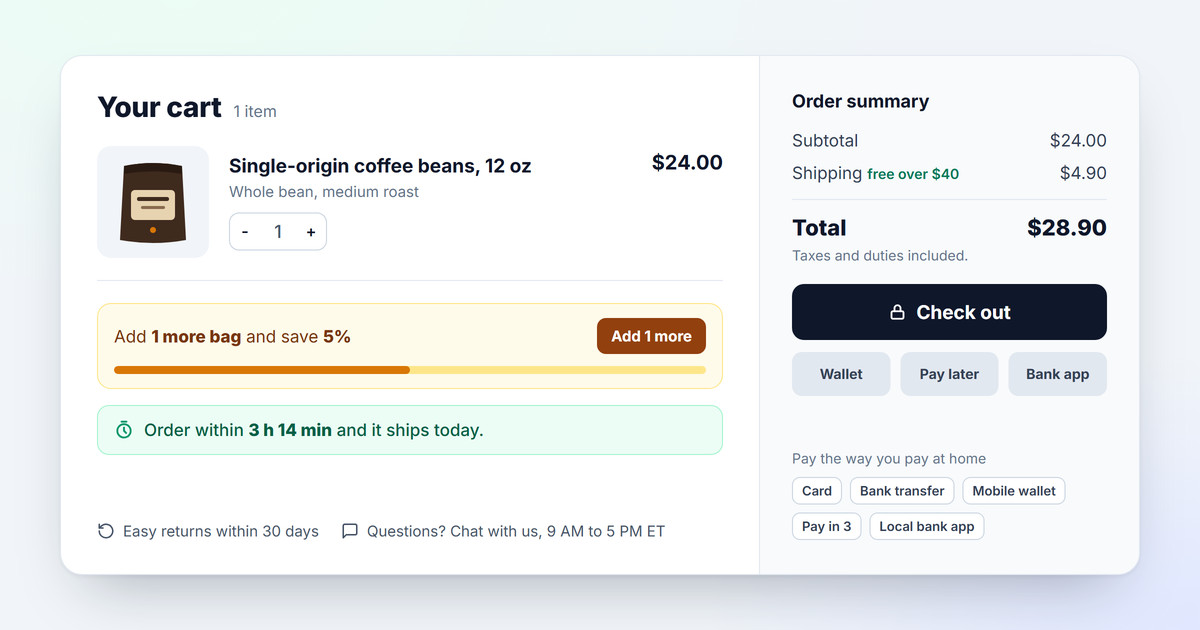
A deadline makes people act. A countdown to the time your warehouse stops packing gives the shopper a true reason to order now, and it answers the delivery question at the same moment: "Order within 3 h 14 min and it ships today." It must be true. A timer that restarts on every visit, or an offer that ends tonight every night, is banned outright in the European Union: point 7 of Annex I of the Unfair Commercial Practices Directive lists falsely stating that a product or its terms are available only for a very limited time among practices that are unfair in all circumstances.
This free code counts down to your cutoff in your store's timezone, skips the days you do not ship and the holidays you list, and after the cutoff switches to "ships tomorrow" or "ships on Monday". It updates every 30 seconds and loads nothing from outside your store. Until it runs, the line stays hidden.
Shopify: add the countdown with a Custom Liquid block
- Open the theme editor: Online Store, then Themes, then Customize.
- Add it to the product page: pick Products, then Default product, in the menu at the top. In the Product information section, click Add block, choose Custom Liquid, paste the code and drag the block under Buy buttons.
- Add it to the cart: switch the menu to Cart, click Add section, choose Custom Liquid and paste the same code.
- Set your values on the first line after the comment: data-cutoff in 24-hour time, so 2 PM is 14:00, data-timezone as your warehouse's city in the form America/New_York, America/Chicago, America/Los_Angeles or Europe/London, data-days (1 is Monday, 5 is Friday, 6 is Saturday, 0 is Sunday) and data-closed with your holidays as year-month-day, separated by commas.
- Save and check it on your phone, on a product page and in the cart.
<!-- Same-day dispatch countdown. It counts down to a real deadline: the time your warehouse
     stops packing for today, in your store's timezone, skipping the days you do not ship.
     Set the four data- values on the next line: cutoff time (24-hour, so 2 PM is 14:00),
     timezone, shipping days (1 = Monday ... 5 = Friday, 6 = Saturday, 0 = Sunday) and the
     dates you are closed. -->
<p class="dispatch-timer" data-cutoff="14:00" data-timezone="America/New_York" data-days="1,2,3,4,5" data-closed="2026-11-26,2026-12-25,2027-01-01" hidden></p>

<style>
  .dispatch-timer { margin: 12px 0; padding: 10px 14px; border-radius: 10px; background: #ecfdf5; color: #065f46;
    font-size: 15px; line-height: 1.4; font-weight: 500; border: 1px solid #a7f3d0; }
  .dispatch-timer strong { font-weight: 700; }
</style>

<script>
  (function () {
    var el = document.querySelector('.dispatch-timer');
    if (!el || !window.Intl) return;
    var hm = (el.getAttribute('data-cutoff') || '14:00').split(':');
    var cutoff = (+hm[0]) * 3600 + (+hm[1] || 0) * 60;
    var tz = el.getAttribute('data-timezone') || 'UTC';
    var days = (el.getAttribute('data-days') || '1,2,3,4,5').split(',').map(Number);
    var closed = (el.getAttribute('data-closed') || '').split(',').filter(Boolean);
    var NAMES = ['Sunday', 'Monday', 'Tuesday', 'Wednesday', 'Thursday', 'Friday', 'Saturday'];
    var SHORT = { Sun: 0, Mon: 1, Tue: 2, Wed: 3, Thu: 4, Fri: 5, Sat: 6 };
    var fmt = new Intl.DateTimeFormat('en-US', { timeZone: tz, year: 'numeric', month: '2-digit', day: '2-digit',
      hour: '2-digit', minute: '2-digit', second: '2-digit', hourCycle: 'h23', weekday: 'short' });

    // Date, weekday and seconds since midnight in the store's timezone.
    function local(d) {
      var p = {};
      fmt.formatToParts(d).forEach(function (x) { p[x.type] = x.value; });
      return { date: p.year + '-' + p.month + '-' + p.day, day: SHORT[p.weekday], secs: (+p.hour) * 3600 + (+p.minute) * 60 + (+p.second) };
    }
    function ships(l) { return days.indexOf(l.day) !== -1 && closed.indexOf(l.date) === -1; }

    function update() {
      var now = Date.now(), today = local(new Date(now)), left = cutoff - today.secs;
      if (ships(today) && left > 0) {
        // If the clocks change before the cutoff, the real time left differs by that hour.
        left += cutoff - local(new Date(now + left * 1000)).secs;
        var h = Math.floor(left / 3600), m = Math.floor((left % 3600) / 60);
        if (!h && !m) m = 1;
        el.innerHTML = 'Order within <strong>' + (h ? h + ' h ' : '') + m + ' min</strong> and it ships today.';
      } else {
        // Step through calendar days from today's local noon, so a clock change never skips a date.
        var noon = now + (43200 - today.secs) * 1000;
        for (var k = 1; k <= 14; k++) {
          var next = local(new Date(noon + k * 86400000));
          if (ships(next)) {
            el.innerHTML = 'Order now and it ships <strong>' + (k === 1 ? 'tomorrow' : 'on ' + NAMES[next.day]) + '</strong>.';
            break;
          }
        }
      }
      el.hidden = false;
    }
    update();
    setInterval(update, 30000);
  })();
</script>
WooCommerce: add the countdown with the free WPCode plugin
- Install WPCode: Plugins, then Add New Plugin, search for WPCode, then install and activate it.
- Set your timezone: Settings, then General, then Timezone. Pick a city, such as New York or Los Angeles, not a UTC offset such as UTC-5: an offset does not follow the clock change in spring and fall, so the cutoff would drift by an hour.
- Add the snippet: Code Snippets, then Add Snippet, then Add Your Custom Code. Choose PHP Snippet as the code type, paste the code, leave the insertion on Auto Insert and Run Everywhere, switch it to Active and save.
- Set your values on the line with data-cutoff: the cutoff time, the shipping days and the closed dates, the same way as on Shopify.
/**
 * Same-day dispatch countdown for WooCommerce, under the Add to cart button and at the
 * top of the cart, in classic and block themes. Add it as a PHP snippet in the free
 * WPCode plugin, or to a child theme's functions.php. The timezone comes from
 * Settings > General: pick a city there, not a UTC offset. Set the cutoff time
 * (24-hour, so 2 PM is 14:00), shipping days (1 = Monday ... 5 = Friday, 6 = Saturday,
 * 0 = Sunday) and closed dates on the data- line.
 */

function ch_dispatch_timer_html( $where ) {
    // Once per place: a block theme can fire the classic hook and the block filter on one page.
    static $done = array(), $printed = false;
    if ( isset( $done[ $where ] ) ) return '';
    $done[ $where ] = true;
    $html = '<p class="dispatch-timer" data-cutoff="14:00" data-timezone="' . esc_attr( wp_timezone_string() ) . '"'
        . ' data-days="1,2,3,4,5" data-closed="2026-11-26,2026-12-25,2027-01-01" hidden></p>';
    if ( ! $printed ) {
        $printed = true;
        $html   .= '<style>.dispatch-timer{margin:12px 0;padding:10px 14px;border-radius:10px;background:#ecfdf5;color:#065f46;'
            . 'font-size:15px;line-height:1.4;font-weight:500;border:1px solid #a7f3d0}.dispatch-timer strong{font-weight:700}</style>'
            . '<script>' . ch_dispatch_timer_js() . '</script>';
    }
    return $html;
}

function ch_dispatch_timer_js() {
    return <<<'JS'
(function () {
  function run(el) {
    var hm = (el.getAttribute('data-cutoff') || '14:00').split(':');
    var cutoff = (+hm[0]) * 3600 + (+hm[1] || 0) * 60;
    var tz = el.getAttribute('data-timezone') || 'UTC';
    var days = (el.getAttribute('data-days') || '1,2,3,4,5').split(',').map(Number);
    var closed = (el.getAttribute('data-closed') || '').split(',').filter(Boolean);
    var NAMES = ['Sunday', 'Monday', 'Tuesday', 'Wednesday', 'Thursday', 'Friday', 'Saturday'];
    var SHORT = { Sun: 0, Mon: 1, Tue: 2, Wed: 3, Thu: 4, Fri: 5, Sat: 6 };
    var fmt = new Intl.DateTimeFormat('en-US', { timeZone: tz, year: 'numeric', month: '2-digit', day: '2-digit',
      hour: '2-digit', minute: '2-digit', second: '2-digit', hourCycle: 'h23', weekday: 'short' });
    function local(d) {
      var p = {};
      fmt.formatToParts(d).forEach(function (x) { p[x.type] = x.value; });
      return { date: p.year + '-' + p.month + '-' + p.day, day: SHORT[p.weekday], secs: (+p.hour) * 3600 + (+p.minute) * 60 + (+p.second) };
    }
    function ships(l) { return days.indexOf(l.day) !== -1 && closed.indexOf(l.date) === -1; }
    function update() {
      var now = Date.now(), today = local(new Date(now)), left = cutoff - today.secs;
      if (ships(today) && left > 0) {
        // If the clocks change before the cutoff, the real time left differs by that hour.
        left += cutoff - local(new Date(now + left * 1000)).secs;
        var h = Math.floor(left / 3600), m = Math.floor((left % 3600) / 60);
        if (!h && !m) m = 1;
        el.innerHTML = 'Order within <strong>' + (h ? h + ' h ' : '') + m + ' min</strong> and it ships today.';
      } else {
        // Step through calendar days from today's local noon, so a clock change never skips a date.
        var noon = now + (43200 - today.secs) * 1000;
        for (var k = 1; k <= 14; k++) {
          var next = local(new Date(noon + k * 86400000));
          if (ships(next)) {
            el.innerHTML = 'Order now and it ships <strong>' + (k === 1 ? 'tomorrow' : 'on ' + NAMES[next.day]) + '</strong>.';
            break;
          }
        }
      }
      el.hidden = false;
    }
    update();
    setInterval(update, 30000);
  }
  function start() {
    if (!window.Intl) return;
    document.querySelectorAll('.dispatch-timer').forEach(run);
  }
  if (document.readyState === 'loading') document.addEventListener('DOMContentLoaded', start); else start();
})();
JS;
}

// Classic themes: under the Add to cart form, and above the cart table.
add_action( 'woocommerce_after_add_to_cart_form', function () { echo ch_dispatch_timer_html( 'product' ); } );
add_action( 'woocommerce_before_cart', function () { echo ch_dispatch_timer_html( 'cart' ); } );

// Block themes and the Cart block (the default cart since WooCommerce 8.3).
add_filter( 'render_block_woocommerce/add-to-cart-form', function ( $html ) { return $html . ch_dispatch_timer_html( 'product' ); } );
add_filter( 'render_block_woocommerce/cart', function ( $html ) { return ch_dispatch_timer_html( 'cart' ) . $html; } );
I ran the JavaScript of both versions through twelve fixed moments for a store in New York: a Wednesday morning, 30 seconds before the cutoff, an hour after it, a Friday afternoon, a Saturday, the day before Thanksgiving, Christmas Eve, the two nights the clocks change, the countdown on each of those nights, and a store in London. Each one printed the right line. Then I ran the WooCommerce snippet in Chrome on WooCommerce 11.1 with Storefront, a classic theme, and Twenty Twenty-Five, a block theme. In both, one line appeared under the Add to cart button and one above the cart, including the Cart block that new WooCommerce stores get by default.
Turn on guest checkout and cut the form
Forced accounts and long forms are each named by almost one in five shoppers who left. Both are settings, and neither needs an app.
- Shopify, accounts: in Settings, then Customer accounts, leave "Require customers to sign in to their account before checkout" turned off.
- Shopify, form fields: in Settings, then Checkout, under Customer information, set Company name to Don't include or Optional, Address line 2 to Optional, and keep the shipping address phone number Optional, the default, unless your courier needs it. Shopify warns that requiring the company name can switch off accelerated checkouts such as Apple Pay.
- WooCommerce, accounts: in WooCommerce, then Settings, then Accounts and Privacy, tick Enable guest checkout.
- WooCommerce, form fields: open the checkout page in the editor, select the address form of the Checkout block and set the company, apartment and phone fields to optional or hidden. A new block checkout starts with the phone optional and the company hidden; the older shortcode checkout makes the phone required.
Errors cost as many shoppers as long forms. Nobody reports them. Place a real order on your own phone after every app, plugin or theme update and refund it. On WooCommerce the checkout runs on your own server, so a slow host or a plugin conflict shows up there first; WooCommerce hosting explains what to pay for.
Offer the payment methods each country uses
Cards are not the default everywhere. In the Netherlands iDEAL carried 71% of all online purchases in 2025, according to the Dutch Payments Association; Poland pays with BLIK, Belgium with Bancontact and Switzerland with TWINT. A shopper who finds only card fields at the moment of paying has to change habits, and some of them close the tab instead.
| Country | Local method | Shopify Payments | WooPayments |
|---|---|---|---|
| Netherlands | iDEAL | Wero | Yes | Yes |
| Belgium | Bancontact | Yes | Yes |
| Austria | EPS | Yes | Yes |
| Portugal | Multibanco, MB WAY | Both | Multibanco only |
| Poland | BLIK, Przelewy24 | Both | Neither for new accounts |
| Switzerland | TWINT | Yes | No |
| Sweden | Swish | Yes | No |
| Denmark, Finland | MobilePay | Yes | No |
| Italy | Satispay | Yes | No |
From the Shopify Help Center and the WooPayments documentation, checked on October 5, 2026. WooPayments stopped enabling Przelewy24 for new accounts on August 17, 2026 and does not offer BLIK.
Shopify handles this well. With Shopify Payments the methods are switched on in Settings, then Payments, and each one appears only to shoppers in its country paying in its currency, so that country has to be set up as a market. WooCommerce takes more work, because every method comes from a payment plugin with its own account and approval: WooPayments covers iDEAL, Bancontact, EPS and Multibanco, Polish shoppers need a Polish provider's own plugin such as Przelewy24, PayU or Tpay, and before WooPayments takes iDEAL from a store outside the Netherlands, the store must show its company registration number on the site.
Make the shopper feel safe before they pay
Almost one in five shoppers who left did not trust the site with their card. That feeling starts on the product page. So the answers go there, long before the checkout. Express buttons such as Shop Pay, Apple Pay, Google Pay and PayPal let the shopper pay with details stored at a company they already trust, without typing a card number into a store they met ten minutes ago. Next come verified reviews from a review platform Google licenses and two to four trust badges under the Add to cart button, then a visible way to reach a person: a chat button, an email address or a phone number, with the hours someone answers. A shopper who knows they can ask a question before paying is far less likely to leave over one. Put your company name and address in the footer and on the contact page too, which EU consumer law requires of online sellers anyway.
Do trust badges work? covers which badges help and how to test them.
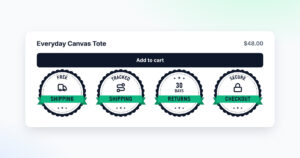
Add trust badges under your Add to cart button
Build a badge row and install it with one line on Shopify or WooCommerce. A free account gets 8 badges and view counts.
Build my trust badgesNudge the cart toward a bigger order
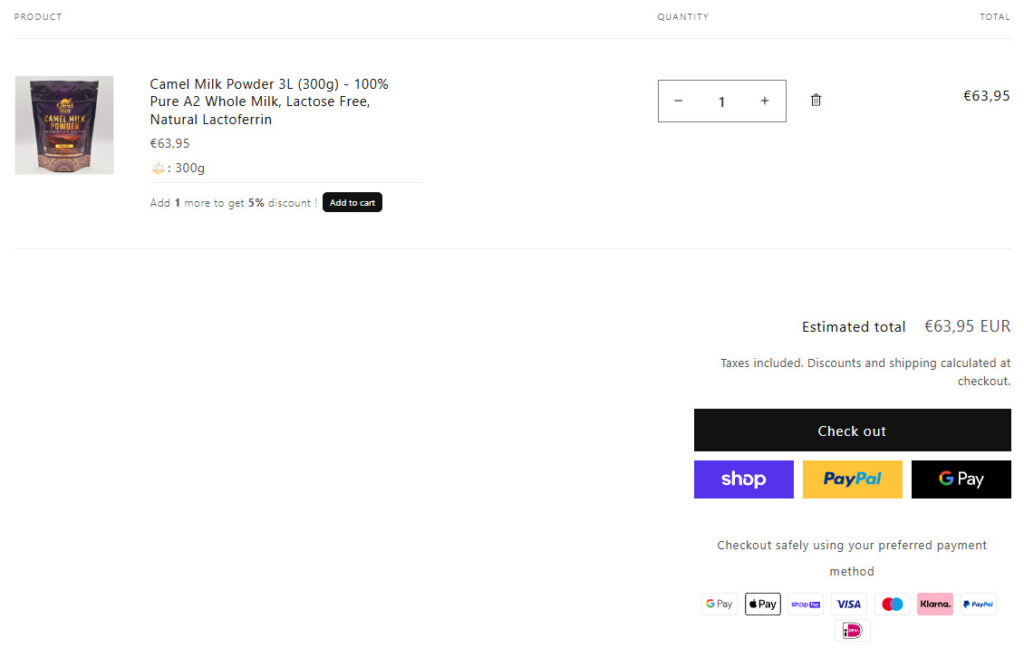
A line in the cart such as "Add 1 more to get 5% discount", with its own Add to cart button, turns a single-pack order into a bigger one while the shopper is already buying. camelway.eu shows it under the product in the cart. The discount behind it must be real and apply on its own. On Shopify you build it natively: Discounts, then Create discount, then Amount off products, with the method set to Automatic discount and a minimum quantity of items. The cart line itself takes an app or a theme edit in Shopify's free themes, and WooCommerce needs a plugin for both the discount and the line. A free shipping bar, "Add $12 more for free shipping", works the same way and answers the extra costs reason too.
CartHacker's Volume Discounts Engine is in development for quantity discounts and the cart line that sells them. It is included in CartHacker Premium and due in Q1 2027.
Send an abandoned cart email that sounds like your store
Shopify has ready automations under Marketing, then Automations, called Recover abandoned checkout, Recover abandoned cart and Convert abandoned product browse. Turn them on, then rewrite them. The default text is the same for every store that uses it, and a shopper who left over the shipping cost or the delivery date finds no answer in it.
- Show what they left: the product photo, its name and the link back to the same cart.
- Answer the likely doubt: the shipping cost or threshold, the dispatch time and the returns promise, in one short paragraph.
- Sign it as a person: a real name and a reply address someone reads, so the shopper can ask the question that stopped them.
- Send the first one within about an hour, while the shopper still remembers the product, and keep a discount for a later email, if any, so shoppers do not learn to leave carts for a code.
By default Shopify sends these only to customers subscribed to email marketing; for an abandoned checkout you can change the To field to All customers. In the EU, check with your lawyer before you email shoppers who never agreed to marketing. WooCommerce sends none on its own. The free Cart Abandonment Recovery for WooCommerce plugin, with more than 300,000 active installs, captures the email address typed at checkout and sends a series of emails with a link back to the cart. It can also add a GDPR consent checkbox to the checkout. Email platforms such as Klaviyo and Omnisend do the same through their WooCommerce integrations.
How to measure the fixes
Change one thing at a time. Compare the same number of weeks before and after it, so you know which fix moved the rate and which did nothing. On Shopify the numbers are on the Conversion rate breakdown card in Analytics, which counts the sessions that added to cart, reached the checkout and completed it. Orders, then Abandoned checkouts, lists every checkout where a shopper typed an email address or phone number and left.
WooCommerce Analytics counts orders, not visits. The free Google Analytics for WooCommerce plugin sends add to cart, begin checkout and purchase events to Google Analytics 4: paste your Measurement ID, the one that starts with G-, in WooCommerce, then Settings, then Integration, then Google Analytics. A Funnel exploration in Google Analytics 4 with those three steps then shows the same picture Shopify draws.
Speed belongs in the same picture. CartHacker's Store Speed Test checks the one page you paste into it; it cannot test a checkout, and on Shopify the checkout is not reachable at all. Core Web Vitals Monitoring measures real shoppers on every page your theme loads, the cart included, and on WooCommerce the checkout too, because there it is a page of your own site. Shopify's checkout runs outside your theme, so no theme snippet sees it.
Monitor your store's Core Web Vitals every day, for free
One snippet in your theme measures real shoppers. A free account keeps 7 days of history, Premium keeps 180.
Create a free accountCart abandonment checklist
- Shipping cost, threshold and taxes next to the price on the product page.
- The dispatch cutoff and delivery time next to the price, with an honest countdown.
- The returns promise under the Add to cart button.
- Guest checkout on, sign-in not required.
- Company, apartment and phone fields optional or hidden.
- The local payment methods of every country you sell to.
- Express buttons, verified reviews, trust badges and a way to reach a person.
- A real quantity discount with a nudge in the cart.
- Abandoned cart and checkout emails rewritten for your store.
- A test order on your phone after every update.
- One change at a time, measured in your funnel.
Cart abandonment questions store owners ask
What is a good cart abandonment rate?
Around 70% is normal: Baymard Institute's average across 50 studies is 70.22%. A rate below that is better than most stores manage, but the number that matters is your own rate month after month, because traffic sources, prices and seasons move it more than any comparison with another store.
How do I see abandoned carts on Shopify?
Orders, then Abandoned checkouts, in your Shopify admin lists every checkout where a shopper typed an email address or phone number and left. The Conversion rate breakdown card in Analytics shows how many sessions added to cart, reached the checkout and completed it.
Does WooCommerce send abandoned cart emails?
No, not on its own. A plugin such as the free Cart Abandonment Recovery for WooCommerce, or the WooCommerce integration of an email platform such as Klaviyo or Omnisend, captures the email address typed at checkout and sends the reminders.
Is a countdown timer legal?
Yes, when it counts down to a real deadline, such as your dispatch cutoff or the true end of a sale. A timer that restarts for every visitor, or a sale that never ends, is banned in the European Union as a false claim of limited time, under point 7 of Annex I of the Unfair Commercial Practices Directive.
Should an abandoned cart email include a discount?
Not the first one. Most shoppers come back for the answer to a question, such as the shipping cost, the delivery date or the returns, and a code in every first email teaches regular customers to leave their carts on purpose.
Sources
- camelway.eu, Shopify Analytics, Conversion rate breakdown, December 1, 2023 to July 7, 2026.
- Baymard Institute: Cart abandonment rate statistics.
- Dutch Payments Association: Online payments.
- Shopify Help Center: Local payment methods, Checkout form options and Creating marketing automations.
- WooCommerce documentation: WooPayments local payment methods, Accounts and Privacy settings and Google Analytics for WooCommerce.
- WordPress.org: Cart Abandonment Recovery for WooCommerce.
- European Union: Unfair Commercial Practices Directive 2005/29/EC, Annex I, point 7.