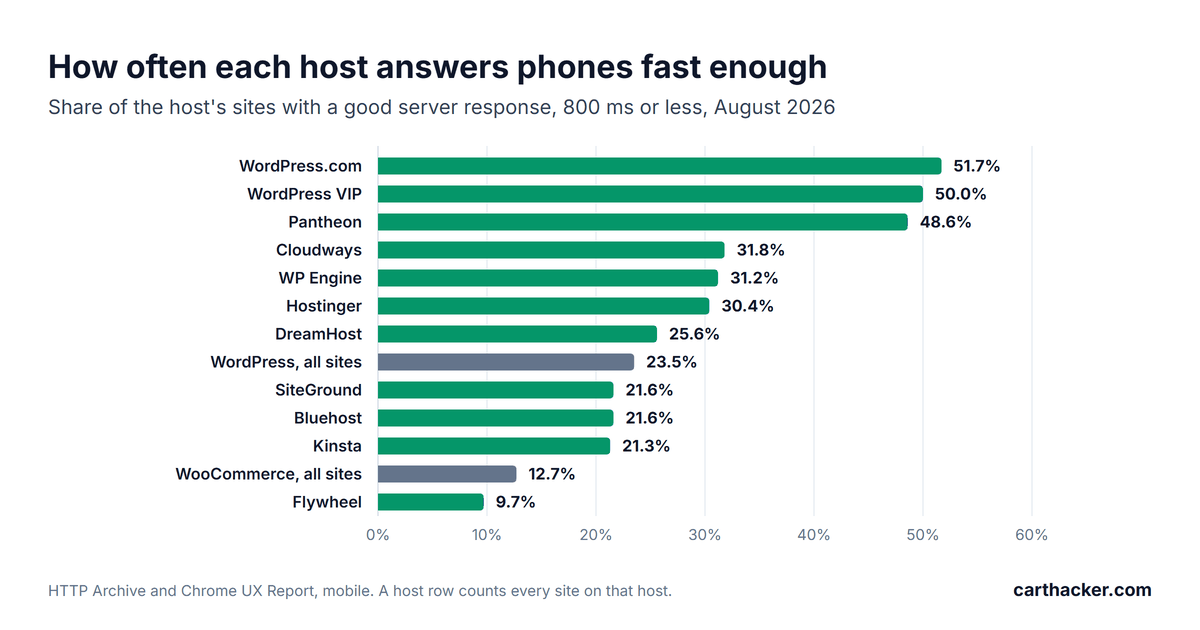
Good WooCommerce hosting does two things well: it keeps ready-made copies of your pages so shoppers get them at once, and it has enough computing power for the pages that cannot be copied, such as the cart and the checkout. Most hosting fails at one or both. In August 2026 only 12.7% of WooCommerce sites answered phone visitors fast enough by Google's measure. Paying more does not fix that on its own.
This guide walks you through the choice step by step, in plain words. It uses real speed data for 29 hosts, prices checked on October 5, 2026, and a benchmark of a Hetzner cloud server. No host paid to be in it. I recommend one provider by name, Hetzner, because I have used it for more than 15 years, and it has no affiliate program, so I earn nothing if you choose it.
What is WooCommerce hosting?
Hosting is the computer that runs your store around the clock. WooCommerce is software, so every time a shopper opens a page, that computer has to build the page from your products, prices and settings before it can send it. You will meet four words everywhere.
- Server: the computer your store runs on, in a data center.
- CPU core (often written vCPU): one unit of computing power. Each core builds one page at a time, so more cores means more shoppers served at once.
- Page cache: a store of ready-made copies of your pages. A copy goes out in about a millisecond; building the page takes about a hundred times longer.
- CDN (content delivery network): a network of servers around the world, such as Cloudflare, that keeps copies of your images and pages close to your shoppers.
What makes a WooCommerce store fast?
Three things, in this order. I measured each of them on a test store with 600 products.
- A page cache: a product page took about 100 milliseconds to build and about 1 millisecond from a page cache. Every good host has one. Make sure yours is switched on.
- Enough CPU cores for the pages a cache cannot serve: the cart, the checkout and the account pages are built fresh for every shopper. One core built about 10 of those pages a second; four cores built about 39.
- A server close to your shoppers, or a CDN in front of it: each new visitor's phone has to exchange several messages with the server before the page starts to arrive, and every exchange travels the full distance. From a server in Helsinki, a round trip took 28 milliseconds to Amsterdam, 100 to New York and 225 to Sao Paulo.
A current version of PHP, the programming language WordPress is written in, helps too, so ask your host for PHP 8.3 or newer when you compare plans. Why your WooCommerce store is slow has the full test, for anyone who wants the technical detail.
The four kinds of hosting, explained
Hosting comes in four kinds, and they differ mostly in who does the technical work. Read the second column first. If nobody on your team wants to run a server, keep it updated and fix it when something breaks, that column answers most of the question.
| Kind | Who does the technical work | Good for | Watch out for |
|---|---|---|---|
| Shared hosting | The host. You share one server with many other sites. | A brand new store with few visitors | Slowdowns when your neighbors get busy, and limits on how much the server works for you |
| Managed WordPress hosting | The host: caching, updates, backups | Owners who want no technical work at all | Prices that rise with your monthly visits, and plans that sell "PHP workers" without saying how many cores stand behind them |
| Managed cloud | A service such as Cloudways sets up a cloud server for you | Owners who want their own server without running it | Default settings nobody reviews |
| Cloud server (VPS) | You or your developer, or a server panel | The best price for the power; stores with a developer | You start with an empty server and keep it updated |
My recommendation: Hetzner, with Cloudflare in front
Hetzner is a German hosting company, and I have rented servers there for more than 15 years. Stability is why I stayed. It runs data centers in Nuremberg and Falkenstein in Germany, Helsinki in Finland, Singapore, and Hillsboro and Ashburn in the United States, and every cloud server in Germany or Finland includes 20 TB of traffic a month, more than most stores will ever use; servers in the United States include 1 TB and in Singapore 0.5 TB.
| Hetzner plan, Regular Performance | CPU cores | Memory | Disk | Price a month |
|---|---|---|---|---|
| CPX12 | 1 | 2 GB | 40 GB | EUR 11.49 |
| CPX22 | 2 | 4 GB | 80 GB | EUR 19.49 |
| CPX32 | 4 | 8 GB | 160 GB | EUR 35.49 |
| CPX42 | 8 | 16 GB | 320 GB | EUR 69.49 |
Hetzner Console, October 5, 2026, prices excluding VAT for a server in Germany or Finland with 20 TB of traffic; a public IPv4 address adds EUR 0.50 a month, and Singapore adds EUR 7.00. Cheaper Cost-Optimized plans showed limited availability.
For a new store, CPX22 with 2 cores is a sensible start; a store that runs campaigns should start at CPX32 with 4. Traffic is where big clouds charge most. Amazon Web Services charges $0.09 per gigabyte sent to visitors for the first 10 TB a month and $0.085 after that, once the first 100 gigabytes are used, so the 20 TB included with a European Hetzner server would cost about $1,750 in data transfer alone there.
One honest warning. A Hetzner cloud server is unmanaged, which means you get an empty computer and somebody has to install WordPress on it and keep it updated for as long as the store runs. Three ways to handle that, from easiest to most hands-on:
- Hetzner's WordPress app: when you create the server, open the Apps tab and pick WordPress. The server starts with WordPress already installed.
- A server panel: CloudPanel is free, while RunCloud and SpinupWP are paid services. Each one installs the web server and WordPress for you and keeps them updated from a dashboard.
- A developer: a one-time setup and a small monthly retainer for updates.
If none of the three suits you, choose managed WordPress hosting instead and skip this section. For shoppers mainly in the Americas, DigitalOcean and Vultr are strong alternatives, with data centers in several US cities and more traffic included than Hetzner's US servers, and Cloudways can set up a managed server on either of them.
Put Cloudflare in front of any host
Cloudflare's free plan sits between your shoppers and your server. It hands out copies of your images, styles and scripts from data centers near each shopper. It also gives you a free SSL certificate for the padlock in the address bar and blocks floods of fake traffic before they reach your store. Setup takes fifteen minutes.
- Create a free account at cloudflare.com and add your store's domain.
- Change your domain's nameservers at the company where you bought the domain, to the two Cloudflare gives you.
- Wait for the email that says your site is active on Cloudflare, usually within a few hours and at most a day.
- For whole-page copies of a WooCommerce store, add Automatic Platform Optimization (APO) for WordPress: $5 a month on the free plan, included in the paid plans. It keeps whole pages close to your shoppers and skips anyone who is logged in or has something in the cart.
Other CDNs, such as Bunny.net or Fastly, do the same job. One thing the free plan does not include is automatic switching to a second server when the first one fails, which Cloudflare sells as Load Balancing from $5 a month.
What speed data says about popular hosts
The HTTP Archive records which host each website uses, and Google's Chrome browser reports how fast those sites really were for visitors. Together, they grade each host. A host row counts every site on that host, whatever software it runs and wherever its visitors are, so read it as a picture of the host's customers as much as its servers.
| Host | Kind | Sites | Answer phones fast enough |
|---|---|---|---|
| WooCommerce, all sites | Reference | 557,369 | 12.7% |
| WordPress, all sites | Reference | 2,752,367 | 23.5% |
| Hetzner | Cloud server | 12,196 | 61.0% |
| Google Cloud | Cloud server | 266,054 | 61.1% |
| Amazon Web Services | Cloud server | 1,151,193 | 50.2% |
| WordPress.com | Managed WordPress | 56,934 | 51.7% |
| Pantheon | Managed WordPress | 14,376 | 48.6% |
| Cloudways | Managed cloud | 18,658 | 31.8% |
| WP Engine | Managed WordPress | 83,985 | 31.2% |
| Hostinger | Shared | 349,478 | 30.4% |
| SiteGround | Shared | 112,334 | 21.6% |
| Bluehost | Shared | 36,414 | 21.6% |
| Kinsta | Managed WordPress | 31,012 | 21.3% |
| Flywheel | Managed WordPress | 10,580 | 9.7% |
Share of each host's sites with a good server response, 800 milliseconds or less, for phone visitors in August 2026, from the HTTP Archive Technology Report with Chrome UX Report data. Hostinger also sells a website builder, and its row includes those sites.
Two things stand out. Price does not sort the list: Kinsta and Flywheel cost far more than shared hosting, yet their sites do worse than WordPress as a whole. And the WordPress hosts at the top, WordPress.com and Pantheon, have one thing in common: they hand out ready-made copies of pages from close to the visitor. The cloud rows, Hetzner's included, mix every kind of website, so they say as much about who builds there as about WordPress on them.
How to choose hosting for your WooCommerce store, step by step
- Measure the store you have: run the Store Speed Test on your best-selling product page and write down the server response. That is your number to beat.
- Decide who does the technical work: you, a developer, a server panel or the host. That decides between a cloud server and managed hosting.
- Pick a data center near most of your shoppers: Germany or Finland for Europe; the US east or west coast for the Americas; Singapore for Southeast Asia.
- Choose the size: 2 CPU cores and 4 GB of memory for a new store, 4 cores and 8 GB once you run campaigns or sell a few hundred orders a month.
- Check four things before you pay: a page cache, PHP 8.3 or newer, daily backups you can restore yourself, and a staging copy for testing changes.
- Put Cloudflare in front: free, with APO if you want whole pages cached close to shoppers.
- Measure again after the move: run the same Store Speed Test and compare the server response with the number from step 1.
Check your store's Core Web Vitals for free
Paste a product page address. You get the three scores right away, and a free account names every slow app and the fix for your platform.
Test my storeRed flags on a hosting plan page
- Unlimited everything: the limit is still there, usually on how hard the server will work for you, written in the terms rather than on the price page.
- PHP workers without a core count: workers are places in a queue. Cores do the work. Ask how many cores stand behind your plan.
- Prices by monthly visits: one popular post or a busy sale can push you into extra fees. Ask what an extra 10,000 visits costs.
- An old PHP version: anything older than 8.2 no longer gets security fixes, and 8.2 stops at the end of 2026.
- No backups you can restore yourself: one bad plugin update can take your store down.
- A speed promise with no method: "loads in 0.5 seconds" means nothing without the page, the place and how it was measured.
WooCommerce hosting checklist
- Page cache switched on.
- At least 2 CPU cores, 4 if you run campaigns.
- Data center near your shoppers.
- PHP 8.3 or newer.
- Daily backups and a staging copy.
- Cloudflare or another CDN in front.
- Server response measured before and after the move.
Monitor your store's Core Web Vitals every day, for free
One snippet in your theme measures real shoppers. A free account keeps 7 days of history, Premium keeps 180.
Create a free accountWooCommerce hosting questions store owners ask
What is the best hosting for WooCommerce?
The best one has a page cache, enough CPU cores for the cart and checkout, and a data center near your shoppers. No brand guarantees all three. In the speed data, some expensive managed hosts do worse than average. I use Hetzner cloud servers with Cloudflare in front, and if you want no technical work at all, a managed WordPress host is the simpler choice.
Is shared hosting good enough for WooCommerce?
For a brand new store with few visitors, often yes, if the plan includes a page cache and a current PHP version. It stops being enough once campaigns bring many shoppers to the cart and checkout at the same moment, because a shared server limits how much it works for each site.
How much should WooCommerce hosting cost?
A cloud server with 2 to 4 cores costs about EUR 20 to EUR 36 a month at Hetzner before VAT, plus whatever you pay for setup and updates. Managed WordPress plans often cost more for the same power and add limits on monthly visits. Pay for cores, a page cache and backups. Skip "unlimited".
Do I need a CDN for WooCommerce?
Yes, if shoppers come from several countries. Cloudflare's free plan is enough to start: it shortens the distance for images and other files, and with APO for whole pages, though the cart and checkout still go to your server, which is why the server's location matters too.
Managed WordPress hosting or a cloud server?
Managed hosting buys you peace of mind and a cloud server buys you more power for the money, so choose the cloud server if you, a developer or a server panel will look after it. Choose managed hosting if nobody will.
Sources
- Speed data: HTTP Archive Technology Report, August 2026, mobile, with Chrome UX Report results.
- Test store: CartHacker's WooCommerce benchmark, October 2026, the study behind Why your WooCommerce store is slow.
- Hetzner: Cloud server plans, prices from the Hetzner Console on October 5, 2026. Benchmark: Yet-Another-Bench-Script.
- Amazon Web Services: EC2 on-demand pricing, data transfer.
- Cloudflare: Free plan and Automatic Platform Optimization for WordPress.
- PHP: Supported versions. Google, web.dev: Time to First Byte.