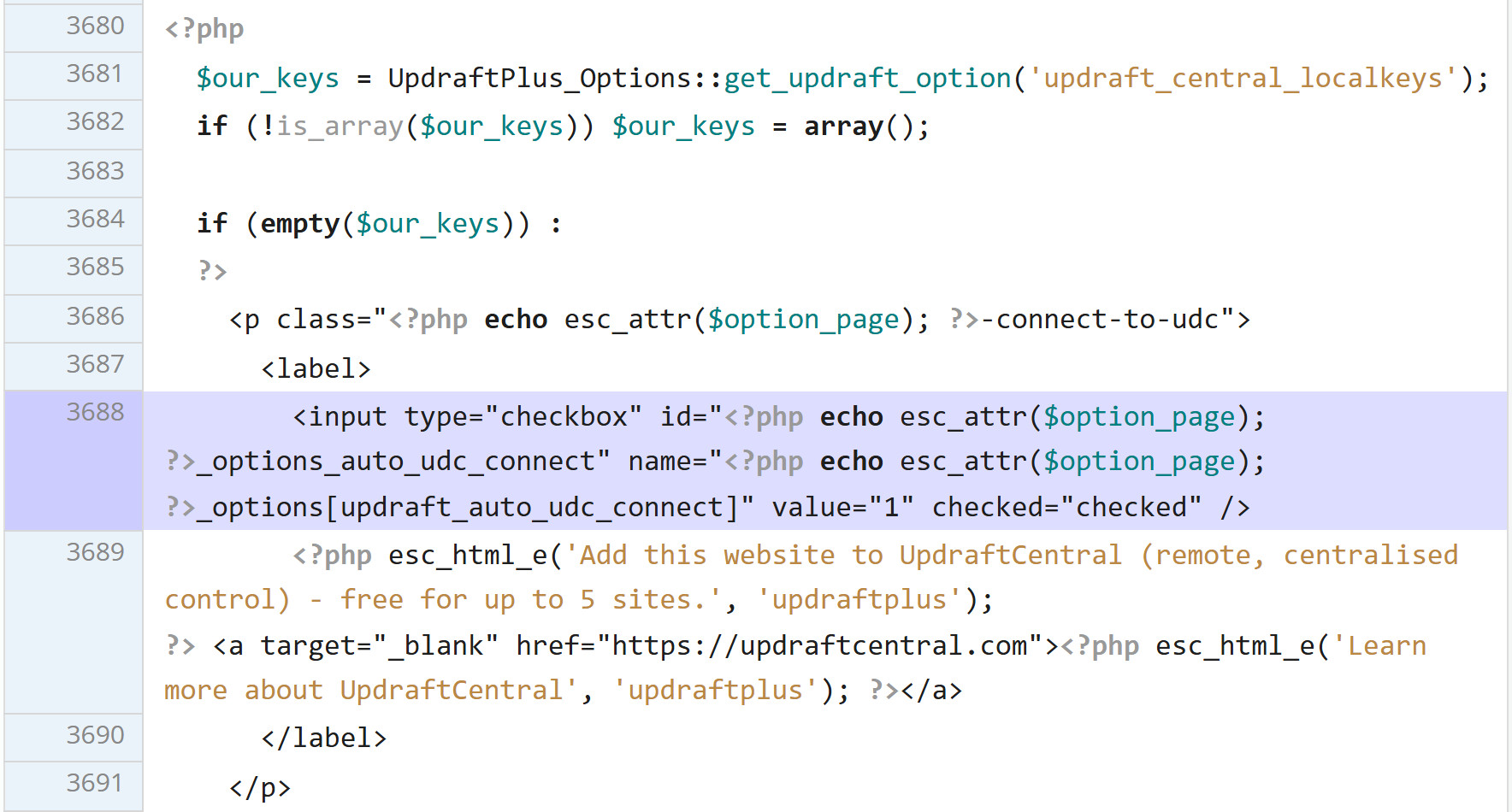
UpdraftPlus Premium has a checkbox that's already ticked the first time you see it: "Add this website to UpdraftCentral (remote, centralised control) - free for up to 5 sites." Leave it on when you connect your TeamUpdraft account, and the site makes a key that lets a dashboard on TeamUpdraft's servers run commands on your store, installing plugins included.
Keys like that were stolen from teamupdraft.com on October 17 and 18. By the afternoon of the 18th somebody was using them to install backdoors. Three days before, Rank Math PRO 3.0.123 had gone out with a backdoor of its own and sat on the update server for 11 hours.
If you run a WordPress or WooCommerce store, this is about the two jobs those plugins do on most stores: SEO tags and backups. On a test WooCommerce store I replaced Rank Math with a 230-line mu-plugin that keeps every title and description you saved in it, and UpdraftPlus with a backup script that runs from cron. Then I measured what both plugins cost a page no cache can serve and wrote down what you give up.
Both files are free to copy from this article. On Shopify, Wix or Squarespace the platform does both jobs for you, and none of this applies.
I'm not telling you to rip both plugins out tonight. The free Rank Math on WordPress.org was never touched, and the attackers didn't break the UpdraftPlus code either.
What they used is something every plugin has in some form: a way for a server you don't control to change what runs on yours. For Rank Math PRO it was the update feed, for UpdraftCentral a remote key. You can't take that away from every plugin, but you can hand it to fewer of them, and a meta description doesn't need it.
| October 2026 | Rank Math PRO | UpdraftCentral (UpdraftPlus) |
|---|---|---|
| What happened | Version 3.0.123 shipped with a backdoor, October 15, 20:02 UTC to October 16, 07:12 UTC | Connection keys stolen from teamupdraft.com on October 17 and 18, used to install backdoor plugins from October 18, and again on October 21 |
| Who's affected | PRO sites that downloaded or updated in that window. The free plugin isn't | Sites with an UpdraftCentral Cloud key, up to about 400,000 of more than 4 million installs by the vendor's June estimate. Self-hosted UpdraftCentral isn't |
| Fixed in | 3.0.124, which removes nothing the malware already left | UpdraftPlus 1.26.13 and Premium 2.26.13 revoke most old keys and remove no backdoor |
| Rated | CVE-2026-111862, 9.8 out of 10 | No CVE: a breach at the vendor |
| What to do | Treat the site as compromised, restore from a backup older than October 15, 20:02 UTC | Delete every UpdraftCentral key by hand, check users and plugins |
Check your store before you change anything
Swapping plugins on a site that's already got a backdoor only hides the backdoor. Five minutes with WP-CLI tells you where you stand, and I ran every command here on the test store first. (On hosting without SSH, the same checks live in wp-admin under Users and Plugins, the Must-Use tab included.)
Start with the key. If this prints anything at all, your site has an UpdraftCentral key, and Patchstack says to check it even if you never opened UpdraftCentral, because of that ticked box:
$ wp option get updraft_central_localkeys
Error: Could not get 'updraft_central_localkeys' option. Does it exist?
That error's the answer you want: no key. Anything else (a long serialized array) means a key exists, and the section on keeping UpdraftPlus says how to delete it.
The backdoor plugins create an account with the Editor role and then give it two powers an editor never has: manage_options and install_plugins. Look for that combination, not for a name, because the names change (Patchstack saw data-ops43 and media-staff96). I gave one editor on the test store both powers to make sure the loop catches it:
for id in $(wp user list --role=editor --field=ID); do
  wp user list-caps "$id" | grep -qxE "manage_options|install_plugins" && echo "user $id: editor with admin powers"
done
On the test store it printed "user 2: editor with admin powers", which was my test account (I deleted it right after). On a real store, any line it prints is an account to look at today, with its registration date from wp user list --role=editor --fields=ID,user_login,user_registered.
Then the traces both campaigns leave in files and options. Every UpdraftCentral backdoor so far carries the same description line, and Rank Math lists three option names and a fake core file:
grep -rl "Small maintenance toolkit: keeps option storage tidy" wp-content/plugins/ wp-content/mu-plugins/
wp db query "SELECT option_name FROM $(wp db prefix)options WHERE option_name IN ('_uf6qdn2hmm','t8krdk990phb','_np5pvf754c') OR option_name LIKE '%\_sync\_token'"
ls -la wp-includes/class-wp-cache-util.php
wp core verify-checksums
wp plugin verify-checksums --all
On a clean site the first three print nothing (or "No such file or directory"), and the checksum commands end in "Success: WordPress installation verifies against checksums" and "Success: Verified 22 of 22 plugins" on my test store.
Paid plugins such as Rank Math PRO and UpdraftPlus Premium aren't on WordPress.org, so WP-CLI can't verify them; for those, Rank Math's advice is to delete the whole PRO folder and install a fresh 3.0.124 from your rankmath.com account.
If anything turns up, stop swapping plugins and clean up first. Delete the UpdraftCentral key before you touch the backdoor plugin, or the attacker can push a fresh one (Patchstack's advice). Then move the plugin folder out of the web root instead of deleting it in wp-admin, because its uninstall routine wipes its own traces.
After that, Rank Math says restore from a backup older than October 15, 20:02 UTC, and TeamUpdraft says older than October 17. That only works if the backup sits somewhere the attacker couldn't reach, which is the second file in this article.
What WordPress does on its own once Rank Math is off
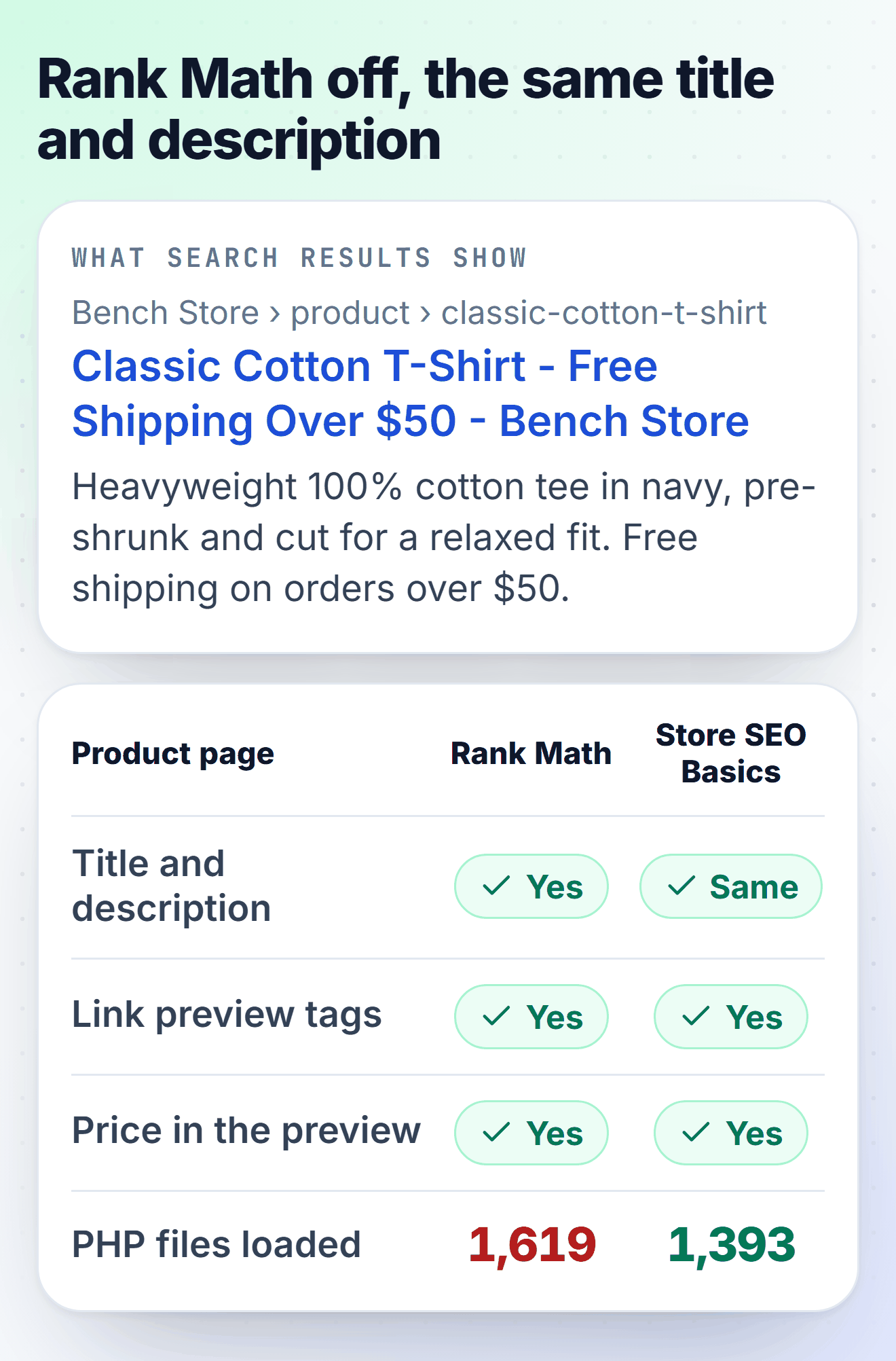
Before writing a line of code I switched Rank Math off on the test store and read the head of a product page. More was left than I expected. WordPress still printed the title tag and the canonical link, and WooCommerce printed its own Product schema with price, stock and reviews again (Rank Math replaces it while it's active).
What went missing was the meta description, the Open Graph tags that give a shared link its picture and price, the canonical on category pages and any title you'd written by hand. WordPress has a sitemap of its own at /wp-sitemap.xml too, once one thing Rank Math leaves behind is cleared (the 404 story right after the switch-over steps).
| In the head of a product or category page | Rank Math | WordPress and WooCommerce alone | With Store SEO Basics |
|---|---|---|---|
| Title tag | Your saved title | Product name - Store name | Your saved Rank Math or Yoast title |
| Meta description | Yes | Missing | Your saved one, or the product's short description |
| Canonical on products and pages | Yes | Yes | Yes (WordPress) |
| Canonical on shop and category pages, sorted and filtered views included | Yes | Missing | Yes |
| Open Graph with price | Yes | Missing | Yes |
| Product schema | Rank Math's | WooCommerce's | WooCommerce's |
| Sitemap | /sitemap_index.xml | /wp-sitemap.xml, with the author list | /wp-sitemap.xml without it, old address redirected |
| Noindex on cart, checkout, My account | Yes | Yes (WooCommerce) | Yes (WooCommerce) |
So the job's smaller than the plugin. One thing in that table I wouldn't keep, though: WordPress's own sitemap adds a list of author pages, and the address of each one ends in the author's user name, which on most stores is the admin login.
Store SEO Basics, the mu-plugin
A must-use plugin is a PHP file in wp-content/mu-plugins/. WordPress loads every file in that folder on every request, before ordinary plugins, and wp-admin shows it under Plugins, Must-Use, with no Deactivate link. Nobody switches it off by accident, and nothing updates it behind your back: what runs is what you read.
Store SEO Basics prints the meta description, Open Graph tags (product price and currency included) and the canonical on shop and category pages. It reads the titles and descriptions you saved in Rank Math (rank_math_title and rank_math_description) or Yoast, fills in %title%, %sep% and %sitename%, and falls back to the WordPress default when a saved title uses a variable it doesn't know.
Sorted and filtered views of a category (?orderby=price, ?filter_color=blue) get the plain category as their canonical, the way Rank Math handled them. It honors the noindex ticks you set in either plugin, drops the author list from the sitemap and sends /sitemap_index.xml, the address Search Console still asks for, to /wp-sitemap.xml. While Rank Math or Yoast is active it does nothing, so you can install it first and switch the plugin off after.
<?php
/**
 * Plugin Name: Store SEO Basics
 * Description: Meta description, Open Graph and shop and category canonicals for a WooCommerce store, without an SEO plugin. Reads the titles, descriptions and noindex ticks Rank Math or Yoast saved, so nothing you set there is lost.
 * Version: 1.0.0
 * Author: Adrian Wadowski, CartHacker
 * Author URI: https://carthacker.com/
 * License: GPL-2.0-or-later
 * Requires PHP: 7.4
 *
 * Copy this file to wp-content/mu-plugins/ (create the folder if it isn't there).
 * WordPress loads it on every request, it can't be switched off from wp-admin by
 * accident, and it never contacts another server or updates itself.
 *
 * What WordPress and WooCommerce already do once the SEO plugin is gone, so this
 * file leaves it alone: the <title> tag, rel=canonical on posts, pages and products,
 * /wp-sitemap.xml, robots.txt, noindex on search results (WordPress) and on cart,
 * checkout and My account (WooCommerce), and the Product schema with price, stock
 * and reviews (WooCommerce prints it again when Rank Math stops replacing it).
 */

defined( 'ABSPATH' ) || exit;

// Where the old plugins kept their per-page fields. Rank Math first, then Yoast.
const SSB_TITLE_KEYS = array( 'rank_math_title', '_yoast_wpseo_title' );
const SSB_DESC_KEYS  = array( 'rank_math_description', '_yoast_wpseo_metadesc' );

/**
 * What the request is about: array( 'post', id ), array( 'term', id ) or array( '', 0 ).
 * The WooCommerce shop page is an archive, but its title and description were saved
 * on the page that holds it.
 */
function ssb_context() {
	if ( function_exists( 'is_shop' ) && is_shop() ) {
		return array( 'post', (int) wc_get_page_id( 'shop' ) );
	}
	if ( is_singular() ) {
		return array( 'post', (int) get_queried_object_id() );
	}
	if ( is_category() || is_tag() || is_tax() ) {
		return array( 'term', (int) get_queried_object_id() );
	}
	return array( '', 0 );
}

/** The first non-empty value of the given meta keys. Yoast keeps term fields in one option, so terms read Rank Math only. */
function ssb_saved( array $keys, $type, $id ) {
	foreach ( $keys as $key ) {
		$value = 'term' === $type ? get_term_meta( $id, $key, true ) : get_post_meta( $id, $key, true );
		if ( is_string( $value ) && '' !== trim( $value ) ) {
			return $value;
		}
	}
	return '';
}

/**
 * Fills the variables both plugins use in saved titles (%title% in Rank Math,
 * %%title%% in Yoast). A variable this file doesn't know, %primary_category% or a
 * custom field, means the text isn't safe to print, so the default is used instead.
 */
function ssb_fill( $text, $title ) {
	$site = get_bloginfo( 'name' );
	$text = strtr( $text, array(
		'%%title%%'    => $title,
		'%title%'      => $title,
		'%%sitename%%' => $site,
		'%sitename%'   => $site,
		'%%sep%%'      => '-',
		'%sep%'        => '-',
		'%%page%%'     => '',
		'%page%'       => '',
	) );
	if ( preg_match( '/%%?[a-z0-9_]+%%?/i', $text ) ) {
		return '';
	}
	return trim( preg_replace( '/\s+/', ' ', $text ) );
}

/** Plain text, cut at a word near $max characters. */
function ssb_trim( $text, $max = 155 ) {
	$text = html_entity_decode( wp_strip_all_tags( strip_shortcodes( (string) $text ) ), ENT_QUOTES, 'UTF-8' );
	$text = trim( preg_replace( '/\s+/u', ' ', $text ) );
	if ( mb_strlen( $text ) <= $max ) {
		return $text;
	}
	$cut = preg_replace( '/\s+\S*$/u', '', mb_substr( $text, 0, $max ) );
	return rtrim( $cut, ' ,.;:-' ) . '...';
}

function ssb_description() {
	// Cart, checkout and My account are noindex in WooCommerce and have nothing to describe.
	if ( function_exists( 'is_cart' ) && ( is_cart() || is_checkout() || is_account_page() ) ) {
		return '';
	}
	list( $type, $id ) = ssb_context();
	if ( ! $id ) {
		$tagline = get_bloginfo( 'description' );
		return ( is_front_page() || is_home() ) && 'Just another WordPress site' !== $tagline ? ssb_trim( $tagline ) : '';
	}
	$saved = ssb_saved( SSB_DESC_KEYS, $type, $id );
	$name  = 'term' === $type ? single_term_title( '', false ) : get_the_title( $id );
	if ( '' !== $saved && '' !== ( $filled = ssb_fill( $saved, $name ) ) ) {
		return ssb_trim( $filled, 300 );
	}
	if ( 'term' === $type ) {
		return ssb_trim( term_description( $id ) );
	}
	$post = get_post( $id );
	return $post ? ssb_trim( '' !== $post->post_excerpt ? $post->post_excerpt : $post->post_content ) : '';
}

// Quiet while Rank Math or Yoast is still active, so this file can go in first and
// the plugin can be switched off after, with no hour of missing tags in between.
add_action( 'plugins_loaded', function () {
	if ( defined( 'RANK_MATH_VERSION' ) || defined( 'WPSEO_VERSION' ) ) {
		return;
	}

	/** The <title>: the one saved in the old plugin when there is one, the WordPress default otherwise. */
	add_filter( 'pre_get_document_title', function ( $title ) {
		list( $type, $id ) = ssb_context();
		if ( ! $id || is_paged() ) {
			return $title;
		}
		$keys  = 'term' === $type ? array( 'rank_math_title' ) : SSB_TITLE_KEYS;
		$saved = ssb_saved( $keys, $type, $id );
		if ( '' === $saved ) {
			return $title;
		}
		$name   = 'term' === $type ? single_term_title( '', false ) : get_the_title( $id );
		$filled = ssb_fill( $saved, $name );
		return '' !== $filled ? $filled : $title;
	} );

	/** Description, Open Graph and the canonical WordPress doesn't print on shop and category pages. */
	add_action( 'wp_head', function () {
		if ( is_404() || is_search() ) {
			return;
		}
		list( $type, $id ) = ssb_context();
		$desc  = ssb_description();
		$url   = '';
		$image = '';
		if ( 'term' === $type ) {
			$url = get_term_link( $id );
		} elseif ( $id ) {
			$url = function_exists( 'is_shop' ) && is_shop() ? get_permalink( $id ) : wp_get_canonical_url( $id );
			if ( has_post_thumbnail( $id ) ) {
				$image = wp_get_attachment_image_url( get_post_thumbnail_id( $id ), 'large' );
			}
		} elseif ( is_front_page() || is_home() ) {
			$url = home_url( '/' );
		}
		if ( is_wp_error( $url ) ) {
			$url = '';
		}

		echo "\n";
		if ( '' !== $desc ) {
			printf( '<meta name="description" content="%s">' . "\n", esc_attr( $desc ) );
		}
		// Page 2 of a category is its own page; the canonical only goes on page 1.
		if ( $url && ! is_paged() && ( 'term' === $type || ( function_exists( 'is_shop' ) && is_shop() ) ) ) {
			printf( '<link rel="canonical" href="%s">' . "\n", esc_url( $url ) );
		}

		$product = $id && function_exists( 'wc_get_product' ) && is_singular( 'product' ) ? wc_get_product( $id ) : null;
		$og      = array(
			'og:type'        => $product ? 'product' : ( is_singular( 'post' ) ? 'article' : 'website' ),
			'og:site_name'   => get_bloginfo( 'name' ),
			'og:title'       => wp_get_document_title(),
			'og:description' => $desc,
			'og:url'         => $url,
			'og:image'       => $image,
		);
		if ( $product && '' !== $product->get_price() ) {
			$og['product:price:amount']   = wc_format_decimal( $product->get_price(), wc_get_price_decimals() );
			$og['product:price:currency'] = get_woocommerce_currency();
		}
		foreach ( $og as $property => $content ) {
			if ( '' !== (string) $content ) {
				printf( '<meta property="%s" content="%s">' . "\n", esc_attr( $property ), esc_attr( $content ) );
			}
		}
		if ( $image ) {
			echo '<meta name="twitter:card" content="summary_large_image">' . "\n";
		}
	}, 1 );

	/**
	 * The noindex ticks you set per page in Rank Math or Yoast keep working. Sorted and
	 * filtered views (?orderby=price, ?filter_color=blue) get no noindex: their canonical
	 * already points at the plain category, the way Rank Math handled them, and Google
	 * reads noindex next to a canonical as two different instructions.
	 */
	add_filter( 'wp_robots', function ( array $robots ) {
		if ( is_singular() ) {
			$id = (int) get_queried_object_id();
			$rm = get_post_meta( $id, 'rank_math_robots', true );
			if ( ( is_array( $rm ) && in_array( 'noindex', $rm, true ) ) || '1' === get_post_meta( $id, '_yoast_wpseo_meta-robots-noindex', true ) ) {
				$robots['noindex'] = true;
			}
		}
		return $robots;
	} );

	// The users sitemap lists the login name of everyone who published a post. A store doesn't need it.
	add_filter( 'wp_sitemaps_add_provider', function ( $provider, $name ) {
		return 'users' === $name ? false : $provider;
	}, 10, 2 );

	// Pages you ticked noindex in Rank Math stay out of /wp-sitemap.xml too.
	add_filter( 'wp_sitemaps_posts_query_args', function ( array $args ) {
		$args['meta_query'] = array(
			'relation' => 'OR',
			array( 'key' => 'rank_math_robots', 'compare' => 'NOT EXISTS' ),
			array( 'key' => 'rank_math_robots', 'value' => 'noindex', 'compare' => 'NOT LIKE' ),
		);
		return $args;
	} );

	// Rank Math rebuilds the address rules as it's switched off, but while it's still
	// loaded, so its sitemap rules are saved again. One of them, ([^/]+?)-sitemap..., also
	// matches wp-sitemap.xml, which then answers 404. Rebuild once if they're still there.
	add_action( 'init', function () {
		$rules = get_option( 'rewrite_rules' );
		if ( is_array( $rules ) && isset( $rules['sitemap_index\.xml$'] ) ) {
			flush_rewrite_rules( false );
		}
	}, 99 );

	// Search Console still asks for the old plugin's sitemap. WordPress itself already redirects /sitemap.xml.
	add_action( 'template_redirect', function () {
		$path = trim( (string) wp_parse_url( isset( $_SERVER['REQUEST_URI'] ) ? $_SERVER['REQUEST_URI'] : '', PHP_URL_PATH ), '/' );
		if ( 'sitemap_index.xml' === $path ) {
			wp_safe_redirect( home_url( '/wp-sitemap.xml' ), 301 );
			exit;
		}
	}, 0 );
} );
Switching over takes about ten minutes:
- Upload the file as wp-content/mu-plugins/store-seo-basics.php (create the folder if it isn't there). It should appear under Plugins > Must-Use.
- Export the redirects if you use Rank Math's: Rank Math > Redirections > Export Options gives you Apache or Nginx rules for .htaccess or the server block.
- Switch Rank Math off. Open a product page, view the source and search for description; your old text should be there. Then open /wp-sitemap.xml; if it says 404, save Settings > Permalinks once (the note after these steps says why).
- Tell Search Console: under Indexing > Sitemaps, add wp-sitemap.xml.
- Delete Rank Math when you're happy. Your saved titles and descriptions stay in the database, because Rank Math only wipes them on uninstall when a developer has set the rank_math_clear_data_on_uninstall filter.
What both plugins cost a page no cache can serve
I measured it on the same test store I used for my WooCommerce server benchmark: 600 products, the Storefront theme, PHP 8.3 on one CPU core, no page cache. The comparison is that same store with only WooCommerce and Storefront installed, so every millisecond here is what the plugins add to a store, not to a bare WordPress.
My first measurement timed each page from outside, and the parts didn't add up: UpdraftPlus alone came out at 12 ms with only 22 more PHP files, which looked like a busy laptop more than a plugin. (The very first try was junk anyway. I edited the script while it was running, bash read it twice, and two runs fought over one CPU core.) So I measured again with a number that doesn't care how busy the machine is: the CPU time PHP spends on each page view, read inside WordPress, on the home page, a product and the cart, three rounds with the setups taking turns.
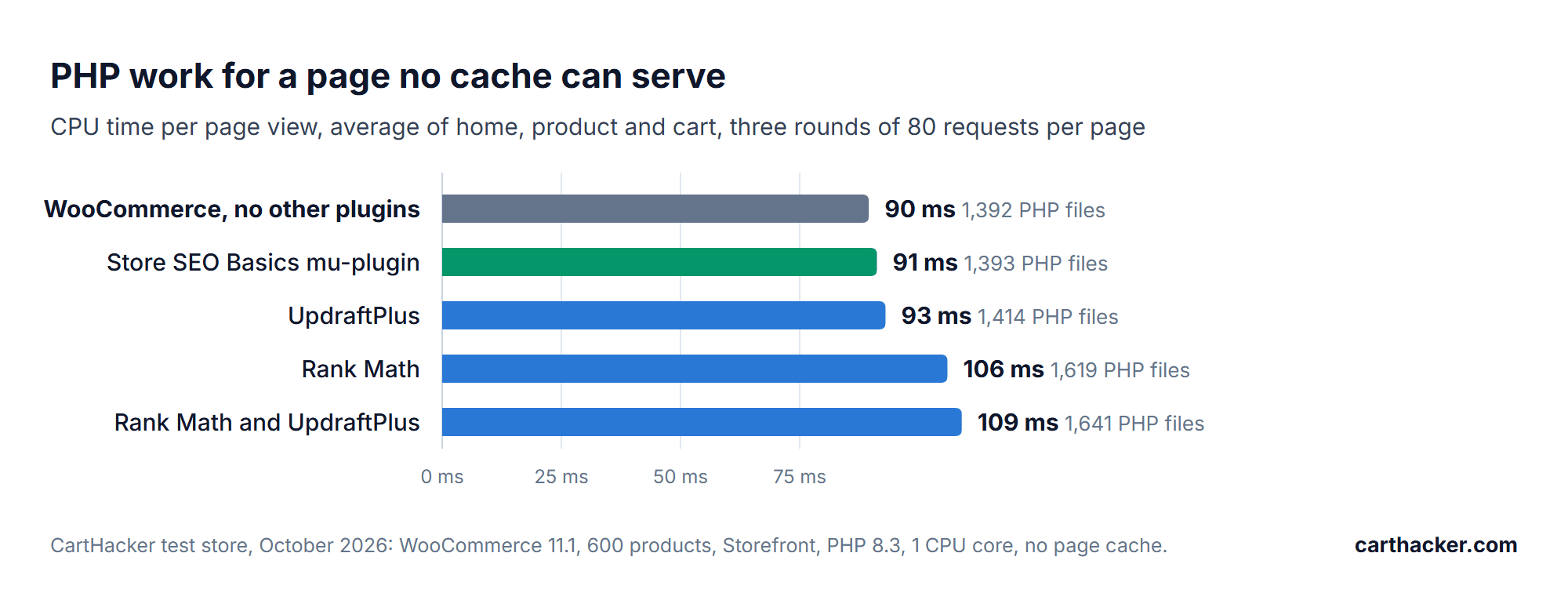
With Rank Math and UpdraftPlus active, PHP did 20 ms more work for every page, 22% on top of the 90 ms WooCommerce and Storefront need on their own. 16 ms of that is Rank Math, which loads 227 more PHP files for a product page (1,619 against 1,392) and runs 16 more database queries, on the cart too, where it has nothing to print. UpdraftPlus added about 3 ms, because it does its real work in wp-admin. Store SEO Basics came out 2 ms above plain WooCommerce. Timed from outside, the server answered 23 ms later with both plugins.
On hosting without OPcache, where PHP compiles every file again on every request, the gap grows with the file count: a product page took 558 ms with both plugins against 497 ms without them, 61 ms more. That's one run of 30 requests, so read it as a rough figure; most hosts have OPcache on, and the benchmark article shows how to check yours.
Is that worth caring about? On a product page served from a page cache it isn't, because the cache answers before PHP starts and none of this code runs. It lands on the pages no cache can answer: the cart, checkout, My account and every page a logged-in customer sees, which are the pages where people pay.
Server time is also the first part of Largest Contentful Paint, the loading score in Core Web Vitals, so every millisecond here is one the shopper waits before anything appears. I'd still count it as a bonus. 20 ms alone won't take a failing store to passing, and it isn't why I'd make the switch.
If you'd like your own before and after, run a product page through the Store Speed Test before you switch and again a week later; the report shows the server response time real Chrome visitors got, next to the lab test.
What you give up
Rank Math free comes with 22 modules, and the mu-plugin covers the part that ends up in the page head. Here's the rest, and where each job goes after the switch:
| Rank Math feature | After the switch |
|---|---|
| Redirections | Exported once to .htaccess or nginx rules (step 2 of the switch), then served by the web server before WordPress even starts |
| 404 monitor | Search Console, Indexing, Pages, "Not found (404)" lists the ones Google hits; the server access log has the rest |
| SEO score and keyword checks in the editor | Gone. They grade your writing and add nothing to the page |
| Schema for products | WooCommerce's own Product schema, with price, stock and reviews |
| Schema for articles, FAQ, local business, organization | Gone. Worth adding back by hand only if you rely on one of those rich results |
| Search Console and Analytics inside wp-admin | Open Search Console and Google Analytics directly |
| Instant Indexing (IndexNow) | Submit the sitemap once in Bing Webmaster Tools; Google doesn't take IndexNow pings |
| Image SEO (automatic alt text) | Write the alt text when you upload the product photo |
| robots.txt and llms.txt editors | A real robots.txt or llms.txt file in the site root, which the web server sends before WordPress gets the request |
Backups that live outside WordPress
Both vendors' recovery steps start with the same sentence: restore from a backup taken before the attack. A backup plugin runs inside the site it protects, with the site's own permissions and its stored passwords for the remote storage, so a backdoor in that site can read those passwords and reach the copies too.
I'd rather the backup ran from the server, under a separate login, to a place WordPress can't see.
The script I wrote for this dumps the database with WP-CLI and sends it, wp-config.php and wp-content to a restic repository on another machine. restic encrypts everything before it leaves the server, stores only what changed since the last run and keeps 14 nightly, 8 weekly and 12 monthly copies.
It works with an SFTP box, Backblaze B2, any S3-compatible bucket or a disk on another server. Every night it also reads back a random 2% of what it stored, so a broken repository shows up in the log, not on the day you need it.
#!/bin/sh
# store-backup.sh - a nightly WordPress or WooCommerce backup without a backup plugin.
#
# The database and wp-content go into an encrypted, deduplicated restic repository on
# another machine. Nothing in wp-admin can start, change or delete it, and no outside
# dashboard holds a key that can install plugins on the site.
#
# Needs wp-cli and restic (Debian and Ubuntu: apt install restic). Run it as the user
# that owns the site, not as root, so wp-cli runs with the site's own permissions.
#
# Once:
#   1. Edit the four settings below.
#   2. Create the password file, keep a copy somewhere that isn't this server:
#        umask 077; openssl rand -base64 32 > ~/.restic-store
#   3. Create the repository:  sh store-backup.sh init
#   4. Add it to that user's crontab (crontab -e), every night at 03:17:
#        17 3 * * * /home/deploy/store-backup.sh >> /home/deploy/store-backup.log 2>&1
#
# Restore test, once a month, into a scratch folder:
#   sh store-backup.sh restore /tmp/restore-test
set -eu

SITE=/var/www/example.com                  # the folder with wp-config.php
DUMP_DIR="$HOME/backup-dump"               # the last database dump, overwritten nightly
export RESTIC_REPOSITORY="sftp:[email protected]:/srv/restic/example-store"
export RESTIC_PASSWORD_FILE="$HOME/.restic-store"

WP="wp --path=$SITE --quiet"

case "${1:-backup}" in
	init)
		restic init
		exit 0
		;;
	restore)
		TARGET=${2:?"usage: store-backup.sh restore /tmp/restore-test"}
		restic restore latest --tag store --target "$TARGET"
		echo "Files are in $TARGET. Import the database into an empty test database with:"
		echo "  mysql test_db < $TARGET$DUMP_DIR/db.sql"
		exit 0
		;;
esac

mkdir -p "$DUMP_DIR"
chmod 700 "$DUMP_DIR"

# --single-transaction copies InnoDB tables as they were at one moment, without
# locking them, so the shop keeps taking orders while the dump runs.
$WP db export "$DUMP_DIR/db.sql" --single-transaction --quick

# Caches, logs and the folders other backup plugins leave behind are skipped.
restic backup --tag store --one-file-system \
	--exclude "$SITE/wp-content/cache" \
	--exclude "$SITE/wp-content/upgrade" \
	--exclude "$SITE/wp-content/updraft" \
	--exclude "$SITE/wp-content/ai1wm-backups" \
	--exclude "*.log" \
	"$DUMP_DIR/db.sql" "$SITE/wp-config.php" "$SITE/wp-content"

# 14 nightly, 8 weekly and 12 monthly copies. restic stores only what changed,
# so a year of history costs little more than one full copy of the uploads.
restic forget --tag store --keep-daily 14 --keep-weekly 8 --keep-monthly 12 --prune

# Reads back a random 2% of the stored data every night, so a broken repository
# shows up in the log long before the day you need it.
restic check --read-data-subset=2%
I ran it on the test store, with the repository on a separate disk standing in for the remote one. The first night has to send everything:
no parent snapshot found, will read all files

Files:       27976 new,     0 changed,     0 unmodified
Dirs:         5275 new,     0 changed,     0 unmodified
Added to the repository: 453.636 MiB (164.726 MiB stored)

processed 27976 files, 462.509 MiB in 0:13
snapshot 5ab61cf9 saved
...
read 2.0% of data packs
no errors were found

real    0m17.057s
The next run only found the fresh database dump changed, added 154 KiB and finished in 6 seconds:
using parent snapshot 5ab61cf9

Files:           0 new,     1 changed, 27975 unmodified
Dirs:            0 new,     3 changed,  5272 unmodified
Added to the repository: 940.136 KiB (154.387 KiB stored)

processed 27976 files, 462.509 MiB in 0:03
snapshot d48e4694 saved
Then the part most people skip. sh store-backup.sh restore /tmp/restore-test put 33,251 files and folders back in 18 seconds, and the dump went into an empty test database in 4 seconds with all 600 products in it. A backup you've never restored is a guess; this one took under half a minute to test.
One step further, if your store is worth it: give the server a storage login that can add copies but not delete them (restic's rest-server with --append-only, or a B2 application key without the deleteFiles permission) and run the forget line from your own computer once a week. Then even root on the store server can't wipe the history.
On shared hosting without SSH or cron, this script isn't an option. There, the host's own daily backups are the copy outside WordPress (ask how many days they keep and how a restore works before you need one), and UpdraftPlus without a remote key is a fine second copy.
If you keep UpdraftPlus
Plenty of people will, and on hosting without SSH it's a reasonable choice. Then the remote key is the thing to get rid of, and the 1.26.13 update doesn't do all of it for you.
Open UpdraftPlus > Advanced Tools > UpdraftCentral in wp-admin (older versions keep UpdraftPlus under Settings), click Manage existing keys and delete every key there. Removing the site from the UpdraftCentral dashboard leaves the key on the site.
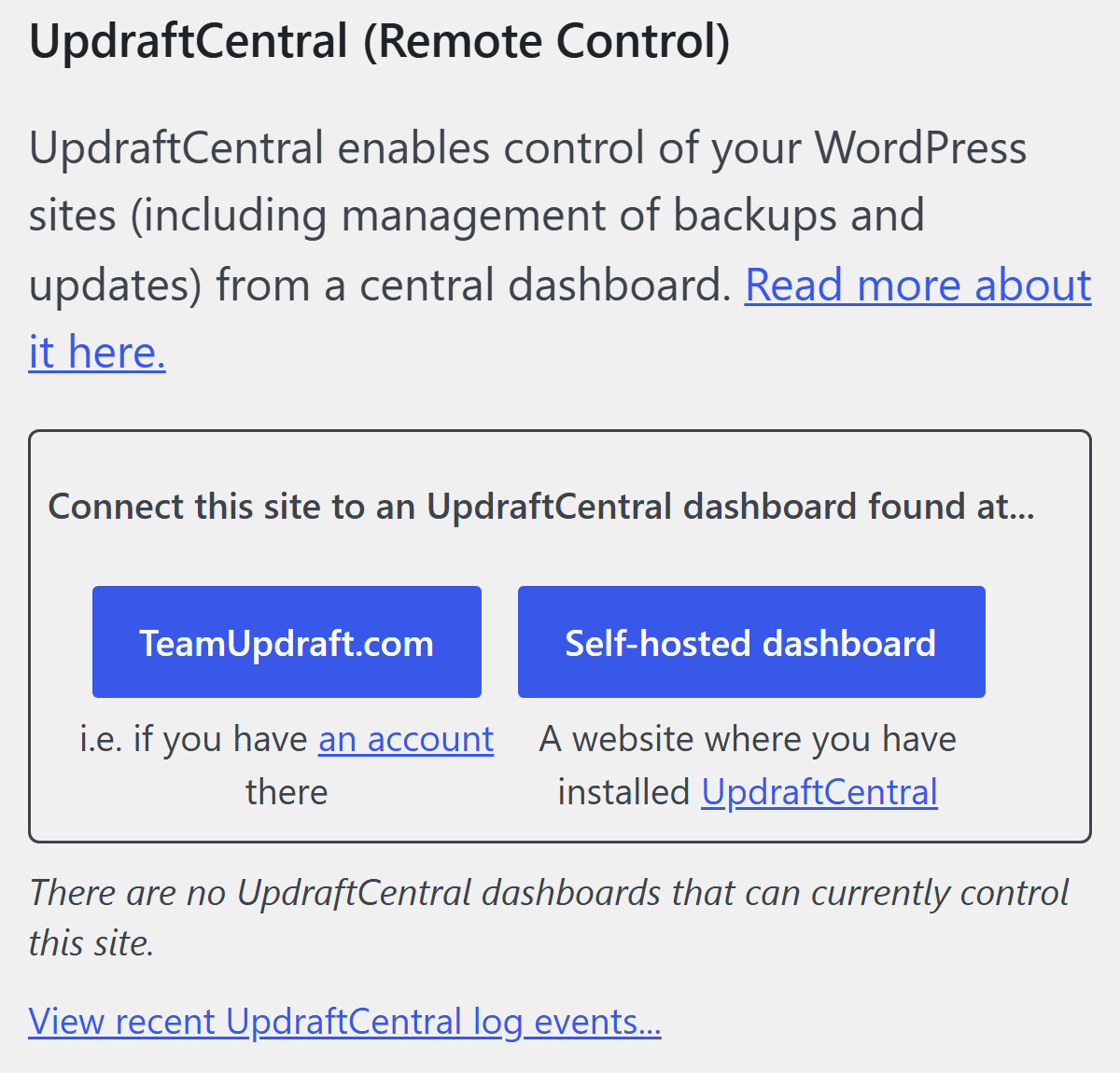
Nethemba found that 1.26.13 skips keys made on October 18 between 12:07 and 21:00 UTC, the gap between the two cutoff times TeamUpdraft gave. Your backups keep running without a key. Patchstack's advice: don't reconnect until TeamUpdraft explains how the keys got out, and if you ever connect your TeamUpdraft account again, untick that box first.
Two more things I'd know about. The UpdraftCentral client ships inside every copy of UpdraftPlus, free and Premium, and waits for a key; in June a bug in it (CVE-2026-10795, fixed in 1.26.5) let attackers forge its commands without any key at all.
And if you back up to UpdraftVault, TeamUpdraft disconnected every Vault site, so your backups stopped going to Vault on October 19 until you reconnect it under Settings, with your new teamupdraft.com password.
Updates to this guide
- October 24, 2026: first version, with the checks, the Store SEO Basics mu-plugin and the backup script, all tested on a WooCommerce 11.1 test store.
Sources
- TeamUpdraft: security incident, what customers need to know (updated October 23, 2026)
- Rank Math: PRO 3.0.123 security incident
- Patchstack: UpdraftCentral key compromise and the backdoor plugins
- Nethemba: analysis of the UpdraftCentral backdoor on its own sites (updated October 23, 2026)
- Patchstack database: Rank Math SEO PRO 3.0.123 embedded malicious code
- CVE-2026-111862
- BleepingComputer: stolen UpdraftCentral keys used to backdoor WordPress sites
- BleepingComputer: WordPress SEO plugin Rank Math compromised to backdoor websites
- UpdraftPlus 1.26.13 source, admin.php line 3688
- WordPress: must-use plugins
- restic documentation