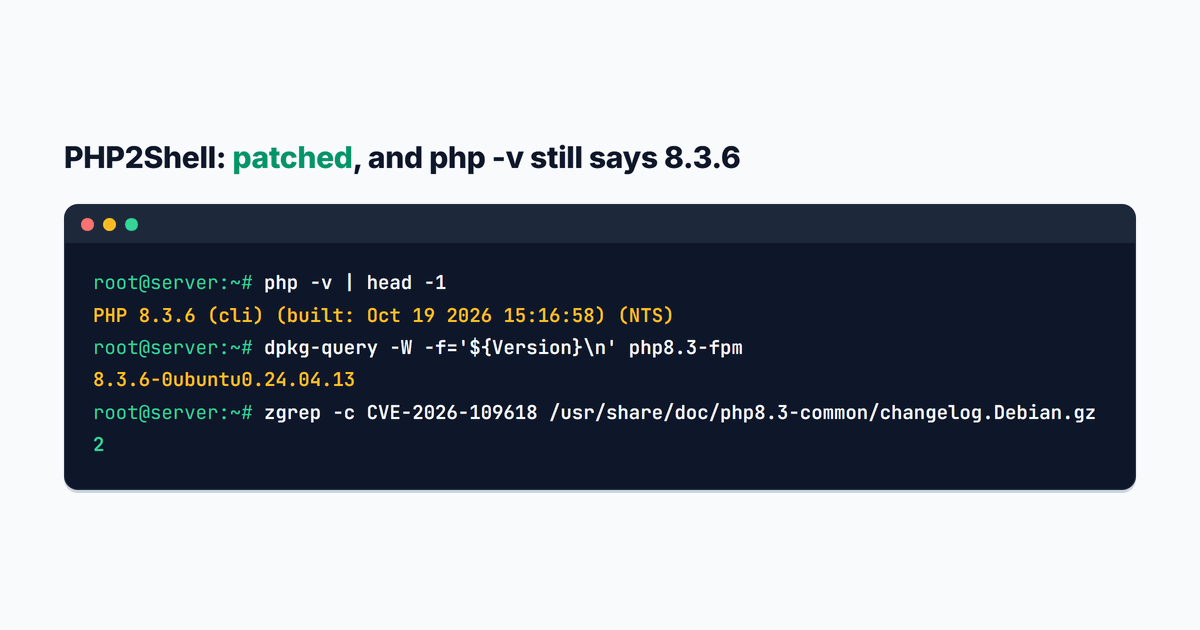
On the morning the PHP2Shell fix landed, I ran apt upgrade on the first of the eight Ubuntu servers I look after, typed php -v and got PHP 8.3.6. The fixed release is 8.3.36. For a minute I thought Ubuntu had missed it.
It hadn't. That server was patched, and so were the seven I worked through the next day (two of them mail servers, the rest WordPress, WooCommerce and a couple of PHP apps), but almost none of them showed it the way the security notices suggest. Here's what I checked on each one, the commands I ran, and the two mistakes that cost me a few minutes of downtime (one of them took a mail server offline).
If your store is on Shopify, you can close this tab. Shopify runs its own servers and you can't run PHP on them.
| PHP2Shell at a glance | |
|---|---|
| The bugs | CVE-2026-109618 and CVE-2026-109619, both 9.2 out of 10 |
| What an attacker gets | Their own code running on your server, no login needed |
| Fixed in | PHP 8.5.12, 8.4.27, 8.3.36 and 8.2.35 (October 21, 2026), or your distribution's patched build |
| Exploited? | Yes. Cloudflare reported attacks on the day of the release |
| What to do | Update PHP, restart every PHP process, check the changelog |
What PHP2Shell is
On October 21, 2026 the PHP project released 8.5.12, 8.4.27, 8.3.36 and 8.2.35. They fix two bugs, CVE-2026-109618 and CVE-2026-109619, and both allow unauthenticated remote code execution: someone who has never logged in sends a request and runs their own code on your server. Both are rated 9.2 out of 10. A few outlets have started calling the pair PHP2Shell, and the name is sticking.
The bugs live in how PHP cleans up between requests. In the first, running out of memory can stop PHP halfway through setting up a request, and the cleanup then trusts the half-built data. In the second, leftover state from one request survives into the next request on the same worker. Either one can be steered into running code.
Every PHP that answers web requests is affected: PHP-FPM (the usual setup behind nginx), Apache with mod_php, php-cgi, FrankenPHP and LiteSpeed. The PHP team rates mod_php the worst case, because they demonstrated an attack that fires before WordPress or WooCommerce code even starts. By the evening of the release, Brian Krebs reported that Cloudflare had already seen exploitation and had added firewall rules for it.
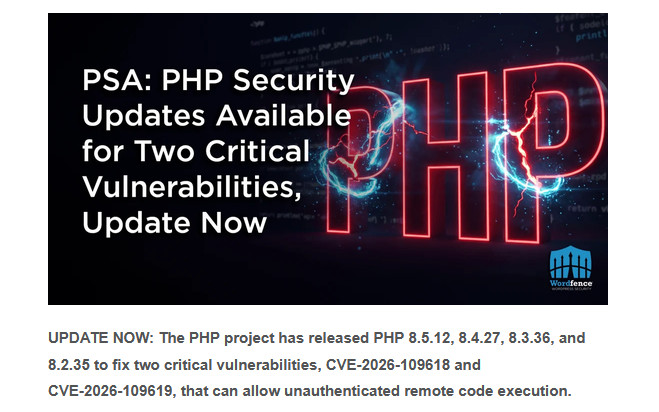
WordPress auto-updates don't touch any of this. PHP lives on the server, so the server has to be updated. Wordfence said the same in the alert it sent to WordPress site owners that day:
The short answer
If a hosting company manages your server (shared hosting, managed WordPress), send them one question: "Is PHP for my site updated for CVE-2026-109618 and CVE-2026-109619, and were the PHP processes restarted?" Don't judge it by the version in WordPress under Tools > Site Health. A correct fix can leave that number exactly where it was.
If you run your own Ubuntu or Debian server, the work is three steps: update the PHP packages, restart everything that runs PHP, and check the package changelog. The rest of this guide is those three steps, plus what I learned doing them eight times.
Why php -v still says 8.3.6 on Ubuntu
Ubuntu doesn't jump to 8.3.36. Its security team copies the two fixes into the 8.3.6 it already ships, so the number PHP prints never changes. The package version does. On Ubuntu 24.04 you want 8.3.6-0ubuntu0.24.04.13, published with Ubuntu security notice USN-8948-1.
So how do you tell from the server itself? Read the package changelog. Here's that first server, a few minutes after the upgrade:
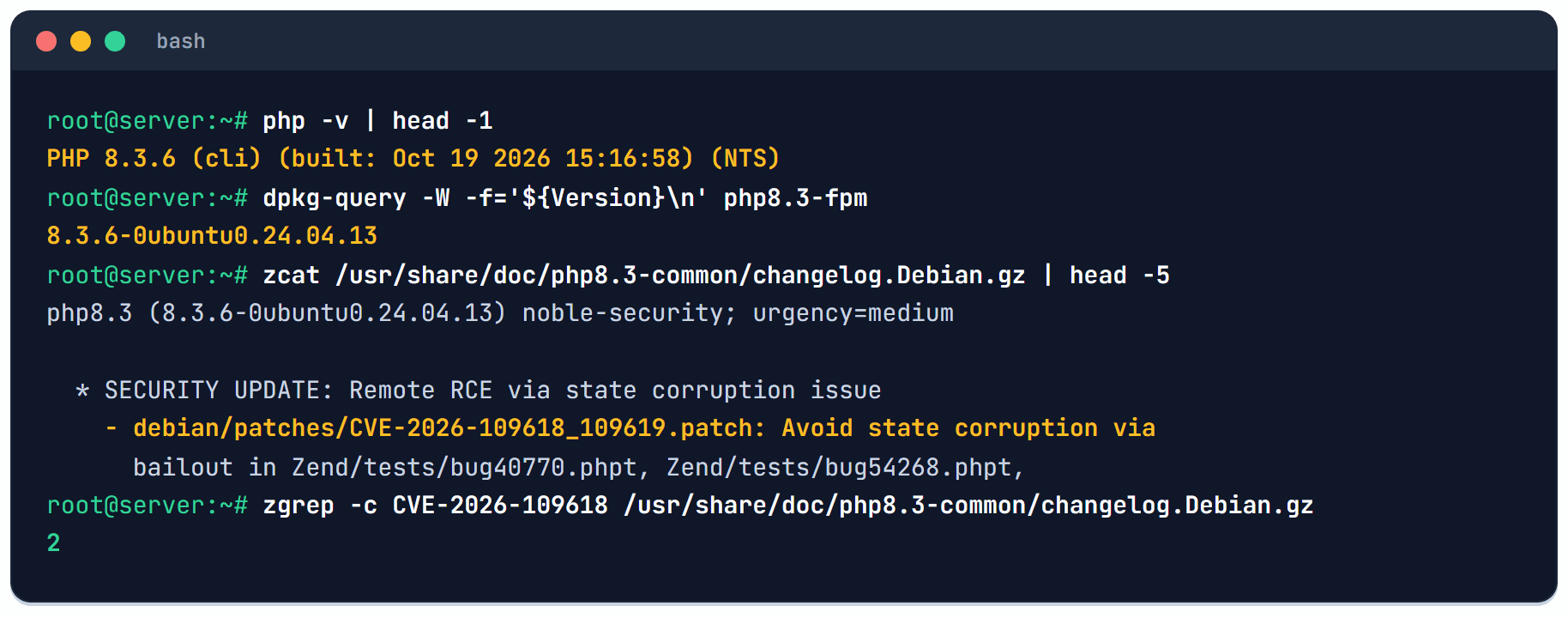
My favorite detail came from php -v itself. It said built: Oct 19 2026 15:16:58, and the changelog entry is stamped Mon, 19 Oct 2026 11:16:58 -0400. Same minute. The patched build existed two days before the public release, which is how coordinated disclosure is supposed to work.
What to look for depends on where your PHP comes from:
| Where your PHP comes from | The fixed package |
|---|---|
| Ubuntu 26.04 (php8.5) | 8.5.4-0ubuntu1.5 |
| Ubuntu 24.04 (php8.3) | 8.3.6-0ubuntu0.24.04.13 |
| Ubuntu 22.04 (php8.1) | 8.1.2-1ubuntu2.28 |
| Ubuntu 20.04 and 18.04 | Only with Ubuntu Pro (USN-8948-2) |
| Debian 13 / Debian 12 | 8.4.27-1~deb13u1 / 8.2.35-1~deb12u1 |
| Ondrej Sury's PPA, 8.2 to 8.5 | 8.2.35, 8.3.36, 8.4.27, 8.5.12 |
| Ondrej Sury's PPA, 7.4 to 8.1 | Same old number, new revision: 7.4.33-31, 8.0.30-25, 8.1.34-9 |
The changelog check works for all of them. Swap 8.3 for your branch:
zgrep -c CVE-2026-109618 /usr/share/doc/php8.3-common/changelog.Debian.gzAnything above 0 means the fix is in. Ubuntu's packages printed 2 on my servers (the patch name and the CVE line), Ondrej's printed 1. On Ondrej's older branches the CVE line sits one entry below the newest one, so don't stop at the top of the file.
If you're still on 7.4, 8.0 or 8.1, the backport closes this hole, and that's all those branches will get. Plan the move to 8.3 or newer on a staging copy first, and if you run WooCommerce, I measured what the newer PHP does for a store's speed too.
Step 1: Update the PHP packages
sudo apt-get update
sudo apt-get install --only-upgrade $(dpkg-query -W -f='${db:Status-Abbrev} ${Package}\n' 'php*' 'libapache2-mod-php*' | awk '$1=="ii"{print $2}')
The second line upgrades every PHP package that's already installed and nothing else, so it won't pull in a new version or a stray extension. One of the servers had four PHP branches side by side (7.1, 8.3, 8.4 and 8.5) and the command moved 39 packages in one go.
If you have Ondrej's PPA and Ubuntu's own PHP on the same machine, apt will move Ubuntu's 8.3.6 over to Ondrej's 8.3.36 while it's at it. That's fine, both are fixed, and afterwards php -v shows the new number.
Step 2: Restart everything that runs PHP
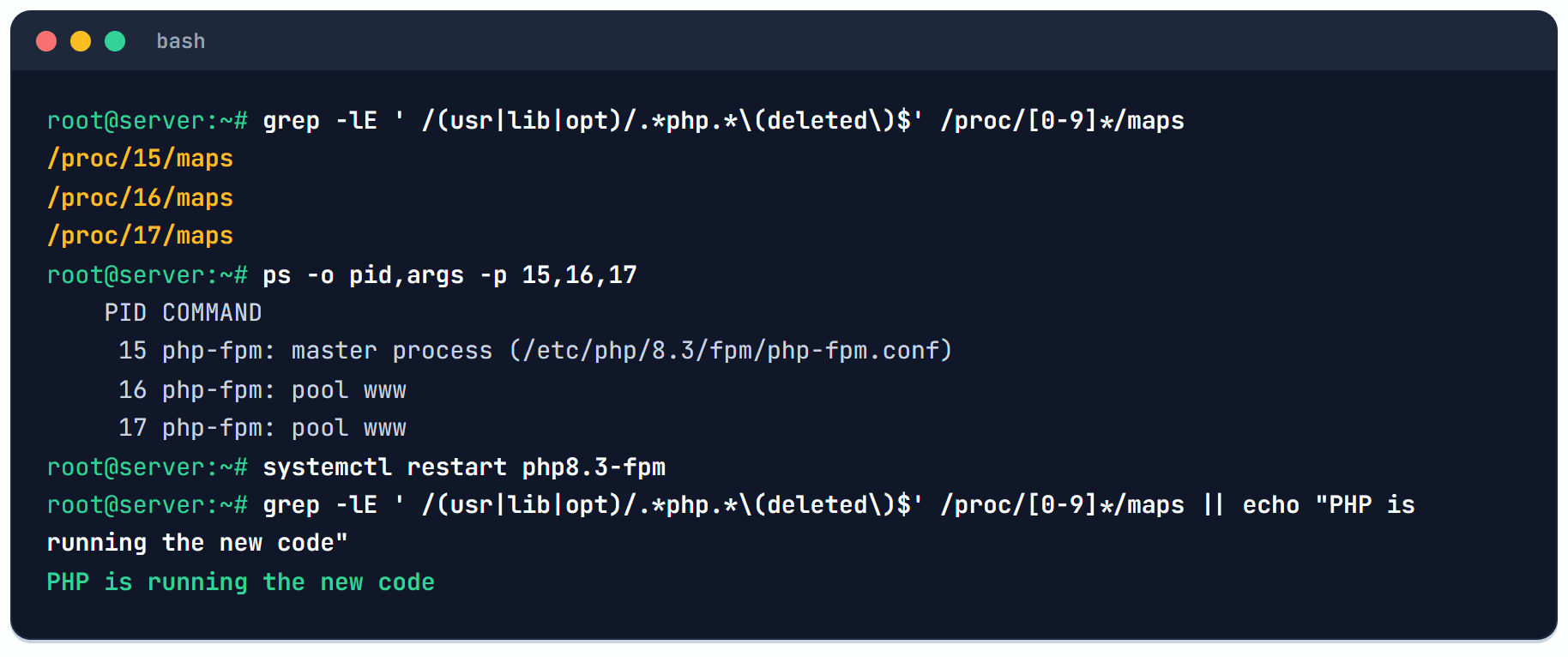
Here's the part most write-ups skip. The upgrade replaces files on disk, but a PHP-FPM worker that started yesterday still runs yesterday's PHP from memory. Linux keeps the old file around for as long as something has it open, and it marks it (deleted).
On Ubuntu the package restarts PHP-FPM for you. Apache with mod_php, long-running php processes (queue workers, a WP-CLI job runner, anything a systemd service keeps alive) and Docker containers built from an old image keep the old code until you restart or rebuild them. So restart, then look:
sudo systemctl restart 'php*-fpm.service'
sudo systemctl is-active --quiet apache2 && sudo systemctl restart apache2
sudo grep -lE ' /(usr|lib|opt)/.*php.*\(deleted\)$' /proc/[0-9]*/maps || echo "PHP is running the new code"
The last line lists every process that still holds a replaced PHP binary or extension. Empty output and the message mean you're done. Anything it prints is a process to restart, and ps -o pid,args -p <pid> tells you which.
I write these up in the CartHacker newsletter when something on a server needs doing, so the next one reaches you before the comment threads do.
Was I hit before I patched?
I haven't seen a published list of signs for these two bugs yet, so I ran the checks I'd run after any server-side hole. On a WordPress site, list the administrators and look for one you didn't create:
wp user list --role=administrator --fields=ID,user_login,user_registeredThen look for PHP files that changed after the advance notice went out on October 20, and for scheduled jobs you don't recognize:
sudo find /var/www /home -name '*.php' -newermt '2026-10-20' -not -path '*/cache/*' | head -50
sudo crontab -l -u www-data
A plugin update on your side will show up in that list too, so read it against what you changed. A file with a random name in wp-content/uploads, or an administrator registered at 3 a.m., is the kind of thing to stop and look at. If you find one, take the site offline, keep the files as they are and get help before you clean anything, because a cleanup erases the trail that tells you how they got in.
The mirror was 16 hours behind
On the first server, the first apt upgrade didn't offer the PHP packages at all. A few minutes later, a second run did. Like most cloud servers, these read Ubuntu packages from a mirror their hosting provider runs, and when I compared the security index files the next morning, the mirror's copy was dated Wednesday 18:27 UTC and Ubuntu's own copy Thursday 10:28 UTC. Sixteen hours.
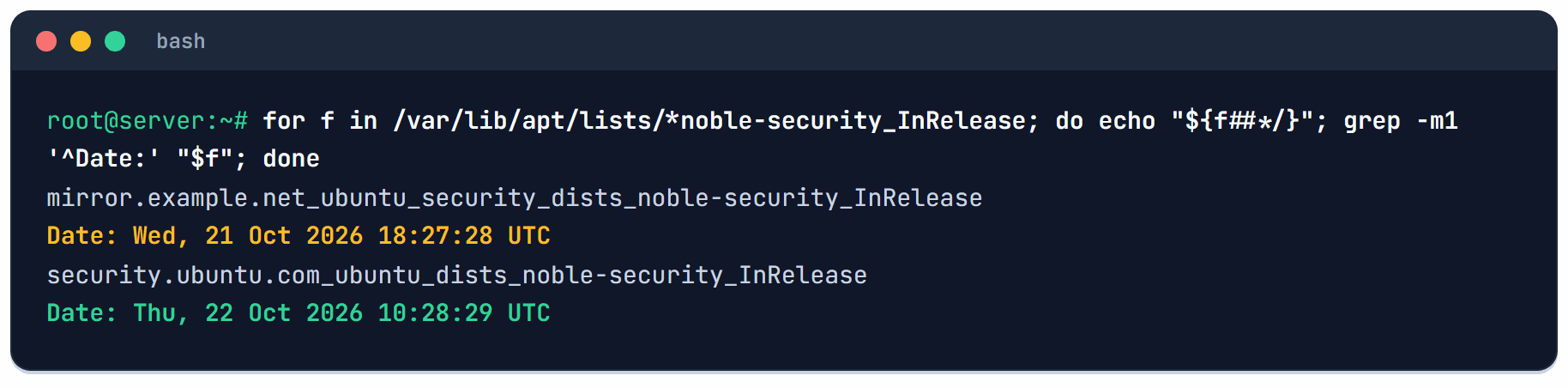
On a normal week nobody notices. On an RCE week that's sixteen hours of waiting for nothing. I added Ubuntu's own security source next to the mirror, in a separate file, because cloud-init owns ubuntu.sources and can rewrite it:
sudo tee /etc/apt/sources.list.d/ubuntu-security-official.sources >/dev/null <<'EOF'
Types: deb
URIs: https://security.ubuntu.com/ubuntu
Suites: noble-security
Components: main universe restricted multiverse
Signed-By: /usr/share/keyrings/ubuntu-archive-keyring.gpg
EOF
sudo apt-get update
Change noble to your release name (jammy for 22.04). apt now takes each security update from whichever source has it first.
unattended-upgrades did most of the work
Three of the eight servers had installed the fix before I logged in. unattended-upgrades had done it overnight, and PHP-FPM had restarted on its own between 06:04 and 06:46 UTC. Two servers on the same Ubuntu release were still on the old build at noon. Why? I can't tell you exactly, and my best guess is the mirror again.
The two servers with Ondrej's PPA hadn't moved at all. unattended-upgrades only installs from sources it's been told to trust, and out of the box that's Ubuntu (plus Ubuntu Pro, if attached). Ondrej's PHP had been sitting there waiting for a human. This adds it:
sudo tee /etc/apt/apt.conf.d/51unattended-upgrades-ondrej >/dev/null <<'EOF'
Unattended-Upgrade::Origins-Pattern {
        "origin=LP-PPA-ondrej-php";
};
EOF
sudo unattended-upgrade --dry-run -d 2>&1 | grep 'Allowed origins'
The dry run should list origin=LP-PPA-ondrej-php at the end. Ondrej only ships bugfix releases inside a branch (8.3.36 to 8.3.37, never 8.3 to 8.4), so letting them in automatically is a small risk compared with the one you just patched.
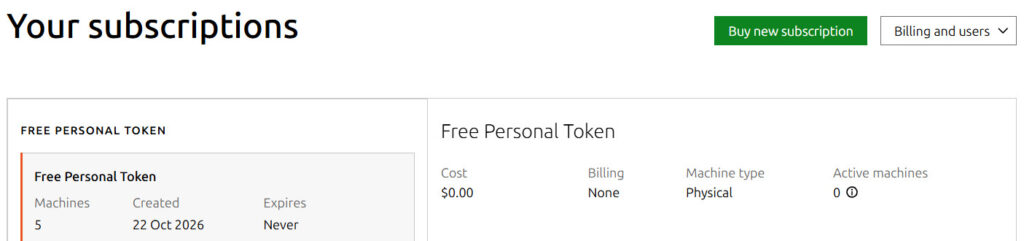
One more thing on Ubuntu: a free Ubuntu Pro subscription covers up to five machines. It adds security fixes for the packages in Ubuntu's universe section (MariaDB, fail2ban and ImageMagick are all in there on 24.04), Livepatch for kernel fixes without a reboot, and the only route to this PHP fix on Ubuntu 20.04 and 18.04. You attach a server with one command, sudo pro attach <your token>, and unattended-upgrades already trusts the Pro sources, so their fixes install on their own from then on.
Before you reboot, find what won't come back
Patch day is also when you finally install that kernel update and reboot. I did exactly that on a mail server, and it came back without mail.
Postfix and Dovecot had been running for months, but someone had started them by hand and never enabled them, so systemd didn't start them after the reboot. Mail was down for a few minutes and nothing got lost (other mail servers queue and retry).
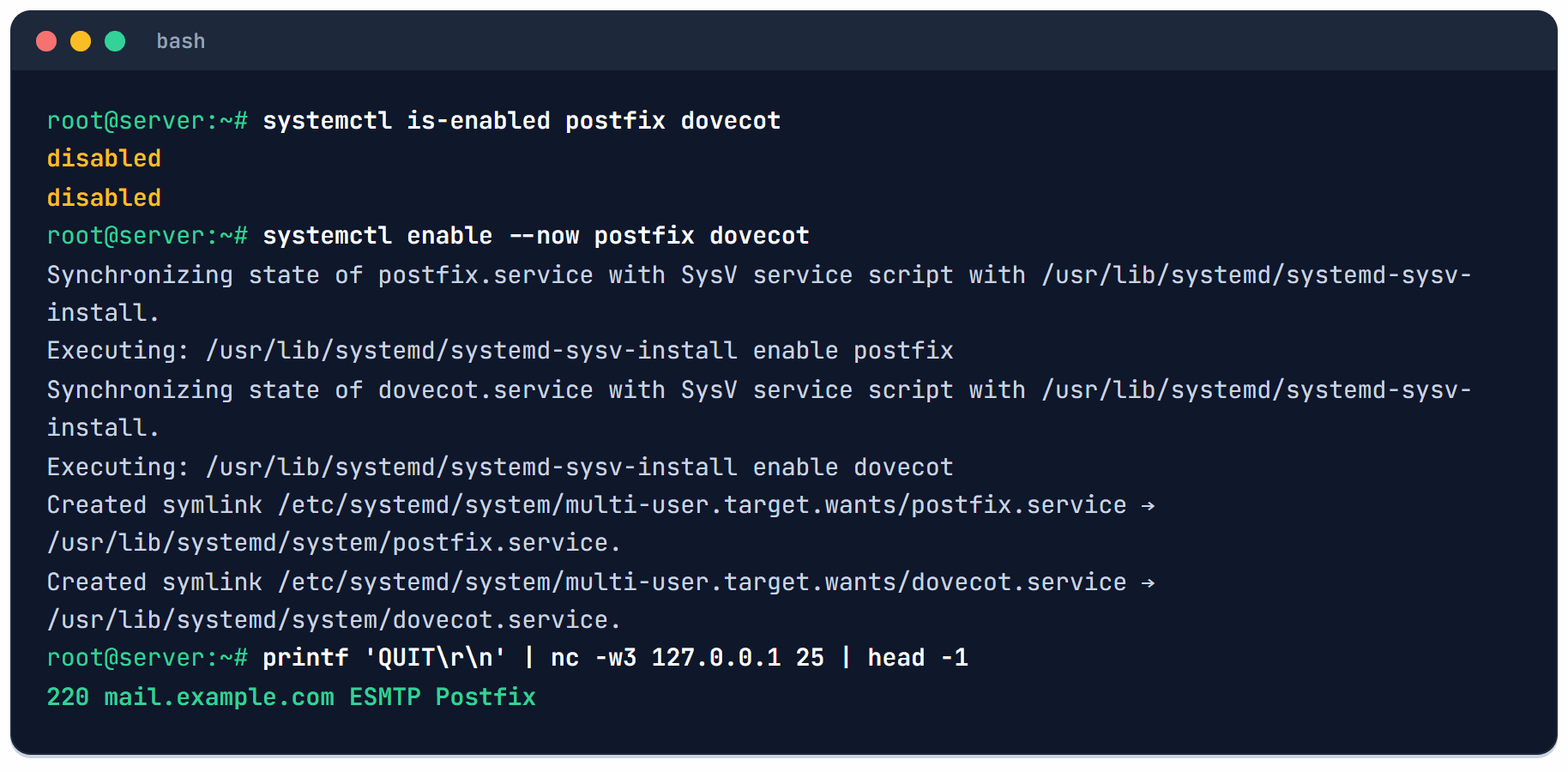
I've added a check I now run before every reboot:
for u in $(systemctl list-units --type=service --state=running --no-legend --plain | awk '{print $1}'); do
  [ "$(systemctl is-enabled "$u" 2>/dev/null)" = disabled ] &&
  [ "$(systemctl is-enabled "${u%.service}.socket" 2>/dev/null)" != enabled ] &&
  echo "WON'T START AFTER REBOOT: $u"
done; echo "checked"
sudo findmnt --verify | tail -1
Anything it prints needs sudo systemctl enable <name> first. The socket test in the middle is there for SSH: on Ubuntu 24.04 ssh.service is meant to be disabled, because ssh.socket starts it on the first connection. My first version of this check flagged it, and enabling it by hand would have set the two fighting over port 22.
The findmnt line checks /etc/fstab. One server still had a line for a storage volume that no longer existed. It carried nofail, so the boot would have skipped it, but without nofail that same line drops a server into emergency mode, and then SSH doesn't come up either.
If you can't update today
The PHP advisory lists ways to lower the risk until you can update. They're stopgaps, and the advisory says plainly that only the update fixes it.
- Set
memory_limit=-1where the application can't override it, for examplephp_admin_value[memory_limit] = -1in the FPM pool. It sounds backwards, but the first bug needs PHP to run out of memory, and unlimited memory takes that trigger away. Put a container or cgroup memory limit around PHP so a runaway script can't take the whole server with it. - Lower
post_max_size: 8M for sites without uploads, 32M if you need uploads, and keepupload_max_filesizebelow it. - Set
session.upload_progress.enabled=0and restart every worker. - On PHP 8.5, set
fatal_error_backtraces=0and restart every worker.
What else I found while I was in there
Patching every server in one day is the closest most of us get to an audit. None of these is PHP2Shell, but each is something an attacker who gets in would enjoy:
- An old copy of a WordPress site sitting inside a live site's public folder. Someone had made a backup by moving the files into a subfolder, so it was a complete second WordPress (with plugins from 2024) answering at its own address. I moved it out of the web root.
- phpMyAdmin in a public web root on two servers.
- An nginx default site whose password covered
/but not.phpfiles, phpMyAdmin included. Alocation ~ \.php$block wins overlocation /, so theauth_basiclines inside/never applied to PHP. Moving them up to theserverblock fixed it.
Updates to this guide
- October 23, 2026: PHP published an advisory for a third bug, CVE-2026-115560, with no fix until the next regular release. It asks everyone to set
session.upload_progress.enabled=0, the third stopgap under If you can't update today, so if you set it on Wednesday you're covered. The upload progress check for every PHP version on a server, and the update for Red Hat, AlmaLinux, Docker and Windows. - October 22, 2026: first version, written after patching eight Ubuntu 24.04 servers.
Sources
- PHP project: PHP security release announcement, October 21, 2026, and the advisories GHSA-w8hw-w9fx-j79w and GHSA-6wmf-4rv5-p3rp.
- Ubuntu: USN-8948-1 and USN-8948-2 (the Ubuntu Pro releases), and the php8.3 8.3.6-0ubuntu0.24.04.13 changelog on Launchpad.
- Ondrej Sury: PHP PPA for Ubuntu.
- Wordfence: PSA: PHP security updates available for two critical vulnerabilities and what their testing found.
- Krebs on Security: Widespread PHP flaw may cause many site outages today, October 21, 2026.
- Ubuntu Pro: pricing and the free personal subscription.