
A Redis object cache reduced the database queries for the cart on my test store from 116 to 17, but the cart needed the same time to build: 166 milliseconds without Redis, 167 with it. The product page, the checkout and the Products list in wp-admin didn't get faster either.
Then I made every query's trip to the database take 2 milliseconds (that's normal for a database on a separate server), and the same Redis made the cart 205 milliseconds faster. The farther away I put the database, the more time Redis saved.
So will Redis make your WooCommerce store faster? In my tests Redis saved time only when every query had to go over a network to reach the database, and only on pages that the page cache doesn't serve: the cart, the checkout, pages for logged-in customers and wp-admin. You can measure how long your web server waits for the database with one command, before you've installed anything.
If you run WooCommerce on a VPS, or on a hosting plan that includes Redis, I'll show you that command, what Redis changed on four kinds of pages in my tests, and the Redis settings that kept my test store working. (On Shopify there's nothing to install, because Shopify runs the servers.)
I ran every test on October 28, 2026, on the store I built for my WooCommerce speed tests: a catalog of 600 products on WooCommerce 11.1.2 and Storefront, with MariaDB 11.4, PHP 8.3, Redis 7.4 and Redis Object Cache 3.0.0, each service in a container of its own on my PC.
What a Redis object cache keeps between page views
While WordPress builds a page, it saves the answer to every lookup in its object cache: the options it loads first, each post with its meta, the categories, the user. When the same page asks for the same thing twice, the second answer comes from memory. "By default, the object cache is non-persistent," says the WordPress reference, so it's deleted when the page is done, and the next shopper's page asks the database again.
A persistent object cache keeps those answers for the next page view. Redis Object Cache, the free plugin by Till Krüss with more than 500,000 active installs, copies a file called object-cache.php into wp-content (a drop-in: WordPress loads it instead of its own cache code).
From then on, every answer is stored in Redis, a database that keeps its data in memory. Transients are stored there too: with a persistent object cache on, WordPress keeps them in Redis instead of in the wp_options table.
WordPress's own Site Health screen had recommended exactly this. On the test store, it listed "You should use a persistent object cache" as a recommended improvement, because the store is above one of the limits that WordPress has checked since version 6.1: more than 1,000 posts. Products and their variations count as posts, so a catalog of this size gets the message.
Here's what Redis changed on one view of each page with a warm cache. I counted with a must-use plugin of my own, which reads WordPress's query counter, its query timer and the statistics that Redis Object Cache keeps for each request:
| Page | Queries without Redis | Queries with Redis | Calls to Redis | Waiting for MariaDB | Time in Redis |
|---|---|---|---|---|---|
| Cart with one item | 116 | 17 | 166 | 35 ms, then 8 ms | 28 ms |
| Checkout | 85 | 16 | 100 | 26 ms, then 6 ms | 15 ms |
| Products list in wp-admin | 151 | 31 | 164 | 48 ms, then 11 ms | 27 ms |
| Product page | 94 | 26 | 301 | 35 ms, then 10 ms | 48 ms |
Median of three page views with a warm cache, with the database and Redis on the same Docker network as PHP. The product page shows random related products, so its counts change from one view to the next.
The queries really were gone. But I hadn't expected the next column: with Redis on, the cart sent 166 commands to Redis, and each command is a round trip over the network, like a query.
Here's how the object cache works: WordPress asks it for one key at a time, and every key that the page hasn't used yet in this request means one trip to Redis. WooCommerce asks for many small things (each product's meta, its terms, its prices), so the number of trips grows quickly. On the cart, Redis saved 27 milliseconds of waiting for MariaDB and used 28 milliseconds for its own commands.
On one server, the store without extra plugins got no faster
| Page | No object cache | Redis, PhpRedis | Redis, Predis |
|---|---|---|---|
| Product page | 136 ms | 127 ms | 136 ms |
| Cart with one item | 166 ms | 167 ms | 168 ms |
| Checkout | 137 ms | 141 ms | 130 ms |
| Products list in wp-admin | 232 ms | 221 ms | 233 ms |
Server time to the first byte, the median of three runs of 40 requests each, with the database and Redis on the same Docker network as PHP and no page cache.
Every difference is smaller than the normal variation between my runs: the same setup, run three times, differed by up to 41 milliseconds. MariaDB ran next to PHP with every table in its buffer pool (the memory where it keeps table data), so a simple query took 0.14 milliseconds, about the same as one Redis command.
Also, the queries didn't take most of the time on these pages. The cart spends most of its time while PHP loads and runs WordPress, WooCommerce and the theme, and an object cache doesn't change that part.
Predis gave the same result. Predis is a Redis client written in plain PHP, and the plugin includes it for servers without PhpRedis, the compiled extension (the plugin's documentation says the client "defaults to phpredis when installed, otherwise predis").
Plugins change the result a little. With the 15 popular plugins from my earlier test switched on (Yoast SEO, Elementor, Wordfence, Jetpack and the others), Redis made the product page faster, from 259 to 223 milliseconds, even on one server. The more queries your plugins add, the more time a local Redis can save, and here it saved about 14%.
Database 2 ms away: Redis made the cart 205 ms faster
Many stores have the database on a separate server: managed WordPress plans, cloud setups with a separate database service, and stores that became too big for one VPS. Then every query goes over a network, and the round trip time is added to each query.
Docker Desktop's virtual machine can't add network delay by itself (its kernel has no netem, the Linux feature for that), so I put a small proxy between PHP and MariaDB that holds every answer for a fixed time. At each step, I measured the real round trip of a simple query, from 0.14 milliseconds on the normal Docker network up to 5 milliseconds.
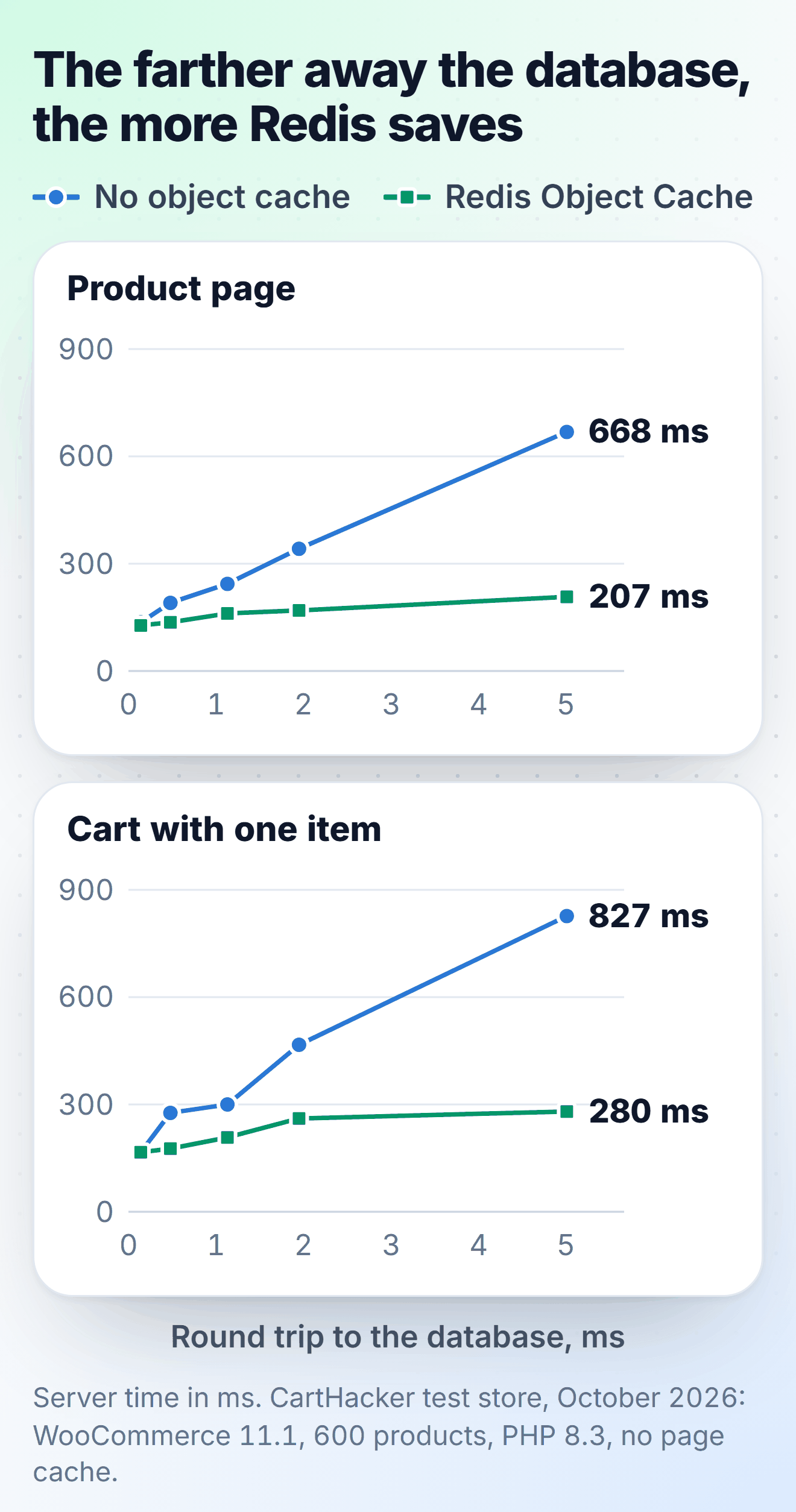
| Round trip to MariaDB | Product page | Cart | Checkout | Products list in wp-admin |
|---|---|---|---|---|
| 0.14 ms (same network) | 136 / 127 | 166 / 167 | 137 / 141 | 232 / 221 |
| 0.48 ms | 191 / 136 | 276 / 176 | 181 / 144 | 289 / 236 |
| 1.13 ms | 244 / 161 | 300 / 208 | 233 / 155 | 417 / 263 |
| 1.95 ms | 342 / 169 | 467 / 261 | 339 / 184 | 578 / 298 |
| 5.01 ms | 668 / 207 | 827 / 280 | 620 / 243 | 1,078 / 403 |
Server time in milliseconds without an object cache, then with Redis Object Cache (PhpRedis). Medians of three runs of 40 requests each, no page cache.
Without an object cache, the cart needed about 136 milliseconds more for every extra millisecond of round trip, because each of its queries waits the extra time, and the connection to MariaDB needs a few more trips. With Redis, it needed 23 milliseconds more, because there weren't many queries left, and Redis itself was still on the same network as PHP. At 5 milliseconds the cart spent 600 milliseconds waiting for MariaDB without Redis, and 88 with it.
Predis was about as fast at most distances, though on a few runs it was more than 30 milliseconds slower than PhpRedis, so I'd pick PhpRedis wherever the host offers it.
How far away is your database?
Run this on your web server, in the folder where WordPress is installed, as the user that your site runs as. It sends 100 simple queries through WordPress's own database connection and prints the average:
root@server:/var/www/example.com# sudo -u www-data wp eval '$t = microtime( true ); for ( $i = 0; $i < 100; $i++ ) { $GLOBALS["wpdb"]->query( "SELECT 1" ); } printf( "%.2f ms per query\n", ( microtime( true ) - $t ) * 10 );'
0.16 ms per query
That's my test store with MariaDB on the same network. With the proxy set to 2 milliseconds, the same command printed 2.00 ms per query.
If your number is close to mine or lower, the database is on the same machine, and Redis won't make a store with few plugins much faster. From half a millisecond up, every page in my tests that reached PHP got faster with Redis, and at 2 milliseconds each page was 155 to 280 milliseconds faster. Is your number above 0.5? Then it's cheapest to put Redis on the web server, and the other fix is to move the database to the same server as PHP.
With a page cache, Redis only helps the pages the cache doesn't serve
| Page, with a page cache | Same network | Database 2 ms away |
|---|---|---|
| Product page for a guest, nginx cache | 1.0 / 1.0 | 0.9 / 0.9 |
| Product page for a guest, Cache Enabler | 1.8 / 1.9 | 1.9 / 1.9 |
| Product page for a logged-in customer | 122 / 126 | 343 / 158 |
| Cart with one item | 158 / 151 | 415 / 199 |
| Checkout | 125 / 123 | 317 / 170 |
Server time in milliseconds without an object cache, then with Redis Object Cache (PhpRedis). In the nginx rows, requests go through fastcgi_cache, which doesn't cache pages for logged-in customers, for anyone with something in the cart, or the cart and checkout addresses. Medians of three runs of 40 requests each, from a later run than the other tables, so compare the rows of this table only with each other.
A cached page never reaches Redis. nginx's cache sends the page before PHP starts at all, and a plugin cache like Cache Enabler answers from its advanced-cache.php file, which WordPress loads in wp-settings.php before it starts the object cache. So there's nothing that either cache would ask Redis.
All other pages run the whole of WordPress, and they're the pages a shopper uses to place an order. WooCommerce's own guide to caching plugins names Cart, Checkout and My Account as pages that "need to stay dynamic since they display information specific to the current customer and their cart". It also lists the cookies that should stop a cache from serving the page, and a shopper gets those cookies with the first item in the cart. Most page caches also don't serve cached pages to logged-in customers.
With the database 2 milliseconds away, Redis made the product page for a logged-in customer faster, from 343 to 158 milliseconds, while the cached product page stayed under 2 milliseconds with and without Redis. (The cache rules that send those pages from nginx to PHP are in my nginx configuration for WooCommerce.)
Big autoloaded options made Redis slower
Autoloaded options are WordPress settings marked to load on every request, all at once, early in the request. Plugins also save logs, statistics and their own caches there, and many plugins don't delete those rows when you remove the plugin, so on an older store these options grow from kilobytes to megabytes. I added useless options of that type (serialized arrays of about 100 KB each) to the test store and measured the product page again without a page cache:
| Autoloaded options | No object cache | Redis, PhpRedis | Redis, Predis | Sent by Redis per page view |
|---|---|---|---|---|
| 72 KB (the clean store) | 120 ms | 121 ms | 126 ms | 0.2 MB |
| 1.1 MB | 122 ms | 123 ms | 128 ms | 1.2 MB |
| 4.2 MB | 127 ms | 129 ms | 135 ms | 4.2 MB |
| 16.6 MB | 142 ms | 158 ms | 175 ms | 16.3 MB |
Product page, database and Redis on the same network, medians of three runs of 40 requests each. I ran these tests after the first tables, and that's why the clean store shows 120 ms here and 136 ms in the first table. The last column comes from Redis's own traffic counter over 20 page views.
Why would a cache make the page slower? WordPress keeps all autoloaded options under one cache key, alloptions, and with Redis on, every page view fetches that whole key. With 16.6 MB of options, Redis sent 16.3 MB to PHP for every page.
Without Redis, the same rows came from MariaDB in one query, the slowest query on the page at 15 milliseconds. With Redis, they arrive as one big value that PHP has to read and unpack completely, and the product page took 16 milliseconds longer on PhpRedis and 33 longer on Predis. Each PHP process also needed about 5 MB more memory at its peak.
On some hosts, a big alloptions causes more than slow pages. WordPress VIP, which keeps alloptions in Memcached, limits every cached object to 1 MB and answers with an error page when alloptions becomes bigger than that.
To see what's in your options, use these two commands. The first command prints the total size that WordPress loads on every request, counted the way Site Health counts it, and the second lists the five largest autoloaded options:
root@server:/var/www/example.com# sudo -u www-data wp eval 'require_once ABSPATH . "wp-admin/includes/class-wp-site-health.php"; echo WP_Site_Health::get_instance()->get_autoloaded_options_size(), "\n";'
74071
root@server:/var/www/example.com# sudo -u www-data wp eval 'global $wpdb; $in = "\"" . implode( "\",\"", wp_autoload_values_to_autoload() ) . "\""; foreach ( $wpdb->get_results( "SELECT option_name, LENGTH(option_value) AS bytes FROM $wpdb->options WHERE autoload IN ($in) ORDER BY bytes DESC LIMIT 5" ) as $o ) { echo $o->bytes, "  ", $o->option_name, "\n"; }'
18070  rewrite_rules
9557  wp_user_roles
7484  wpseo_titles
6783  rank-math-options-titles
4761  cron
That's the clean test store, and it already shows the problem: Yoast SEO and Rank Math are both switched off there, and their settings still load on every page. I didn't use wp option list --autoload=on --format=total_bytes, the command most guides give. It counted only about half of that total on the same store, because it doesn't count the options saved as auto, which WordPress 6.6 and later load too.
Site Health shows more than 800 KB as a critical issue, and since WordPress 6.6 a new option over 150 KB isn't autoloaded unless its plugin asks for that explicitly. You can delete an option from a plugin you've removed, after a database backup. For an option you still use, wp option set-autoload <name> off keeps the option but stops loading it on every page. Run wp cache flush afterwards, so Redis deletes the old alloptions.
Redis settings for a WooCommerce store
Ubuntu's redis-server package starts with defaults made for a database whose data must never be lost, and a cache needs different ones. On a server with more than one site, the plugin needs its own settings too.
Give Redis a memory limit and let it evict
I installed redis-server from Ubuntu's own packages on 24.04 and on 26.04 to see what a new server gets, and both started with maxmemory 0 and the policy noeviction. Zero means there's no limit, so the cache can grow until the server has no free memory left. Once you set a limit, the policy decides what a full Redis does, and with noeviction, redis.io says, "the server will return an error when you try to execute commands that cache new data".
Then I filled a 4 MB Redis with noeviction on purpose: I opened every product and category page of the test store once, which needs more than 4 MB of cache. When Redis couldn't store more data, 537 of the 612 pages answered with an HTTP 500 error and the plugin's message for a missing Redis. PHP's log had the real cause: "OOM command not allowed when used memory > 'maxmemory'".
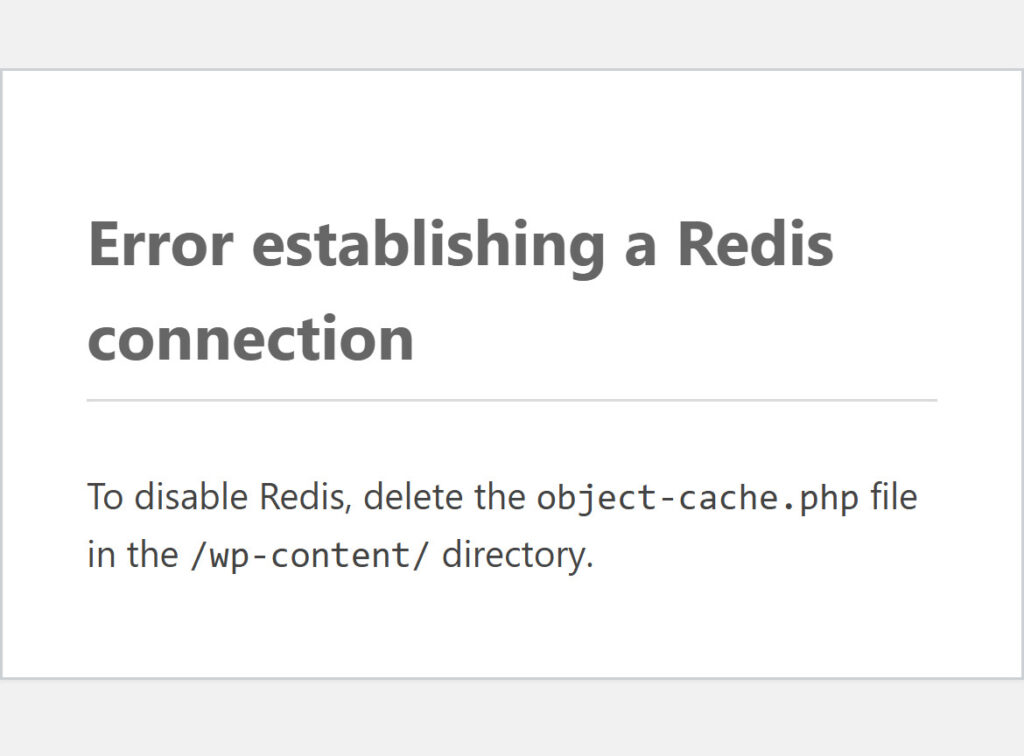
The commands on the server didn't show the problem clearly either. wp redis status still said Connected with no errors, but wp option get stopped with the same message as the pages.
The same 4 MB Redis with allkeys-lru served every page. Redis evicted (removed) 26,634 keys during the test, and after the test the product page still loaded in 118 milliseconds.
The plugin also has a safety setting, WP_REDIS_GRACEFUL. When I set it to true in wp-config.php, the full noeviction Redis also served every page, and the errors went to PHP's log, not to shoppers.
For a cache, redis.io calls allkeys-lru "a good default option": when Redis is full, it deletes the keys that nobody has asked for in the longest time, and WordPress writes them again the next time a page needs them. How much memory does Redis need? After I'd opened every product and category page of the test store once, Redis held 24,856 keys in 11 MB, so 256 MB is far more than a store of that size needs. The evicted_keys line in redis-cli INFO stats shows you when Redis doesn't have enough memory for your store.
Switch persistence off
The same package also saves a snapshot of everything in Redis to disk at fixed intervals (save 3600 1 300 100 60 10000: after an hour if one key changed, earlier when more keys changed). For each snapshot, Redis starts a copy of itself with fork(), and on a cache that changes all day, that's useless work, because WordPress can build every key again from MariaDB. redis.io lists running with no persistence as an option that's "sometimes used when caching". The cost comes once, after a restart: the first page views find the cache empty and fill it again.
# /etc/redis/redis.conf: Redis as a cache next to WordPress
maxmemory 256mb
maxmemory-policy allkeys-lru
save ""
appendonly no

# PHP on the same server reaches Redis through a socket file instead of TCP
unixsocket /run/redis/redis-server.sock
unixsocketperm 770
Keep Redis on the web server, and use its socket
Where Redis runs is even more important than where the database runs, because a page sends more commands to Redis than it sent queries to the database. I kept the database 2 milliseconds away and tested Redis in different places:
| How PHP reached Redis | Redis round trip | Product page | Cart |
|---|---|---|---|
| No Redis | 329 ms | 415 ms | |
| Same server, TCP | 0.11 ms | 152 ms | 201 ms |
| Same server, unix socket | 0.08 ms | 141 ms | 191 ms |
| Another server | 0.38 ms | 216 ms | 258 ms |
| Another server, farther | 1.90 ms | 547 ms | 551 ms |
The database is 2 ms away in every row. Server time is the median of three runs of 40 requests each; the Redis round trip is the median of 1,000 PING commands sent from PHP.
A Redis 1.9 milliseconds away made the product page 218 milliseconds slower than no Redis at all. Each call to Redis now had the round trip time that the queries no longer had. If a host sells Redis as a separate service, don't use it before you've measured the distance: redis-cli -h with the Redis address and --latency prints the round trip in milliseconds.
The socket file saves a little more time: a PING took 0.08 milliseconds instead of 0.11, and the pages were about 10 milliseconds faster than over TCP. You'll need two lines in redis.conf, two in wp-config.php and one permission: on Ubuntu, the socket belongs to the redis user and group, so PHP-FPM's user (www-data) has to be in that group. Before I added it, my test got "Permission denied".
root@server:~# usermod -aG redis www-data
root@server:~# systemctl restart redis-server php8.3-fpm
One Redis for several sites
Redis Object Cache puts its keys into Redis database 0 unless you set another number, and a flush (the plugin's Flush Cache button or wp cache flush) deletes everything in that database. I wrote the test store's cache into one Redis twice, with the prefixes shopa and shopb, like two sites that share one Redis, and flushed shopb. The key counts from redis-cli --scan:
before: shopa 60 keys, shopb 60 keys
after wp cache flush on shopb: shopa 0 keys, shopb 3 keys
The prefix kept the keys separate, but the flush deleted the keys of both sites. Two settings fixed this in my test. With WP_REDIS_SELECTIVE_FLUSH set to true, a flush deletes only the keys with the site's own prefix. With a separate database number for each site (WP_REDIS_DATABASE, from 0 to 15, because Redis has 16 databases), the flush stays inside that database. With either setting, shopa didn't lose a key.
Turn on Redis Object Cache and check that it's connected
I tested these steps on Ubuntu 24.04 with nginx and PHP-FPM 8.3, as root. On another Ubuntu release, the PHP version in the package and service names isn't 8.3. On a managed plan that offers Redis, the host switches Redis on for you, and the last two steps still apply. (I install the whole server from the beginning in my WordPress and WooCommerce install on Ubuntu 26.04.)
- Install Redis and PhpRedis with
apt install redis-server php8.3-redis. On Ubuntu 24.04 that gave me redis-server 7.0.15 and PhpRedis 5.3.7. - Add the lines of the redis.conf block from Switch persistence off to the end of /etc/redis/redis.conf, then run the usermod and systemctl commands from the socket part.
- Copy the four WP_REDIS constants of the wp-config.php block into your wp-config.php, anywhere before the "stop editing" comment.
- In wp-admin open Plugins > Add Plugin, search for Redis Object Cache, install and activate it, then open Settings > Redis and press Enable Object Cache. With WP-CLI it's
wp plugin install redis-cache --activate, thenwp redis enable. - Check that the same screen says Connected, or run
wp redis status.
// wp-config.php: Redis Object Cache through the local socket
define( 'WP_REDIS_SCHEME', 'unix' );
define( 'WP_REDIS_PATH', '/run/redis/redis-server.sock' );
define( 'WP_REDIS_PREFIX', 'shop1' );   // a short name, different for each site
define( 'WP_REDIS_DATABASE', 0 );       // 0 to 15, a different number for each site
This is what wp redis status printed on the test store. I removed everything after the first six lines; the rest lists the plugin's cache groups:
root@server:/var/www/example.com# sudo -u www-data wp redis status
Status: Connected
Client: PhpRedis (v6.3.0)
Drop-in: Valid
Disabled: No
Ping: 1
Errors: []
...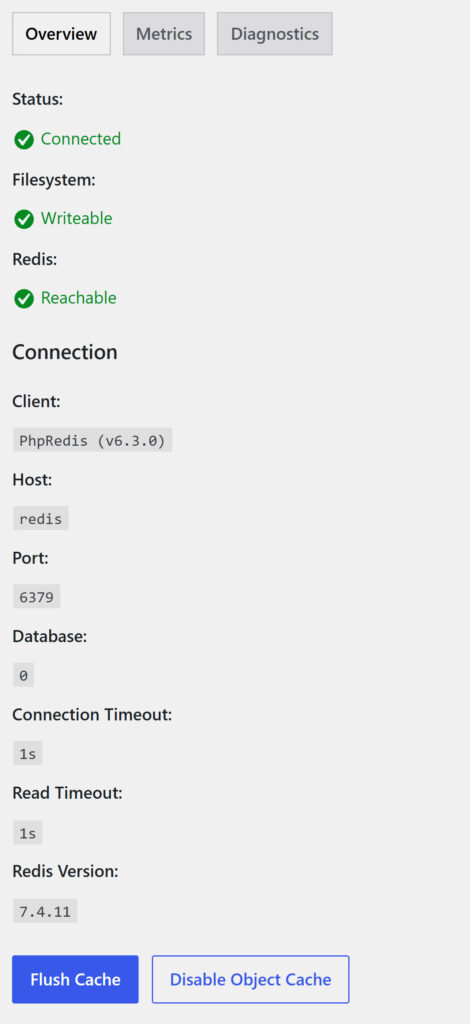
Connected only means that the plugin reached Redis, and my full test Redis also said Connected. So check the memory lines too. On that full test Redis, they said:
root@server:~# redis-cli INFO memory | grep -E '^(used_memory_human|maxmemory_human|maxmemory_policy):'
used_memory_human:4.00M
maxmemory_human:4.00M
maxmemory_policy:noeviction
Used memory at the limit with noeviction is the state that broke my test store. With allkeys-lru and free memory, the store keeps working.
A test server can't show you what your shoppers get, so after the change I'd watch the server response time of real visits for a week. We make a free tool for that, Core Web Vitals Monitoring.
See whether real shoppers get faster pages after the change to Redis
One snippet, or our WordPress plugin, shows the speed and traffic of every real visit, with an email the week your store gets slower. Free accounts keep 7 days of history, Premium keeps 180.
Start free monitoringOn a store whose database runs on the same VPS, I'd fix the page cache rules and remove the large autoloaded options first, and add Redis when the store gets more plugins or the database moves to another server. On a store whose database is a separate service, I'd put Redis on the web server immediately.
Sources
WordPress developer reference, WordPress core, WP-CLI and 4 more7
- WordPress developer reference: WP_Object_Cache (non-persistent by default), set_transient() (transients in a persistent object cache) and WP_Site_Health::should_suggest_persistent_object_cache() (the thresholds, WordPress 6.1).
- WordPress core: wp-settings.php (advanced-cache.php loads before the object cache starts) and Options API: disabling autoload for large options (the 150 KB limit and the 800 KB Site Health check, WordPress 6.6).
- WP-CLI: wp option list and wp option set-autoload.
- Redis Object Cache: the plugin on WordPress.org (version 3.0.0, 500,000+ active installations) and its configuration constants on GitHub.
- Redis: Key eviction (maxmemory, noeviction, allkeys-lru), Redis persistence, redis-cli (--latency) and redis.conf for 7.4 (the defaults).
- WooCommerce: Configuring caching plugins (cart, checkout and My Account stay dynamic; the cookies to exclude).
- WordPress VIP: Autoloaded options (the 1 MB limit per cached object).


Discussion 0
Ask a question or share what you saw on your own store.
No comments yet.