In 24 hours, Wordfence blocked 62,969 attacks on one WordPress file, The Hacker News reported on October 30: the installer that sits in the wp-content/upgrade folder for a few seconds while WordPress unpacks a core update. Every WordPress version from 4.7 to 7.1.3 puts it there under a name an attacker can guess. A request that reaches it in those seconds can end with the attacker's code running on your server, without a login.
The bug is CVE-2026-119977, and WordPress 7.1.4 fixes it (so does the security release of every older branch). One detail is easy to miss (a reader raised it under Wordfence's post): on a site that still runs an older version, the update to 7.1.4 puts the installer in that folder one more time. I ran a normal wp core update from 7.1.3 on a test server today, and the upgrade folder existed for 2.1 seconds, long enough for the installer in it to answer six of my requests. So on my servers I block the folder first and update second. It takes two lines in Apache and three in nginx.
If you run WordPress or WooCommerce on your own server or a VPS, you'll need these steps. A store on Shopify or Wix runs on servers the platform updates, so there's nothing for you to do. On WordPress.com or a managed WordPress host, open your dashboard and check the version: your host has most likely installed 7.1.4 already.
| WordPress 7.1.4: the facts | |
|---|---|
| The bug | CVE-2026-119977: code execution during a core update, no login needed |
| How serious | 8.1 out of 10 from Wordfence; WordPress rates it Low |
| Who's affected | Every version from 4.7 to 7.1.3 (4.6 and older get no fixes at all) |
| Fixed in | 7.1.4, and for older branches 7.0.8, 6.9.11, 6.8.12, 6.7.11 and so on, back to 4.7.39 |
| Attacked? | Yes, since October 28; no confirmed break-in reported by October 31 |
| What to do | Check the version, block wp-content/upgrade, update, read your access log |
What to do today
- Check which version each site runs (Dashboard > Updates, or
wp core versionon the server). - Block web access to wp-content/upgrade in nginx or Apache.
- Update to 7.1.4, or to the security release of your branch, and then look for requests to that folder in your access log.
What's the latest WordPress version?
The latest WordPress version is 7.1.4, released on October 28, 2026. WordPress 7.2 is still in beta, so don't install it on a live store. If a site has to stay on an older branch, the version you want is that branch's newest security release, from the row Fixed in of the table WordPress 7.1.4: the facts.
How to check your WordPress version
In wp-admin, Dashboard > Updates shows it. A site that still runs an old version also shows the notice "WordPress 7.1.4 is available! Please update now."
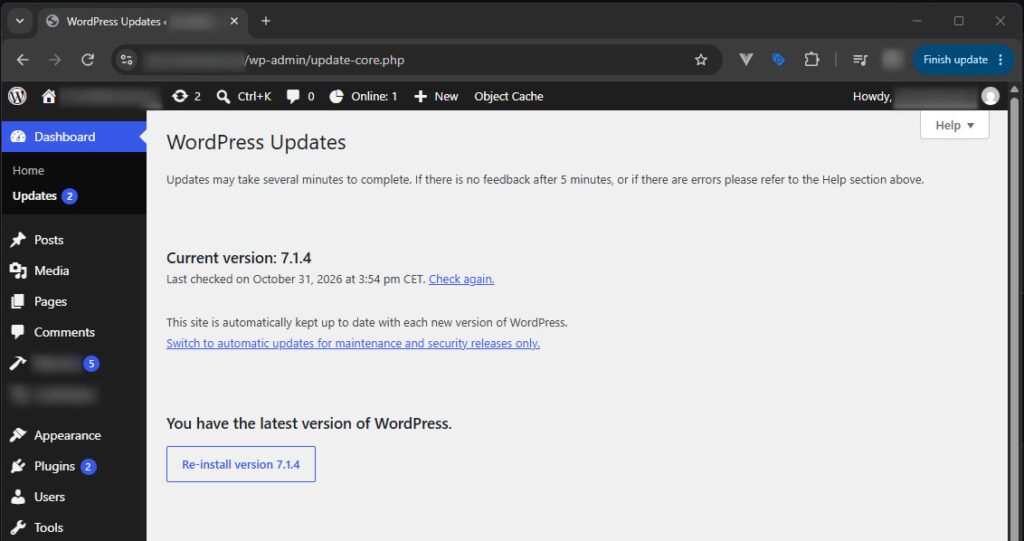
On the server, WP-CLI tells you in one line, and grep works where WP-CLI isn't installed:
cd /var/www/example.com
sudo -u www-data wp core version
grep "wp_version =" wp-includes/version.php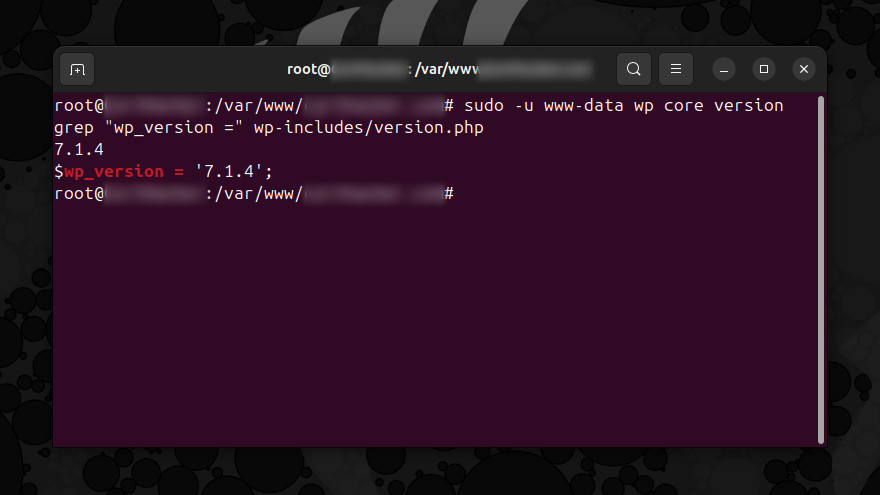
Use the folder of your site and the user that owns its files (that's www-data on most Ubuntu and Debian servers). Here's what my test server printed before the update:
root@server:/var/www/example.com# sudo -u www-data wp core version
7.1.3
root@server:/var/www/example.com# sudo -u www-data wp core check-update
+---------+-------------+-----------------------------------------------------------------------+
| version | update_type | package_url                                                           |
+---------+-------------+-----------------------------------------------------------------------+
| 7.1.4   | minor       | https://downloads.wordpress.org/release/wordpress-7.1.4-partial-3.zip |
+---------+-------------+-----------------------------------------------------------------------+
Do you manage several sites on one server? This loop prints the version of every WordPress install under /var/www:
for f in /var/www/*/wp-includes/version.php; do echo "$(sed -n "s/^\$wp_version = '\(.*\)';/\1/p" "$f") $f"; doneBlock wp-content/upgrade before you update
WordPress writes its update files into wp-content/upgrade through PHP, on the server itself. No visitor ever has a reason to open that folder in a browser, so it's safe to let the web server refuse every request to it. On nginx, put this inside the server block, before the PHP location:
location ^~ /wp-content/upgrade/ {
    deny all;
}
Test the file with nginx -t and reload with systemctl reload nginx. Keep the ^~: it tells nginx to stop at this location, so the PHP location doesn't get those requests. On my test server, every request to the copied installer got 403 with this rule active, and the update still finished.
On Apache, add two lines at the top of the .htaccess file in the WordPress folder, before the line # BEGIN WordPress:
RewriteEngine On
RewriteRule ^wp-content/upgrade/ - [F,L]
On my Apache test, a PHP file in that folder returned 403 with these two lines and ran as PHP when they weren't there. If your site is behind Cloudflare, a WAF custom rule that blocks requests whose URI path starts with /wp-content/upgrade/ stops them before they reach your server (custom rules are part of Cloudflare's free plan).
The upgrade folder existed for 2.1 seconds on my test server
I set up WordPress 7.1.3 on a test server with nginx and PHP 8.3, started the update, and a script on the server listed wp-content/upgrade every few milliseconds. As soon as a folder appeared, the script requested the installer inside it through nginx, the way an attacker would, with one difference: my script already knew the folder name.
| Update on my test server | Folder in wp-content/upgrade | How long it existed | What the requests got |
|---|---|---|---|
| wp core update from 7.1.3 | wp_6ae5ee497169b | 2.1 seconds | the setup page 6 times, a PHP error 48 times |
| Full package from 7.1.3, three runs | wp_6ae5ecc7c7d70 and two more | 2.1 to 2.3 seconds | the setup page 2 times, a PHP error 48 to 50 times |
| Full package from 7.1.3, with the nginx rule | wp_6ae5eda179e68 | 5.5 seconds | 403 for all 131 requests |
| Full package from 7.1.4 | wp_6ae5ed52ee08e-LKCgAzKGNomicvOh | 2.1 seconds | 404 for the name without the random part (29 requests) |
A PHP error (500) means PHP ran a half-copied file and failed. A 200 was the installer's first screen, with the title WordPress › Setup Configuration File. On 7.1.3 the folder name is wp_ plus PHP's uniqid(), which is the time of the update written in hexadecimal, accurate to one microsecond. 7.1.4 adds 16 random characters to the name, and my requests to the name without them didn't get anything but 404.
One thing surprised me: wp core check-update listed the small partial package, but wp core update downloaded wordpress-7.1.4-no-content.zip, a full copy of core without the default themes and plugins, so the installer was in every update I ran. I didn't test WordPress's own background updater, which may use the partial package. If your sites update by themselves, block the folder anyway (it takes a minute).
Update to WordPress 7.1.4
With the folder blocked, update the normal way: Dashboard > Updates > Update to version 7.1.4. With WP-CLI, run the update and then compare every core file with the checksums WordPress publishes:
sudo -u www-data wp core update
sudo -u www-data wp core verify-checksums
On my test server the update printed this:
root@server:/var/www/example.com# sudo -u www-data wp core update
Updating to version 7.1.4 (en_US)...
Downloading update from https://downloads.wordpress.org/release/wordpress-7.1.4-no-content.zip...
Unpacking the update...
Success: WordPress updated successfully.
root@server:/var/www/example.com# sudo -u www-data wp core version
7.1.4
Did your sites update by themselves? Most should have, because WordPress installs security releases in the background on sites that allow automatic updates. I'd still check the version on each one, because a site with automatic updates turned off, or one where the update failed, stays on the old code, and there's no warning except the notice in wp-admin.
After a core update, I run one product page through the free Store Speed Test to make sure it's still as fast as before.
How to check if your site was attacked
Look for requests to the upgrade folder in your access log. A 200 or a 500 on a setup-config.php path means PHP ran the file (on my test server, the 500s came from half-copied files and the 200s were the installer's first screen). A 403 or 404 means the request didn't get anything:
zgrep -h "wp-content/upgrade" /var/log/nginx/access.log* | awk '{print $9, $7}' | sort | uniq -c | sort -rn | head -20On Apache, the log is usually /var/log/apache2/access.log. If you find a 200 or a 500, look for administrator accounts you don't know, plugins nobody on your team installed and core files that changed:
sudo -u www-data wp user list --role=administrator
sudo -u www-data wp plugin list
sudo -u www-data wp core verify-checksums
Wordfence Free gets this firewall rule on Black Friday
Wordfence Premium, Care and Response customers got a firewall rule for this bug on October 28 at 20:30 UTC, and the first attack matched it nine minutes later. Wordfence Free gets the same rule on November 27, after its usual 30-day delay. That's Black Friday. Until then, a site on the free plugin doesn't have a Wordfence rule for this bug, so the web server rule is what protects it. Wordfence also asks every site that uses it to turn on Extended Protection, because the attack requests a PHP file directly and never loads WordPress, and a plugin that loads with WordPress doesn't see the request.
Updates to this guide
- October 31, 2026: first version, written after timing the upgrade folder on a test server during updates from 7.1.3 and 7.1.4, and testing the nginx and Apache rules.
Sources
WordPress, Wordfence, The Hacker News and 5 more8
- WordPress: WordPress 7.1.4, October 28, 2026, and the advisory GHSA-4w3m-c66w-69mg (affected and fixed versions of every branch), and WordPress News for WordPress 7.2 Beta 2 (October 27).
- Wordfence: WordPress 7.1.4 patches unauthenticated upgrade-window RCE, October 29, 2026 (the CVE, the 18,500 requests in the first 21 hours, the rule dates and the comment thread on blocking the folder first).
- The Hacker News: WordPress RCE flaw draws nearly 63,000 attack attempts in 24 hours, October 30, 2026.
- SecurityWeek: Fresh WordPress vulnerability in attackers' crosshairs, October 30, 2026.
- Rescana: WordPress Core 7.1.4 upgrade-window race RCE (CVE-2026-119977), October 31, 2026 (the CVE record, the two severity ratings and what the fix changes).
- Wordfence on WordPress.org: the plugin page (firewall rules for the free version are delayed by 30 days).
- My test runs: the scripts and the raw output of every run in the table under The upgrade folder existed for 2.1 seconds on my test server.
- Cloudflare: WAF custom rules. nginx: the location directive.

Discussion 0
Ask a question or share what you saw on your own store.
No comments yet.